Google Calendar can tell you that your week is crowded. That is useful until the meeting problem stops belonging to one calendar.
Google Calendar Time Insights is the better choice when an individual wants a built-in view of their own meeting time. Flowtrace is the better fit when an organisation needs to understand meeting patterns across teams, estimate meeting costs, and change scheduling behaviour.
That distinction matters. A personal calendar view can help one person notice a crowded week. It cannot, by itself, tell an operations leader whether recurring meetings are multiplying across departments or whether a new meeting policy is changing behaviour.
Key takeaways
- Google Calendar Time Insights is a native personal insight panel for eligible work or school accounts.
- It reports scheduled meeting time, time breakdowns, and the people a user meets with most often. It can also use calendar labels.
- Flowtrace is an organisation-level calendar analytics platform focused on meeting load, cost, focus time, invite patterns, agenda usage, and meeting governance.
- Neither calendar metadata nor an RSVP proves that a person attended, paid attention, or found a meeting useful.
- The products can complement each other. The decision is usually personal reflection versus coordinated organisational improvement, not Google Calendar versus Flowtrace in every use case.
Disclosure and comparison basis: Flowtrace publishes this article and is one of the products discussed. We compared Google's official Calendar and Workspace documentation with current Flowtrace product capabilities. Google account eligibility and product features can change. Last verified: 29 July 2026.
In this comparison
What does Google Calendar Time Insights do?
Google Calendar Time Insights helps a user see how time is allocated in their primary calendar. It appears in Google Calendar on a computer for eligible work or school accounts, provided the organisation's administrator has not disabled it.
According to Google Calendar Help, the panel includes three main views:
- Time breakdown: focus time, one-to-one meetings, meetings with three or more guests, meetings that still need a response, and remaining working time.
- Time in meetings: a view of meeting hours and how they compare with recent weeks or months.
- People you meet with: the people with whom the user has the most scheduled meeting time, including up to ten pinned contacts.
Google also allows users to create calendar labels and track labelled events in Time Insights. This can be useful for distinguishing activities such as customer calls, interviews, planning sessions, or project work.
Which meetings count?
Google documents a specific calculation. An event counts when the user has replied “Yes”, the event has at least one other guest, it is marked “Busy”, and it lasts less than eight hours. Solo events and invitations the user has not accepted do not count.
Overlapping meetings are not simply added together. Google says meeting time normally counts only once for an overlapping period, with special handling for one-to-one meetings. The average shown also depends on the calendar view: recent weeks for day or week views, and recent months for month view.
These details are important because Time Insights is a summary of calendar records. It is not proof of actual attendance or meeting quality.
Who can see Time Insights?
Time Insights is primarily personal, but “personal” does not mean completely private from everyone with calendar control. Google says the primary calendar owner can access it, as can people who have permission to make changes and manage sharing settings for that calendar.
It is not automatically a manager dashboard. An administrator can enable or disable Time Insights, but that does not create a central view of every team's meeting patterns.
If the goal is simply to inspect one person's calendar and build better habits, this narrow scope is often an advantage. There is little to deploy, and the insight appears where the user already plans their week.
What does Flowtrace do?
Flowtrace is a metadata-first meeting analytics platform for organisations. It connects calendar and meeting metadata to show patterns that are difficult to see one calendar at a time.
The product is designed around a practical improvement loop:
- Establish a baseline for meeting load, focus time, meeting cost, recurrence, invite responses, and agenda usage.
- Find patterns across teams, organisers, and meeting types.
- Decide what to remove, shorten, redesign, or govern.
- Use Google Calendar or Outlook tools to reinforce meeting rules when an invite is created.
- Measure whether meeting behaviour changes over time.
Flowtrace does not need to record or transcribe meetings. It analyses metadata and scheduling patterns rather than what people say. This makes it materially different from an AI notetaker and keeps the analysis focused on the meeting system.
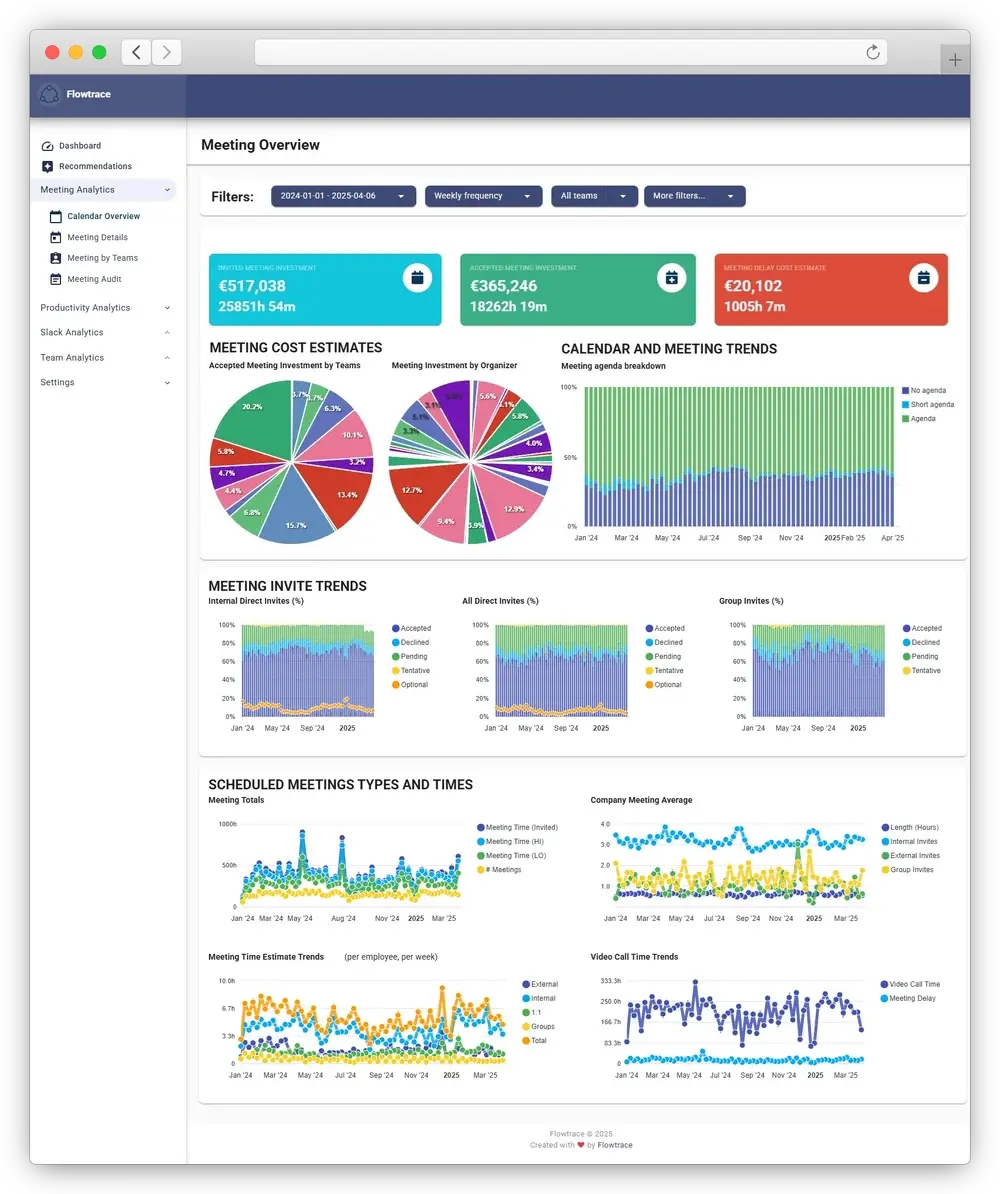
An individual may use Google Time Insights to ask, “Where did my week go?” Flowtrace helps an operations or leadership team ask, “Which recurring meeting patterns are consuming time across the organisation, what do they cost, and is our intervention working?”
Google Calendar Time Insights vs Flowtrace
| Decision criterion |
Google Calendar Time Insights |
Flowtrace |
| Primary job |
Help an individual understand scheduled meeting time |
Help an organisation measure and improve meeting culture |
| Typical user |
Individual Google Workspace user |
Operations, People, IT, leadership, managers, and teams |
| Availability |
Eligible work or school account, desktop access, and administrator enabled |
Separate Flowtrace deployment connected to supported calendar and meeting systems |
| Data scope |
The user's primary Google Calendar |
Calendar and meeting metadata across the connected organisational scope |
| Core views |
Time breakdown, time in meetings, and people met with |
Meeting load, focus time, recurrence, organiser and team patterns, invite responses, agenda usage, and trends |
| Labels |
User-created calendar labels can be tracked in Time Insights |
Organisational analysis uses configured dimensions and meeting patterns rather than relying on each user to label every event |
| Cross-team reporting |
Not a central organisation-wide reporting product |
Designed for team and organisation-level reporting |
| Meeting cost |
Not documented as a Time Insights metric |
Meeting cost estimates and trends are available |
| Meeting rules |
Supports personal reflection and focus-time planning |
Calendar-side validation can reinforce agenda, attendee, recurrence, duration, and cost rules |
| Meeting content |
Does not need meeting transcripts for the documented Time Insights views |
Metadata-first; does not need to record, transcribe, summarise, or interpret conversations |
| Best fit |
Personal calendar awareness with minimal setup |
Coordinated analysis and behaviour change across an organisation |
| Cost model |
Included with eligible Google Workspace editions |
Separate Flowtrace product; pricing and scope depend on the deployment |
A feature score would hide the real decision. Google wins on built-in personal visibility. Flowtrace goes further when the organisation needs a shared baseline and a way to change scheduling behaviour.
The differences that affect the decision
1. Personal visibility versus a shared organisational baseline
Time Insights is strongest as a personal feedback tool. A user can see a heavy meeting week, identify the people who occupy most calendar time, and label different kinds of work. That is immediate and useful.
The limitation appears when the problem crosses team boundaries. Ten people can each see that their week is crowded, yet nobody has a shared view of the recurring meeting that creates the crowding. Leaders then rely on anecdotes, manual calendar inspection, or a one-off calendar audit.
Flowtrace creates a shared baseline across the connected scope. The purpose is not to rank employees. It is to find system patterns such as:
- a rise in recurring meeting hours;
- teams with very different focus-time conditions;
- large meetings with widening invite lists;
- meetings repeatedly scheduled without agendas;
- meeting load concentrated at particular times of the week;
- cost patterns that are invisible when each calendar is viewed separately.
If the organisation wants to run a structured meeting audit, the shared baseline is the more important difference than the number of charts.
2. Time reporting versus meeting economics
Google Time Insights answers how much scheduled time appears in the user's calendar. It does not document meeting cost as part of the feature.
Flowtrace can estimate cost using meeting duration, attendee information, and configured salary assumptions. That supports questions such as:
- Which recurring meetings consume the most combined employee time?
- Where has a small invite expanded into an expensive default?
- Is meeting cost changing after a policy or calendar intervention?
Cost is still an estimate, not a statement of value. An expensive meeting can be essential, and a cheap meeting can still be unnecessary. The useful role of meeting cost analytics is to make the tradeoff visible before habit makes the decision.
3. Observation versus behaviour change
Time Insights can prompt a user to block focus time, relabel events, or reconsider a crowded schedule. The action depends on the individual noticing the pattern and changing it.
Flowtrace extends the process into meeting governance. Its Google Calendar and Outlook tools can show cost and apply configured validation rules while the organiser is creating an invite. A rule might flag a missing agenda, excessive duration, an oversized attendee list, or a recurring meeting that needs more thought.
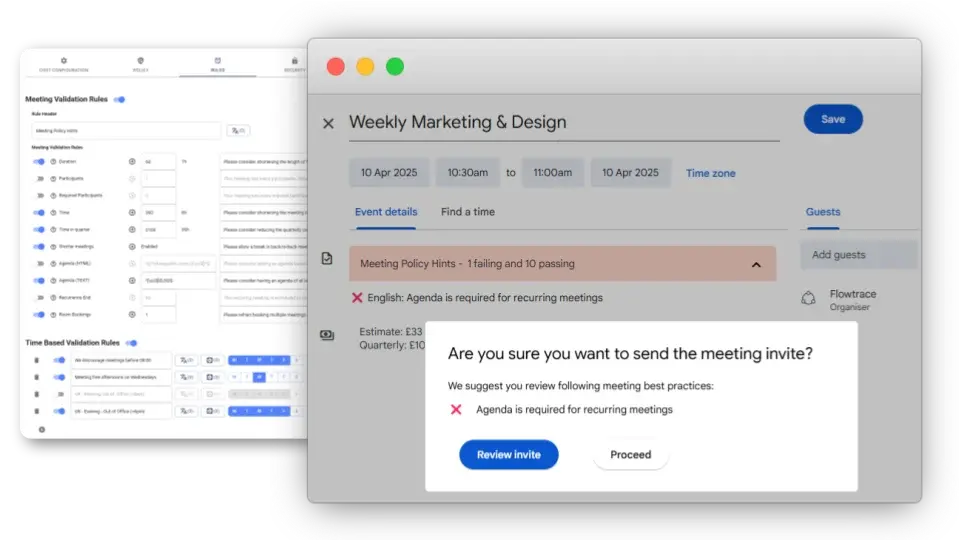
That does not mean every company needs a rule for every meeting. It means the organisation can connect its meeting policy to the point where scheduling behaviour happens, then use analytics to see whether the policy survives contact with the calendar.
4. Calendar records versus meeting quality
Calendar records have a hard limit.
An accepted invitation is not proof of attendance. A scheduled hour is not proof that the meeting lasted an hour. A small invite list is not proof that the right people were present. Neither Time Insights nor basic calendar metadata can determine whether a decision was good.
Flowtrace can analyse observable scheduling signals such as invite responses, attendee patterns, agenda presence, recurrence, duration, and meeting cost. Those signals help teams decide what to investigate. They should not be described as direct measures of attention, employee performance, or productivity.
If attendee discipline is the problem, use the data to improve how meeting participants are selected. If focus time is the problem, examine the relationship between meeting load and deep work. The metric points to the conversation. It does not replace it.
5. Deployment and adoption
Time Insights has the lighter adoption path. If the account is eligible and the administrator has enabled the feature, the user opens Google Calendar and starts exploring.
Flowtrace requires an organisational decision about scope, access, privacy, metrics, and rollout. That is more work because the job is larger. A good rollout should explain:
- which calendar metadata is used;
- who can see team and organisation views;
- which metrics are intended for diagnosis rather than employee evaluation;
- how salary assumptions are handled for cost estimates;
- which meeting rules will be introduced;
- when the baseline and follow-up periods will be reviewed.
For a personal insight problem, this would be unnecessary overhead. For a company trying to improve meeting culture, it is part of responsible implementation.
When Google Calendar Time Insights is enough
Choose Google Calendar Time Insights when:
- the need is personal calendar awareness;
- users already have eligible Google Workspace accounts;
- individuals want a quick view of meeting hours, focus time, and frequent collaborators;
- calendar labels provide enough categorisation;
- no central cross-team reporting or meeting-cost analysis is required;
- the organisation is not ready to introduce shared meeting rules or an improvement programme.
There is no reason to buy a separate analytics platform merely to reproduce a personal chart that Google already provides. Start with the native feature, learn what users can act on, and only expand the tooling when the problem becomes organisational.
For teams still defining their requirements, our review of the best calendar analytics tools explains the wider category and when a lighter option is enough.
When Flowtrace is the better fit
Choose Flowtrace when:
- meeting overload is a team or company-level operating problem;
- leaders need consistent trends across groups rather than isolated personal views;
- meeting cost and combined attendee time affect the decision;
- the organisation wants to analyse recurring meetings, invite patterns, agenda usage, and focus-time conditions;
- Google Calendar or Outlook rules should guide organisers before invitations are sent;
- the organisation needs to measure whether an intervention changed meeting behaviour;
- a metadata-first approach is preferable to recording or transcribing conversations.
This is the point where calendar analytics becomes more than time awareness. It becomes an operating mechanism: observe the pattern, agree the change, reinforce it in the calendar, and measure again.
Can you use Google Time Insights and Flowtrace together?
Yes. The products can operate at different layers.
An employee can use Time Insights to review their own week. The organisation can use Flowtrace to understand cross-team patterns and improve the rules around scheduling. Personal reflection remains personal; the organisational programme focuses on shared meeting habits and system design.
This combination can be sensible when a company wants to support individual agency without pretending that meeting overload is solely an individual time-management failure.
Decision checklist
Ask these questions before choosing:
- Is the problem visible in one calendar, or does it span teams?
- Do we need personal awareness or a shared baseline?
- Is scheduled meeting time enough, or do meeting cost, recurrence, invite patterns, and agenda usage affect the decision?
- Do we only want to observe behaviour, or also reinforce meeting rules when invitations are created?
- Who should see the results, and at what level of aggregation?
- Can every important comparison claim be explained using calendar metadata without implying attendance, engagement, or productivity?
- What will we change after seeing the data?
If the answers remain personal, begin with Google Time Insights. If they describe an organisational change programme, explore the Flowtrace meeting analytics guide or see how Flowtrace works with Google Calendar.
Frequently asked questions
Is Google Calendar Time Insights free?
No. Time Insights is included with eligible Google Workspace work or school accounts. Availability depends on the Workspace edition and whether the administrator has enabled the feature. Check Google's current administrator documentation before making a plan or procurement decision.
Can managers see an employee's Google Calendar Time Insights?
Not automatically. Google says the primary calendar owner and people with permission to make changes and manage sharing settings can access that calendar's Time Insights. A person's job title alone does not grant access.
Does Google Calendar Time Insights measure meeting productivity?
No. It summarises scheduled meeting time and related calendar patterns. It does not determine whether a meeting was useful, whether someone actively attended, or whether a business outcome improved.
Does Flowtrace record or transcribe meetings?
No. Flowtrace uses a metadata-first approach and does not need to record, transcribe, summarise, or interpret meeting conversations to produce meeting analytics.
Can Google Calendar Time Insights and Flowtrace be used together?
Yes. Time Insights can support personal calendar reflection, while Flowtrace can provide organisation-level patterns, meeting cost visibility, and calendar-side meeting rules.
The practical answer
Google Time Insights is a good native feature. Its narrow scope is not a flaw when the job is helping one person understand their calendar.
Flowtrace becomes relevant when the meeting problem belongs to the system rather than one person. At that point, the organisation needs a shared baseline, clear privacy boundaries, a way to change scheduling behaviour, and evidence that the change is working.
If that describes your situation, book a Flowtrace demo and bring the decision checklist above. It will produce a more useful conversation than a generic feature tour.
