A People team can reasonably encounter both products while trying to improve meetings. One promises better manager conversations. The other explains what the whole company calendar is doing. Those are related problems, but they are not the same purchase.
Peoplelogic is the better fit when the goal is to help managers run 1:1s, goals, feedback, reviews, and employee-development processes. Flowtrace is the better fit when the goal is to understand meeting load across teams and change the organisation's meeting system.
Peoplelogic has a dedicated one-on-one meeting workflow. Flowtrace analyses meeting patterns across teams. Comparing them only makes sense when that boundary stays visible.
Key takeaways
- Peoplelogic is a performance and people-management platform for SMBs.
- Its meeting capability is centred on manager-employee 1:1s: agendas, templates, notes, action items, and recurring check-ins.
- Flowtrace is an organisation-level meeting analytics platform for meeting load, cost, recurrence, focus conditions, scheduling patterns, and governance.
- Peoplelogic helps improve a particular kind of meeting from inside the conversation workflow. Flowtrace helps improve the meeting system without reading the conversation.
- The products can complement each other when a company needs both structured 1:1s and broader meeting governance.
Disclosure and comparison basis: Flowtrace publishes this comparison and is one of the products discussed. We reviewed Peoplelogic's current product pages and official material about one-on-ones, performance management, analytics, and integrations, then applied the same buyer criteria to current Flowtrace capabilities. Product and plan details can change. Last verified: 29 July 2026.
In this comparison
What does Peoplelogic do?
Peoplelogic describes itself as AI-powered performance and people intelligence for SMBs. Its current product family includes:
- OKRs and goal alignment;
- one-on-one meetings;
- performance reviews;
- individual development plans;
- feedback and praise;
- employee surveys;
- people insights and recommendations;
- integrations and notifications.
Its buyer is normally an HR or People team that wants a repeatable performance-management rhythm without assembling separate tools and spreadsheets.
This is a materially different job from meeting analytics. Peoplelogic's meeting features support manager coaching and employee development. Meetings are part of a wider people process.
Does Peoplelogic have meeting capabilities?
Yes. Peoplelogic has a genuine, current meeting use case centred on manager-employee one-on-ones.
Peoplelogic's current one-on-one product page describes structured agendas, shared and private notes, action items, historical meeting context, and AI-generated talking points. Its official performance-management comparison also describes regular check-ins, templates and questions, action-item lists, and calendar integrations.
The current Peoplelogic homepage also places weekly 1:1s and check-ins inside its performance-management proposition.
This capability is best understood as software for running one type of meeting well. The public product material reviewed does not position Peoplelogic as a system for analysing total meeting load, recurring meeting debt, meeting cost, or scheduling policy across every department.
The practical distinction is straightforward: Peoplelogic helps people prepare for and follow up on a 1:1. It is not presented as a system for diagnosing every meeting across the company.
What does Flowtrace do?
Flowtrace is a metadata-first meeting analytics and meeting culture transformation platform. The Meeting Analytics Guide explains how that organisation-level view differs from tools built to support one meeting at a time.
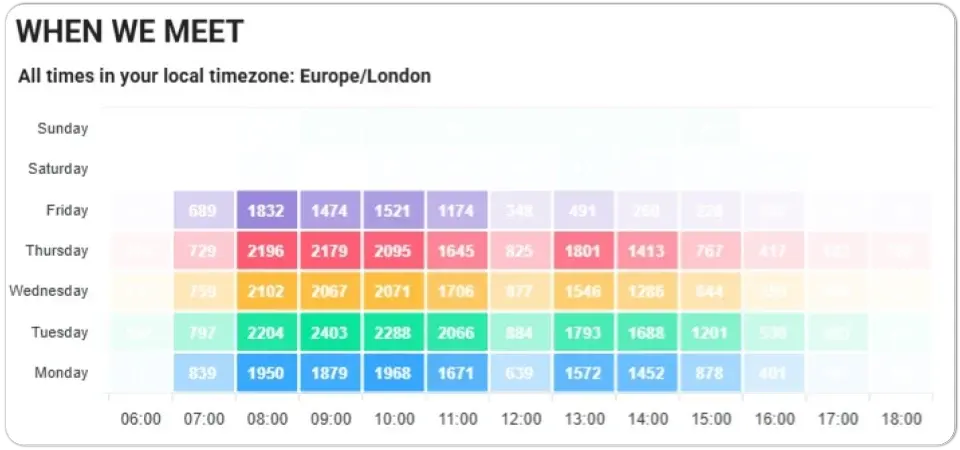
It analyses calendar and meeting patterns across the connected organisation so leaders can understand:
- how much time teams spend in meetings;
- when meeting load fragments focus time;
- where recurring meetings accumulate;
- how attendee and organiser patterns differ;
- what meetings and meeting series cost;
- how much scheduling notice people receive;
- whether agendas and invitation responses are changing;
- whether meeting-policy interventions have a measurable effect.
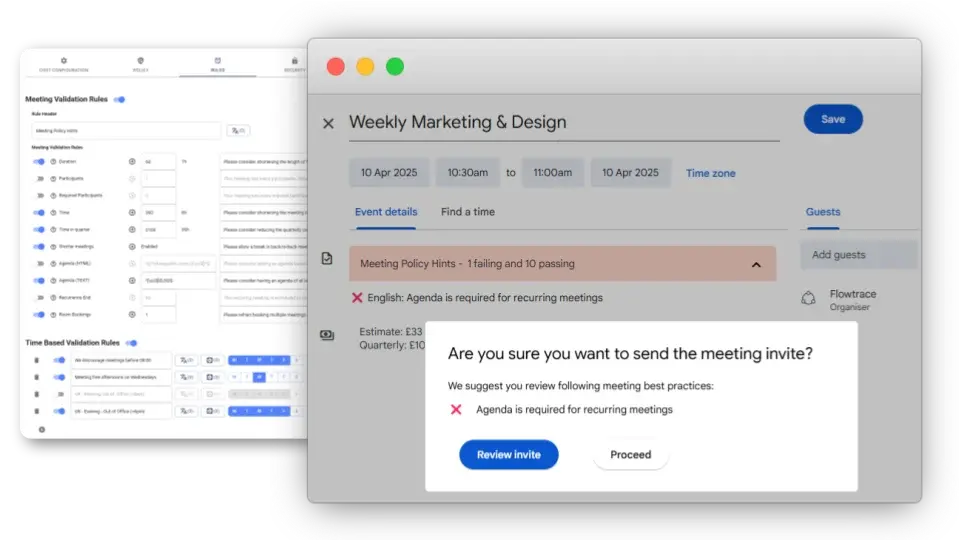
Flowtrace also brings meeting cost and configured validation rules into Google Calendar and Outlook. That allows a company to move from observing the meeting problem to changing scheduling behaviour.
Flowtrace does not manage performance reviews or keep 1:1 conversation notes. It does not need to record or transcribe meetings.
Peoplelogic vs Flowtrace
| Decision criterion |
Peoplelogic |
Flowtrace |
| Organisation-wide meeting analytics |
|
✓ |
| Meeting load and duration |
|
✓ |
| Recurring meeting analysis |
1:1 cadence |
✓ |
| Focus-time and calendar fragmentation |
|
✓ |
| Meeting cost analytics |
|
✓ |
| Agenda support |
1:1 templates and talking points |
Analytics and calendar validation |
| Meeting notes and action items |
1:1 workflow |
|
| Scheduling-notice analysis |
|
✓ |
| Meeting feedback |
|
Where enabled |
| Calendar integrations |
Scheduling workflow |
Analytics and governance |
| Calendar-side meeting cost |
|
Google Calendar and Outlook |
| Calendar policy rules |
|
Configurable invite validation |
| Performance reviews, OKRs and development plans |
✓ |
|
| Public starting price |
$3,588/year, unlimited users |
£0, £1 and £2 per user/month |
An empty cell means the comparison did not find an equivalent capability in the current public product material. It does not imply that the product is incomplete for its intended job.
The differences that affect the decision
1. Improving a 1:1 versus improving the meeting system
Peoplelogic starts with a specific interaction: the recurring conversation between a manager and an employee. It helps both parties prepare, keep continuity between meetings, record notes, and follow up on actions. Flowtrace's guide to one-to-one meeting practice covers the human side of that same meeting type without turning it into a performance score.
Flowtrace starts with the organisation's calendars. It looks for patterns that no single manager can see by reviewing one meeting at a time: departments with high meeting load, costly recurring series, fragmented workdays, oversized invitations, weak agenda discipline, and scheduling practices that have become normal.
Both approaches can improve meetings. They act at different levels.
If the problem is “our managers do not run consistent 1:1s”, Peoplelogic is closer to the need. If the problem is “nobody can explain why the company spends so much time in meetings”, Flowtrace is closer.
2. Conversation workflow versus metadata-first analytics
Peoplelogic's 1:1 workflow deliberately handles the material around the conversation: questions, agendas, notes, and action items. That continuity is useful for coaching and performance development.
Flowtrace deliberately does not need the conversation. It analyses meeting metadata and scheduling patterns. This supports a different privacy and operating model: leaders can understand recurring meeting load, cost, agenda signals, and focus conditions without reading private 1:1 notes or interpreting what employees said.
Neither model is automatically more private. Buyers should define who can access Peoplelogic notes, who can access Flowtrace reports, what the data is used for, and what decisions must never be automated from either source.
3. Manager habits versus organisational governance
Peoplelogic helps managers establish a rhythm. Prompts, templates, notes, and action items can reduce the chance that a 1:1 becomes an unprepared status meeting.
Flowtrace supports an organisation-level meeting governance loop: baseline meeting patterns, choose rules, apply calendar-side nudges, and measure again.
For example, Flowtrace can help a company investigate whether recurring 1:1s are crowding calendars, whether they are being scheduled with enough notice, and how they interact with other recurring meetings. That is a calendar analytics question. It should not judge the quality of the private manager-employee conversation from those signals.
Peoplelogic can help the participants prepare for and follow up on that conversation. It is not publicly positioned as the company-wide meeting policy layer.
4. Performance data versus meeting-culture data
Peoplelogic brings together goals, feedback, reviews, engagement, and employee-development workflows. Its analytics support HR and performance decisions.
Flowtrace brings together meeting load, cost, recurrence, attendee patterns, scheduling behaviour, and time conditions. Its analytics support work-design and meeting-culture decisions.
The distinction matters because the same word, “performance”, can conceal very different data:
- A performance-management platform asks how goals, feedback, development, and manager practices are progressing.
- A meeting analytics platform asks whether the organisation's coordination system leaves enough time and structure for people to do their work.
Meeting metadata should not be treated as an employee performance score. An accepted invitation does not prove attendance or engagement, and a crowded calendar does not prove productivity.
When to choose Peoplelogic
Choose Peoplelogic when:
- the main requirement is structured manager-employee 1:1s;
- shared or private notes and action items matter;
- managers need agendas, questions, and templates;
- the organisation wants goals, OKRs, reviews, feedback, surveys, and development plans in the same platform;
- HR or People Operations owns the programme;
- organisation-wide meeting cost and scheduling governance are not the buying priority.
Peoplelogic may be enough when “better meetings” specifically means better 1:1s. There is no reason to deploy a company-wide meeting analytics programme merely to give managers a place to keep coaching notes.
When to choose Flowtrace
Choose Flowtrace when:
- meeting overload is a cross-team or company-level problem;
- leaders need a shared meeting baseline rather than a 1:1 workspace;
- recurring meeting debt, cost, attendee patterns, notice time, or fragmentation drive the decision;
- the organisation wants to reinforce meeting rules in Google Calendar or Outlook;
- the programme must show whether behaviour changes over time;
- analysing meeting conversations would be unnecessary or inappropriate.
Flowtrace is not a substitute for performance reviews, goals, employee-development plans, or private 1:1 notes.
Can Peoplelogic and Flowtrace work together?
Yes. The clean division is:
- Peoplelogic manages the structure and continuity of manager-employee 1:1s.
- Flowtrace measures the broader meeting system and reinforces scheduling policy.
The combination becomes useful when a People team owns both manager quality and meeting culture. Peoplelogic can improve what happens around a particular 1:1. Flowtrace can show whether the organisation's total recurring meeting system remains sustainable.
Keep the governance boundaries explicit. Private 1:1 notes should not be pulled into meeting-culture analysis merely because both systems touch the same calendar event.
Decision checklist
Ask these questions before choosing:
- Are we fixing 1:1 practice or the company-wide meeting system?
- Do managers need agendas, notes, questions, and action items?
- Do leaders need meeting load, recurrence, cost, and fragmentation by team?
- Is the programme owned by HR performance management or cross-functional operations?
- Do we need calendar-side rules before invitations are sent?
- What data can managers, employees, and administrators see?
- How will private 1:1 content be protected?
- What measurable change should exist after 90 days?
FAQ
Does Peoplelogic have meeting capabilities?
Yes. Peoplelogic supports structured one-on-one meetings with agendas, templates, notes, action items, and calendar-connected workflows as part of its wider performance-management platform.
Is Peoplelogic a meeting analytics platform?
Peoplelogic has analytics and a genuine 1:1 meeting workflow, but its current public positioning is performance and people management. Organisation-wide meeting-load, meeting-cost, and calendar-governance capabilities are not presented as its core meeting proposition.
What is the main difference between Peoplelogic and Flowtrace?
Peoplelogic helps managers run employee performance processes and individual one-on-one meetings. Flowtrace analyses meeting patterns across teams and helps organisations improve meeting culture and scheduling behaviour.
Can Peoplelogic and Flowtrace be used together?
Yes. Peoplelogic can manage the content and follow-up of manager one-on-ones while Flowtrace measures the broader meeting system and governs scheduling patterns.
The bottom line
Peoplelogic is not a direct Flowtrace alternative for organisation-wide meeting analytics. It is a credible adjacent option for a narrower meeting job: helping managers run better 1:1s inside a performance-management process.
Flowtrace does not replace that workflow. It answers a different question: what is happening across the meeting system, what does it cost, and how can the organisation change scheduling behaviour?
Choose Peoplelogic for the conversation workflow. Choose Flowtrace for the meeting operating system.