MeetGeek and Flowtrace both help organisations get more value from meetings, but they work on different parts of the problem. MeetGeek captures what happens inside a meeting and turns the conversation into notes. Flowtrace uses calendar metadata to show how meetings operate across the organisation, then helps teams change the patterns creating unnecessary cost and disruption.
That distinction matters more than a long feature checklist. If people forget decisions and actions after calls, an AI note taker may be the right answer. If leaders cannot see why meeting load keeps growing, whether policy is followed, or whether an intervention worked, they need organisation-wide meeting analytics and governance.
This comparison is based on public product, pricing, integration, privacy, security and help documentation reviewed on 3 August 2026. We publish it as Flowtrace, so our interest is clear. Where MeetGeek's official sources did not document an equivalent capability, we say that. We do not treat missing public documentation as proof that a capability can never exist.
The short answer
Choose MeetGeek when the immediate job is to record permitted meetings, create transcripts and summaries, extract action items, or search knowledge from captured conversations.
Choose Flowtrace when the job is to understand and change meeting behaviour across a company. Flowtrace measures calendar patterns such as meeting load, cost, recurrence, focus time, agendas and notice time. It also puts meeting policy and invite validation into the scheduling workflow, so teams can measure a baseline, intervene, and see whether the behaviour changed.
Some organisations may use both. A note taker can support follow-up after selected calls while Flowtrace governs the wider meeting system. Buying one does not automatically solve the problem owned by the other.
Key takeaways
- MeetGeek is an AI meeting note taker built around recordings, transcripts, summaries, highlights, action items and conversation knowledge.
- Flowtrace is a metadata-first meeting analytics and governance platform. It does not record or transcribe meeting conversations.
- Flowtrace is the stronger fit when the buyer needs company-wide visibility into calendar behaviour, meeting cost, focus time, policy adoption and invite quality.
- Recording and transcribing a meeting is personal-data processing. Under the EU GDPR, recording without an appropriate lawful basis and transparent notice can be unlawful. Consent is one possible basis, not the only one.
- The data boundary is a product decision. Conversation capture may suit the follow-up job, while calendar metadata can support organisation-wide analysis without creating a recording and transcript of what people said.
- Pricing is not directly comparable because the products, currencies, plan limits and buying units differ.
What is the practical difference between MeetGeek and Flowtrace?
MeetGeek starts with the meeting conversation. According to its official product and help documentation, it can capture meetings through a bot, browser, desktop or mobile workflow, then produce a recording, transcript, summary, highlights and action items. MeetGeek also documents AI Chat across meetings and Meeting Skills that process transcripts for repeatable tasks.
Flowtrace starts with the calendar system. It analyses the metadata organisations already create when people schedule meetings: timing, duration, attendee count, recurrence, agenda signals, notice time and related calendar patterns. This creates a shared operating view without interpreting what people said in the room.
The difference is easy to miss because both products use the language of meeting analytics. MeetGeek lists personal aggregated analytics on its Pro plan and team meeting analytics on Business. Those views are connected to captured meetings and conversation-derived information. Flowtrace's meeting analytics platform is designed to reveal organisation-wide calendar patterns and support a governance loop across teams.
One gives you a better record of a conversation. The other helps you change the system producing the meetings.
Flowtrace-led capability comparison
This table focuses on the capabilities organisations evaluate Flowtrace for. It does not include rows for recording, transcription or automatic meeting notes because Flowtrace is not designed to provide them. MeetGeek's strengths in those areas are covered in the best-fit section below.
| Capability Flowtrace is built for |
Flowtrace |
MeetGeek |
| Organisation-wide calendar analytics |
✓ |
Captured-meeting analytics |
| Meeting cost visibility |
✓ |
|
| Focus-time and fragmentation analysis |
✓ |
|
| Calendar-invite policy rules |
✓ |
|
| Invite validation at scheduling time |
Google Calendar and Outlook |
|
| Calendar-policy baseline, intervention and remeasurement |
✓ |
|
| Data boundary |
Calendar metadata |
Meeting content |
A checkmark means the capability is present and broadly comparable at the level named. A blank MeetGeek cell means no equivalent capability was found on the official pages reviewed on 3 August 2026. Short text marks a material difference in scope or implementation. Blank cells are not claims about private roadmaps, undocumented configurations or future releases.
When MeetGeek is the better fit
MeetGeek is the more natural choice when the problem begins after somebody joins a call and needs an accurate record of what was discussed.
Its public documentation describes:
- Recording and transcription for supported meeting workflows.
- AI-generated summaries, highlights, decisions and action items.
- Search and chat across captured meeting knowledge.
- Meeting Skills that run repeatable prompts or processes over transcripts.
- Integrations with Zoom, Google Meet, Microsoft Teams, Slack, HubSpot, Salesforce, Notion, ClickUp, Jira and other work systems.
That can be valuable for sales calls, customer interviews, recruitment conversations and internal meetings where there is a clear purpose, participants have been informed, and the organisation has an appropriate lawful basis for recording. It can reduce manual note-taking and make follow-up less dependent on somebody's memory.
MeetGeek also documents administration, security and retention controls, including organisation-wide settings and locks on Enterprise. It would be misleading to describe it as a simple recording bot with no company controls. The real buyer question is whether conversation capture is the job the organisation is trying to solve.
When Flowtrace is the better fit
Flowtrace is the better fit when leaders are asking questions that cannot be answered by summarising individual calls:
- Which teams carry the greatest meeting load?
- How much does the current meeting pattern cost?
- Where are recurring meetings accumulating?
- How much focus time remains after the calendar fills up?
- Are agendas, notice-time standards and attendee rules being followed?
- Did the meeting-policy intervention improve behaviour after 30, 60 or 90 days?
These are operating-system questions. The unit of analysis is not one transcript. It is the pattern created across calendars, teams and time.
Flowtrace connects that pattern to action. Teams can establish a baseline, define meeting-policy rules, give organisers guidance while they create invitations, and then measure adoption and outcomes. The point is not another dashboard. It is a practical loop: see the behaviour, intervene where it happens, and check whether the habit changed.
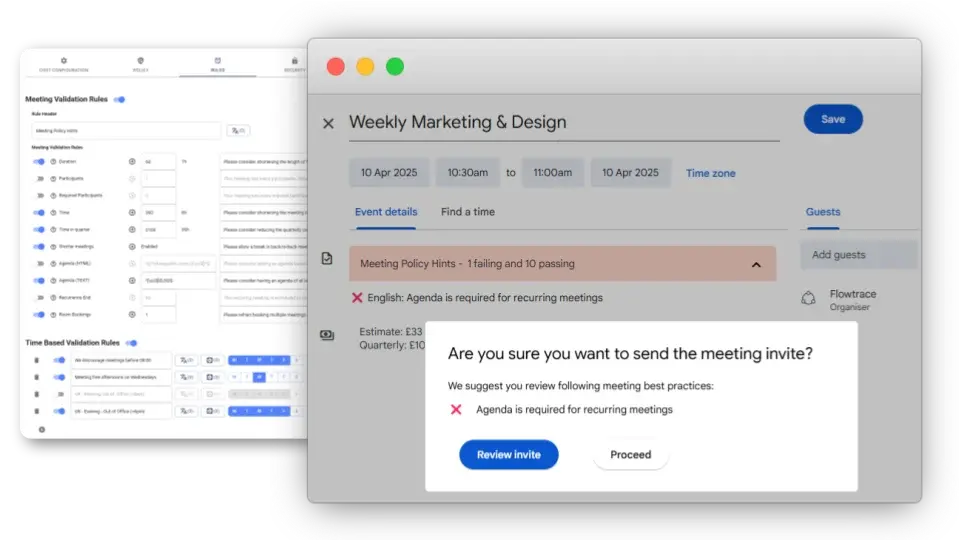
This is also why Flowtrace is not an AI note taker. It does not create meeting recordings, transcripts or summaries. That boundary keeps the product focused on organisation-level meeting behaviour and calendar governance rather than meeting-content analysis.
Can MeetGeek and Flowtrace work together?
Yes, when the organisation has both problems and treats them separately.
A customer-facing team might use MeetGeek for permitted call capture, follow-up notes and action items. At the same time, operations, People or IT teams might use Flowtrace to understand meeting load, cost, recurrence and policy adoption across the wider calendar estate.
This combination needs a clear boundary. Decide which meetings may be recorded, the lawful basis and notice used, who can access the outputs, how long content is retained, and which company-wide questions can be answered with metadata instead. A recording bot joining a call or a platform displaying a recording symbol does not, by itself, establish that legal basis.
The practical test is simple: do not collect meeting content merely because the tool can. Match the data boundary to the job.
GDPR, recording and data boundaries
MeetGeek's privacy and security documentation says the service processes meeting recordings, audio, video, transcripts, summaries and related outputs, with controls that vary by plan and configuration. Buyers should review the MeetGeek privacy policy, security information and retention options against their consent, access, deletion and residency requirements.
For organisations subject to the EU GDPR, this is more than a product setting. A recording and transcript are personal-data processing. The GDPR's lawfulness and transparency rules require the organisation controlling that processing to identify an appropriate lawful basis and tell people what is being collected, why, how it will be used, who can access it, and how long it will be kept. Secret recording, or recording without the required lawful basis and notice, can breach those requirements. National employment, confidentiality and communications laws may add stricter rules.
Consent is not the only lawful basis under the GDPR, so saying that every recording requires consent would be inaccurate. If an organisation does rely on consent, the European Data Protection Board says it must be freely given, specific, informed and unambiguous, with a genuine ability to refuse or withdraw. That is difficult in employment relationships where workers may feel they cannot say no.
The UK's Information Commissioner's Office is not an EU regulator, but its guidance gives UK buyers a practical warning. The ICO says workers and other people caught by audio monitoring must be informed, and describes audio recording as more privacy intrusive than visual recording. Its online-meeting guidance says attendees need to know how their data is processed and have appropriate choice and control.
Before enabling automatic recording across a team, check four things:
- Define the purpose and document the lawful basis before recording starts.
- Give participants clear advance notice, not only a bot appearing after they join.
- Limit which meetings are recorded, who can search them, how outputs are reused, and when recordings and transcripts are deleted.
- Assess whether conversations may capture health, trade-union, political or other special-category data, whether a data protection impact assessment is required, and whether local law or customer contracts impose additional conditions.
Flowtrace takes a different approach. It analyses calendar and meeting metadata and does not record, transcribe or interpret meeting conversations. That gives leaders visibility into meeting patterns without creating a searchable body of what employees, customers or candidates said. Flowtrace customers still need appropriate privacy information and governance for their own use of metadata, but the data surface is materially different.
Neither boundary is universally right. If the purpose is call memory and follow-up, conversation content may be necessary and lawful with the right controls. If the purpose is understanding meeting load, cost, policy and calendar behaviour across an organisation, metadata can answer the question without collecting the conversation itself. This is operational guidance, not legal advice for a particular country or deployment.
Integrations and deployment
MeetGeek's integration directory reflects its post-meeting workflow. It connects captured meetings and outputs with conferencing, CRM, project-management, note-taking and automation systems.
Flowtrace connects to Google Calendar and Microsoft Outlook for calendar analytics and in-workflow interventions, with meeting-platform context for Zoom, Microsoft Teams and Google Meet. The deployment question is therefore not which vendor has the longest logo wall. It is where the organisation needs the product to act.
Choose MeetGeek integrations when recordings, notes and action items need to move into the systems where teams follow up. Choose Flowtrace integrations when analytics and policy need to operate across calendars and when invite quality should improve before the meeting is created.
MeetGeek and Flowtrace pricing
Pricing below was verified on 3 August 2026 and should be checked again before purchase.
MeetGeek's monthly pricing page listed:
- Basic: free.
- Pro: $9.99 per user per month.
- Business: $17 per user per month.
- Enterprise: contact MeetGeek.
Limits, storage, analytics, administration and retention features vary by MeetGeek plan.
Flowtrace's pricing page listed:
- Free: £0.
- Team: £1 per user per month, excluding VAT.
- Scale: £2 per user per month, excluding VAT.
- Enterprise: price on application.
The figures are not a like-for-like value score. The vendors use different currencies, plan designs, usage limits and product scopes. Compare the cost of solving the actual problem, not just the lowest number on the page.
Final verdict
Choose MeetGeek if your primary problem is losing the detail of conversations. It is built to capture selected meetings, produce notes and action items, and make recorded knowledge easier to reuse.
Choose Flowtrace if your primary problem is the meeting system itself. It is built to show how calendars behave across the organisation, reveal meeting load and cost, apply policy in the scheduling workflow, and measure whether interventions work.
The wrong decision starts by asking which tool has more features. The useful decision starts by naming the behaviour you need to change.
If that behaviour sits across calendars, teams and meeting policy, explore Flowtrace meeting analytics or schedule a Flowtrace demo.