Worklytics and Flowtrace overlap more than most workplace analytics products. Both analyse calendar and collaboration metadata. Both show meeting load, focus time, recurring patterns, and organisational trends. The meaningful difference appears after the dashboard.
Worklytics is a broad workplace analytics platform. Flowtrace is a focused meeting analytics and transformation platform that also puts meeting cost, policy reminders, and validation rules into Google Calendar and Outlook.
If the buying decision is mainly about collecting hundreds of metrics across dozens of workplace tools, Worklytics has the broader scope. If the problem is meeting overload and the organisation wants to change how meetings are created, Flowtrace has the more direct operating mechanism.
Key takeaways
- Worklytics covers meetings inside a wider workplace analytics, people analytics, AI adoption, and organisational network analysis product.
- Flowtrace concentrates on meeting load, meeting cost, recurring meetings, agenda discipline, invite patterns, punctuality, focus time, and meeting governance.
- Worklytics documents dashboards, benchmarks, reports, and recommendations. Flowtrace also intervenes while a meeting invitation is being created.
- Worklytics currently lists a Business starting price of $2,500 per month for up to 200 analysed employees. Flowtrace currently publishes £0, £1, and £2 per-user plans.
- A Worklytics comparison published in 2025 gives Flowtrace a $15 per-user price and describes it as an engineering-focused product. Neither statement matches Flowtrace's current product and pricing pages.
Disclosure and comparison basis: Flowtrace publishes this article and is one of the products discussed. We reviewed current Worklytics product, meeting analytics, dashboard, privacy, pricing, and comparison pages alongside current Flowtrace product documentation. Features and prices can change. Last verified: 29 July 2026.
In this comparison
What does Worklytics do?
Worklytics describes itself as a workplace analytics platform for leaders, IT teams, and People teams. Its current product has a wide remit: workplace collaboration, meeting effectiveness, manager effectiveness, organisational network analysis, employee experience, remote work, and AI adoption.
Its meeting analytics product measures:
- meeting hours by employee and team;
- back-to-back meetings and focus-time impact;
- meeting cost based on attendance, duration, and salary bands;
- recurring meeting patterns;
- cross-team and cross-location collaboration;
- after-hours meetings and related workload signals.
Those are genuine meeting analytics capabilities. They sit within a wider platform that Worklytics says connects with more than 50 tools. The Business plan supports up to five integrations, while its Enterprise plan adds raw data access, row-level datasets, predictive analytics, and advanced benchmarking.
The breadth is useful when a buyer wants one analytics layer across calendars, messaging, code, project tools, and AI applications. It can also create a less focused purchase when the operating problem is specifically meetings. A large data dictionary does not automatically tell an organiser what to do before sending tomorrow's recurring invite.
What does Flowtrace do?
Flowtrace is a metadata-first meeting analytics platform. It is designed to help an organisation understand meeting behaviour, choose a practical intervention, apply it where meetings are created, and measure the result.
The analytics cover meeting load, meeting cost, recurrence, invite responses, agenda usage, notice time, focus-time fragmentation, team differences, punctuality, and participation signals where supported. Flowtrace does not need to record or transcribe meeting conversations.
The product then carries the analysis into everyday scheduling:
- Google Calendar and Outlook tools can display meeting cost before an invitation is sent.
- Meeting policy reminders can appear inside the calendar workflow.
- Configurable validation rules can flag agenda, attendee, duration, recurrence, and cost conditions.
- Organisers can receive a warning while they still have time to change the invitation.
- Leaders can compare the later data with the baseline to see whether behaviour changed.
This focus comes from working directly with meeting behaviour at scale. In Flowtrace's 2026 meeting statistics research, based on more than 1.2 million scheduled meetings from 2025, 48.5% were recurring. Recurring meetings are a good example of why measurement alone is insufficient: the expensive pattern continues until somebody changes the invite.
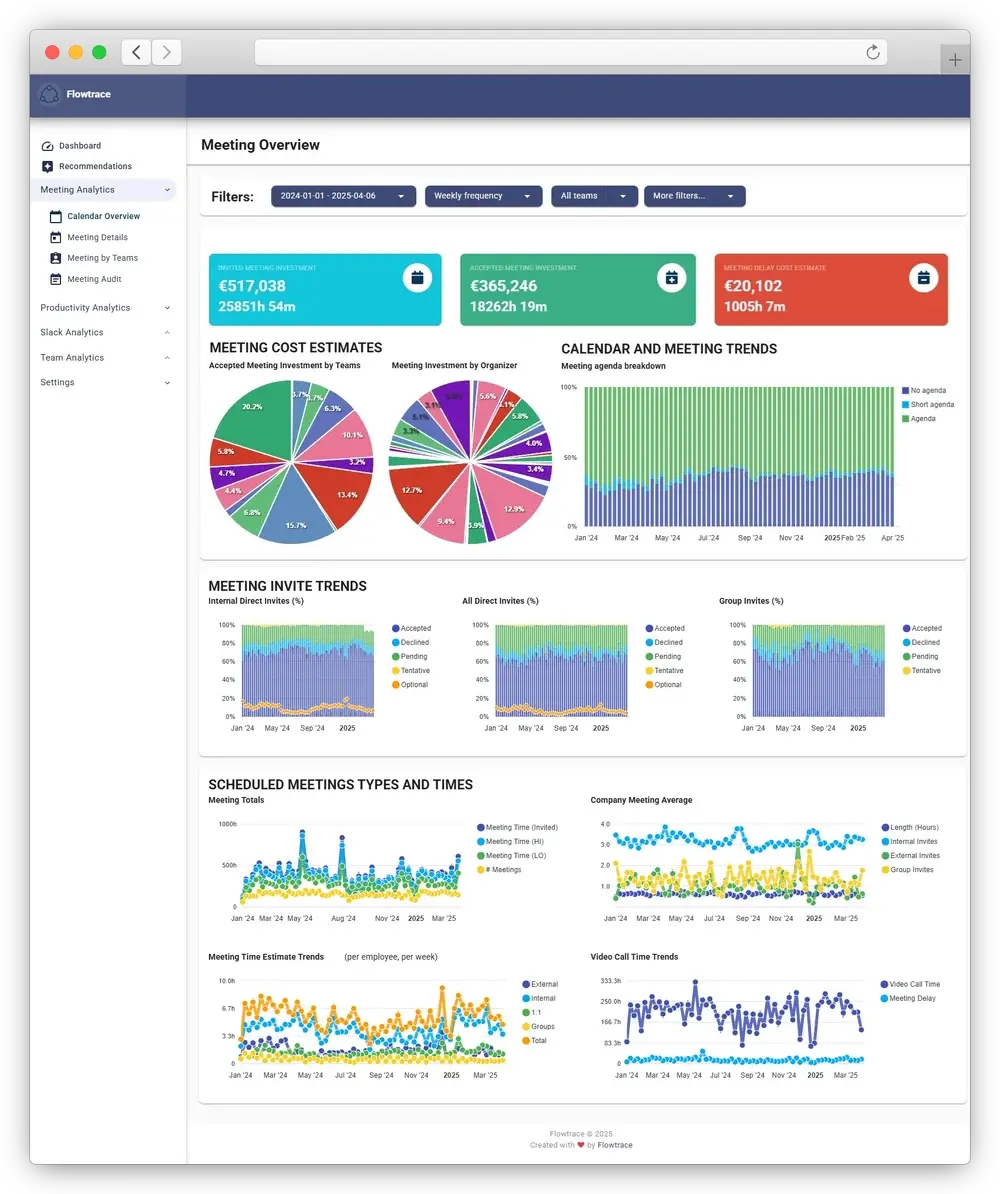
Worklytics vs Flowtrace
| Decision criterion |
Worklytics |
Flowtrace |
| Primary category |
Broad workplace analytics |
Meeting analytics and meeting culture transformation |
| Main buying problem |
Understand workplace, collaboration, People, and AI adoption patterns |
Reduce meeting overload and improve how meetings are organised |
| Meeting data |
Organisation-level meeting load, cost, recurrence, focus time, and collaboration patterns |
Meeting load, cost, recurrence, invite patterns, agendas, notice time, focus time, punctuality, and team trends |
| Data breadth |
50+ workplace tool integrations advertised |
Calendars, meeting platforms, Slack, and selected productivity tools |
| Main delivery surface |
Dashboards, reports, benchmarks, recommendations, and data pipelines |
Analytics dashboards plus Google Calendar, Outlook, and employee workflows |
| Meeting cost |
Analytics and cost calculations |
Analytics plus cost shown to organisers while scheduling |
| Meeting policy |
Measures patterns and supports recommendations |
Policy reminders and configurable invite validation |
| Point-of-scheduling intervention |
Not documented on the Worklytics product pages reviewed |
Google Calendar and Outlook tools can intervene before sending |
| Employee-facing tools |
Primarily anonymised group and team reporting |
Private employee insights, meeting tools, and feedback workflows where enabled |
| Data access |
Enterprise API, warehouse, and row-level datasets |
Product dashboards, organisational views, exports, and configured integrations |
| Public paid entry |
Business starts at $2,500/month for up to 200 users |
Team at £1/user/month and Scale at £2/user/month |
| Best fit |
Broad workplace analytics programme |
Focused meeting analytics and meeting behaviour change |
The table should not be read as a feature score. Worklytics is broader. Flowtrace is more focused. The right choice depends on whether breadth is the requirement or a distraction from the meeting problem.
Where Flowtrace is more focused
Worklytics currently markets AI adoption measurement, software spend, manager effectiveness, HR analytics, organisational networks, real estate, employee experience, and meetings. Meetings are one part of that wider system.
Flowtrace starts from a narrower operating question: how is the organisation spending time in meetings, which habits are creating waste, and what can be changed?
That focus affects the product design. Flowtrace meeting analytics is not a generic set of workplace metrics with a meeting filter. The platform is built around meeting-specific decisions:
- Which recurring meetings have accumulated the greatest attendee load?
- Which teams have lost usable focus time to calendar fragmentation?
- Where are large meetings being created without enough agenda detail?
- How much notice do attendees receive?
- Which meeting rules are being ignored?
- Did meeting duration, size, or frequency change after an intervention?
A buyer does not need 200 unrelated measures to answer those questions. The useful metric is the one connected to a decision and a mechanism for changing what happens next.
Analytics versus behaviour change
Worklytics says its dashboards provide recommendations and help leaders measure whether interventions work. That is useful. The intervention, however, is still largely something the organisation implements after reading the analysis.
Flowtrace shortens that distance. Its Google Calendar and Outlook tools bring the rule to the organiser.
Consider a company that finds a rising number of large recurring meetings without useful agendas.
With reporting alone, a leader can:
- find the pattern;
- contact managers;
- introduce a policy;
- train organisers;
- wait for later data;
- discover whether the advice survived.
Flowtrace can support that process and add an invite-time control. When an organiser creates another large recurring meeting, the calendar tool can flag the missing agenda or another configured rule before the invitation is sent.
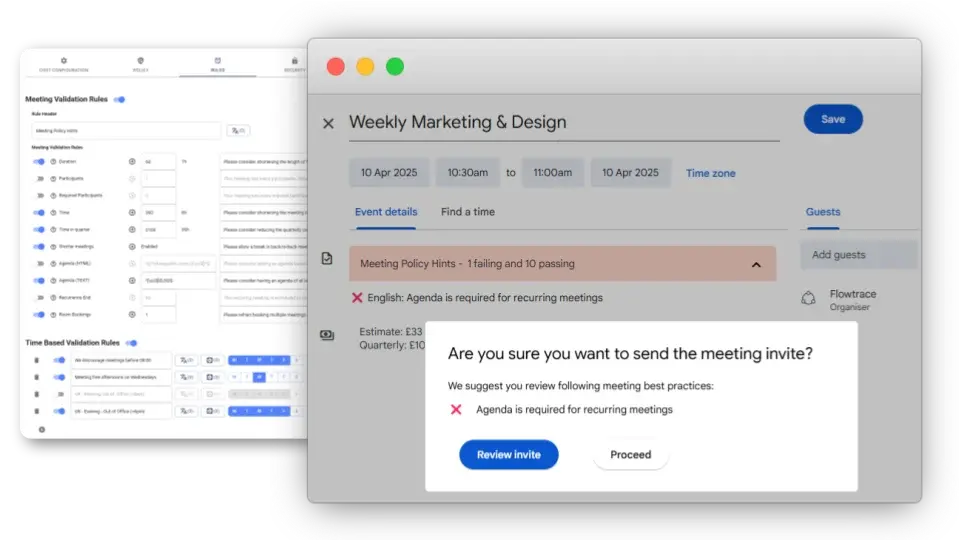
This is the practical difference between observing behaviour and changing the environment in which the behaviour occurs. The Meeting Policy Guide explains how to connect rules, rollout, employee guidance, and measurement without treating meeting governance as a one-off memo.
Meeting cost and governance
Both products can calculate meeting cost. Flowtrace carries the number closer to the decision.
A meeting-cost report helps a leader identify expensive patterns. An in-calendar estimate helps the organiser see the combined commitment before inviting ten people for an hour every week.
Cost does not prove whether a meeting is worthwhile. An expensive meeting can be essential. The purpose is to make attendee time visible before a recurring commitment becomes normal.
Flowtrace can combine that visibility with:
- configurable salary assumptions;
- one-off and recurring cost estimates;
- agenda reminders;
- attendee and duration rules;
- recurrence checks;
- centrally managed configuration;
- later analysis of meeting cost and meeting behaviour.
This gives a company a meeting-governance loop rather than a cost dashboard in isolation. Buyers evaluating the mechanism can review Flowtrace's meeting cost tools for Google Calendar and Outlook.
Worklytics and Flowtrace pricing
Pricing comparisons become misleading when a vendor invents a per-user number or compares plans with different scopes. The safest method is to show each company's live published structure.
According to the Worklytics pricing page:
- Free supports calendar-only analytics for up to 100 users and 30 days of history.
- Business starts at $2,500 per month and includes up to 200 analysed employees.
- Additional Business users cost $10 per user per month.
- Enterprise pricing is custom.
The $2,500 minimum produces different effective per-employee figures depending on deployment size:
| Analysed employees |
Published monthly minimum |
Effective monthly cost per employee |
| 100 |
$2,500 |
$25.00 |
| 150 |
$2,500 |
$16.67 |
| 200 |
$2,500 |
$12.50 |
| 300 |
$3,500 |
$11.67 |
These are calculations from Worklytics' published pricing, not quoted contract prices. The Business plan includes capabilities beyond meeting analytics, and actual enterprise terms may differ.
The same Worklytics page currently contains one detail buyers should confirm. Its Business summary says data history is up to three months, while the feature table says 12 months.
Flowtrace's published pricing currently lists:
- Free at £0 per user per month;
- Team at £1 per user per month;
- Scale at £2 per user per month;
- Enterprise with custom pricing.
The Scale plan is the important meeting-governance comparison because it includes unlimited meeting analytics, meeting invite validation rules, employee apps, and wider meeting integrations. At 200 employees, its published subscription calculation is £400 per month before VAT. Currency, implementation, support, contract, and feature requirements still need to be compared during procurement.
Claims about Flowtrace that buyers should verify
Worklytics has published several comparison articles that discuss Flowtrace. One 2025 Google Calendar analytics comparison contains statements that do not match Flowtrace's current product.
| Worklytics article claim |
Current verifiable position |
| Flowtrace starts at $15 per user per month |
Flowtrace publishes £0, £1, and £2 per-user tiers, plus custom Enterprise pricing |
| Flowtrace is designed specifically for engineering teams |
Flowtrace is an organisation-level meeting analytics and transformation platform used across leadership, operations, People teams, managers, and employees |
| Flowtrace mainly correlates meetings with developer output |
Current Flowtrace meeting analytics centres on meeting load, cost, recurrence, agendas, invite behaviour, focus time, punctuality, and governance |
| Flowtrace has limited applicability outside engineering |
Google Calendar, Outlook, organisation-wide analytics, employee apps, meeting policy, and meeting cost are not engineering-specific use cases |
| Flowtrace has basic privacy and limited enterprise compliance |
The comparison provides scores but does not disclose how those scores were calculated or what evidence was reviewed |
| Flowtrace costs more for specialised functionality |
The article's price input is incorrect, so its value-for-money conclusion is not reliable |
The Worklytics article also assigns numerical scores across 20 criteria without publishing a scoring method. Buyers should treat those numbers as vendor marketing rather than an independent assessment.
Products change, and older descriptions can become inaccurate. That is why this page links to current vendor sources and states when the comparison was verified.
Which product should you choose?
Choose Worklytics when:
- you need broad analytics across calendars, messaging, development tools, project systems, and AI applications;
- AI adoption and software usage are central to the programme;
- a People Analytics or data team wants raw datasets or a warehouse pipeline;
- organisational network analysis is more important than calendar-side meeting controls;
- the $2,500 monthly Business minimum and wider platform scope fit the use case.
Choose Flowtrace when:
- meeting overload is the main operational problem;
- leadership needs a purpose-built meeting analytics guide and measurement framework;
- meeting cost should be visible in Google Calendar or Outlook;
- meeting rules should guide organisers before invitations are sent;
- the company wants to connect analytics with agenda, attendee, duration, recurrence, and cost controls;
- transparent entry pricing and a focused rollout matter;
- the organisation wants to measure whether scheduling behaviour changed after the intervention.
The decision can be reduced to one test: what will happen differently when the dashboard reveals a problem?
If the answer is "our analysts will investigate it across the wider workplace", Worklytics may fit. If the answer is "we will change how meetings are created and measure the result", Flowtrace is built around that job.
Frequently asked questions
Is Worklytics a meeting analytics platform?
Worklytics includes organisation-level meeting analytics within a broader workplace analytics platform. Its public meeting product covers meeting load, attendee count, recurring meetings, focus time, meeting cost, and after-hours patterns.
What is the main difference between Worklytics and Flowtrace?
Worklytics analyses a broad range of workplace, collaboration, and AI adoption data. Flowtrace is more focused on meeting analytics and meeting culture change, including Google Calendar and Outlook tools that show meeting cost and validate meeting invitations.
How much does Worklytics cost?
Worklytics currently advertises a free calendar-only plan for up to 100 users. Its Business plan starts at $2,500 per month for up to 200 analysed employees, with additional users at $10 per month. Enterprise pricing is custom.
Does Flowtrace cost $15 per employee per month?
No. Flowtrace currently publishes Free at £0, Team at £1 per user per month, Scale at £2 per user per month, and custom Enterprise pricing. Buyers should verify the live pricing page because plans can change.
Does Worklytics enforce meeting rules in Google Calendar or Outlook?
The Worklytics product pages reviewed for this comparison describe dashboards, reports, benchmarks, recommendations, and measurement of interventions. They do not document an invite-time calendar add-in equivalent to Flowtrace's meeting cost and validation tools. Product capabilities can change, so buyers should verify this directly with Worklytics.
The practical answer
Worklytics is broad workplace analytics. Flowtrace is focused meeting analytics with a mechanism for changing meeting behaviour.
That focus matters when the organisation already knows it has a meeting problem. Another collection of charts will describe the cost. Flowtrace is designed to help the company change the invitation that creates the cost in the first place.
If that is the outcome you need, book a Flowtrace demo and bring one real recurring meeting problem. It will make the difference between reporting and intervention easier to evaluate.
