Meeting Costs and Policy Validation
✔️Meeting Governance
✔️Behavioral Nudges
✔️Meeting Costs
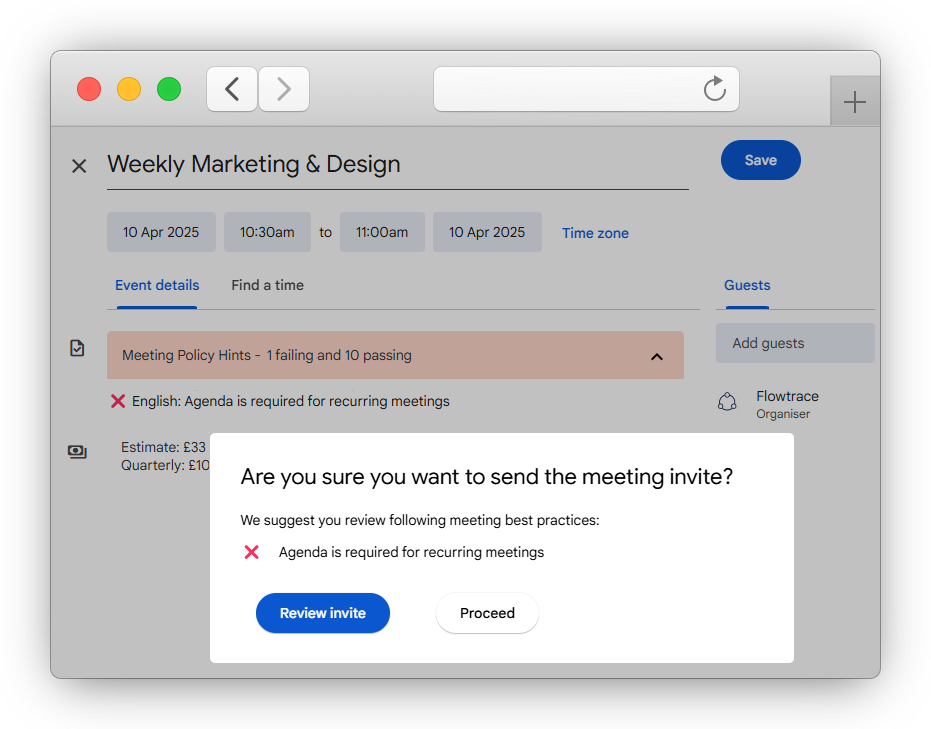
Flowtrace brings meeting cost transparency and invite governance directly into Google Calendar.
Our extension lets you display the real-time cost of every meeting, enforce company-wide scheduling rules, and ensure each invite aligns with your company meeting effectiveness goals and policies.
Why Meeting Efficiency Matters?
Companies waste $37 billion annually on unproductive meetings, with 67% of meeting sessions failing to drive meaningful outcomes.
Flowtrace's meeting cost visibility and policy validation directly tackle this waste by ensuring the 392 hours per year employees spend in meetings are purposeful, properly structured, and cost-justified leading to up to 20% fewer hours spent in unnecessary meetings.
Impact at the Point of Invitation
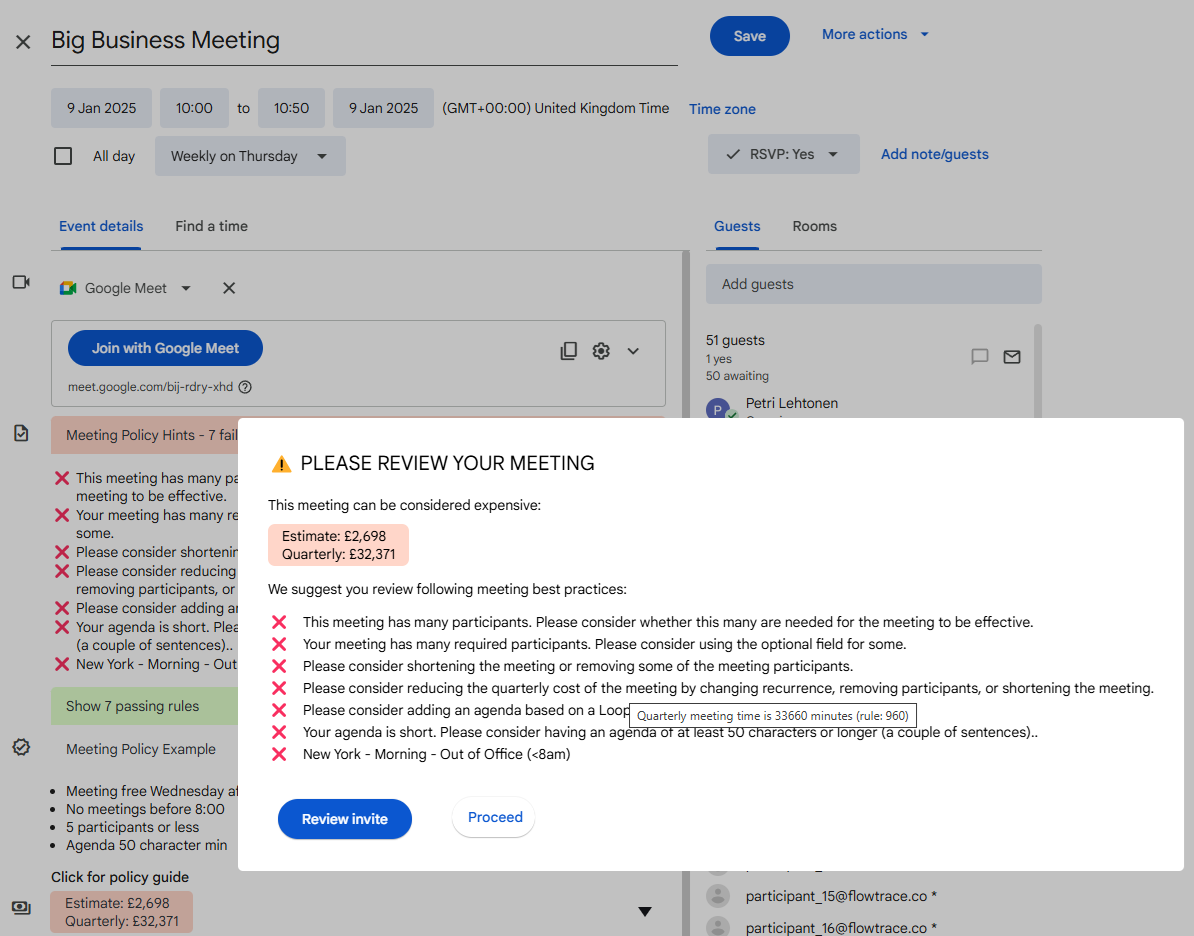
Flowtrace gives Google Calendar meeting organizers instant feedback while they create invites. We check each meeting against company guidelines to ensure they follow best practices.
MEETING COST ALERTING
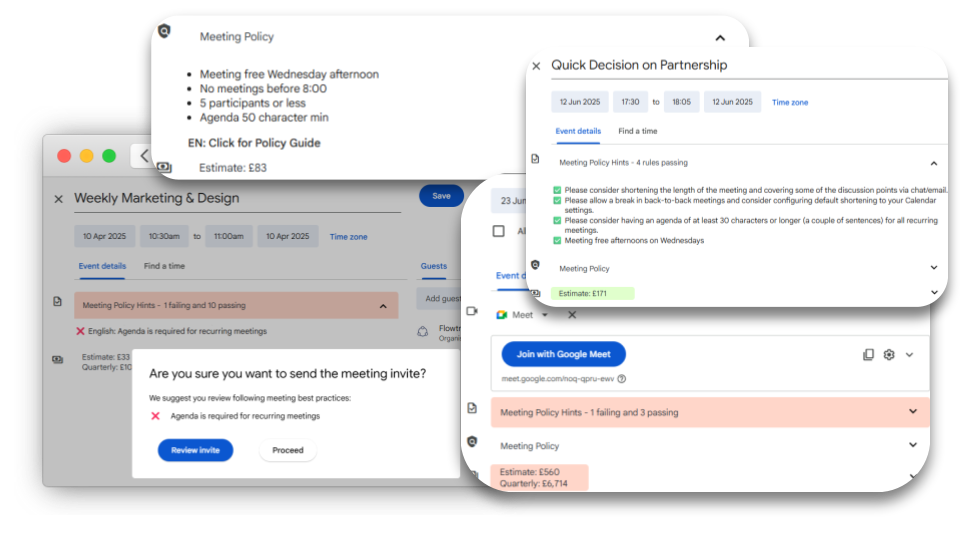
Real-time cost calculation to raise awereness of meeting costs when the invites are being drafted, and when sent.
✅ Real-time feedback during invite draft
✅ Cost confirmation when sending invite
✅ Configurable currency and cost alerting levels
INVITE VALIDATION RULES
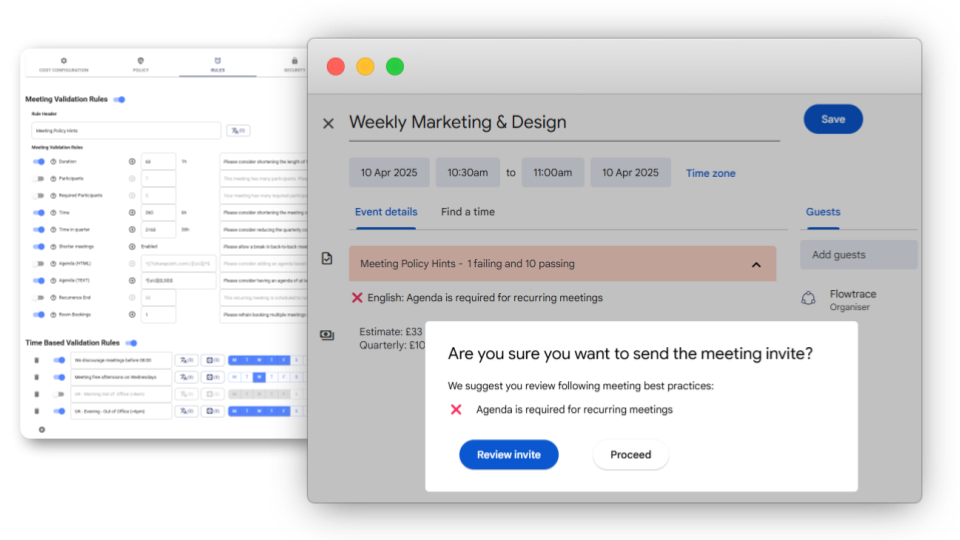
Validate company meetings against meeting policy and guide organizers to better meetings.
✅ Invite validatation for duration, invitees, and agenda
✅ Time and day based invite validation rules
✅ Select from 15 default rules or create your own
MEETING POLICY
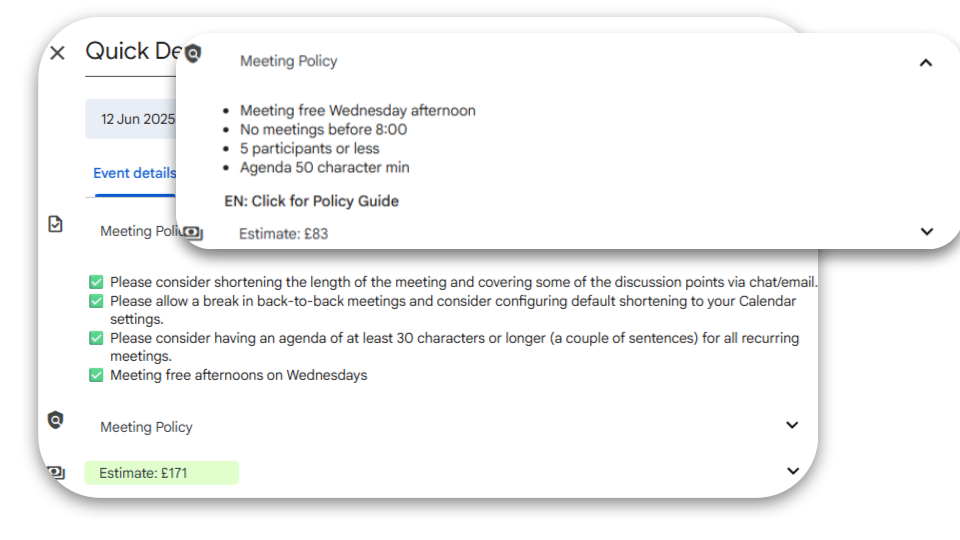
Summary reminders of your company meeting policy when and where it matters the most.
✅ Links to your internal policy documentation
✅ Reminders about what matters
✅ Guides organizer towards effective meetings
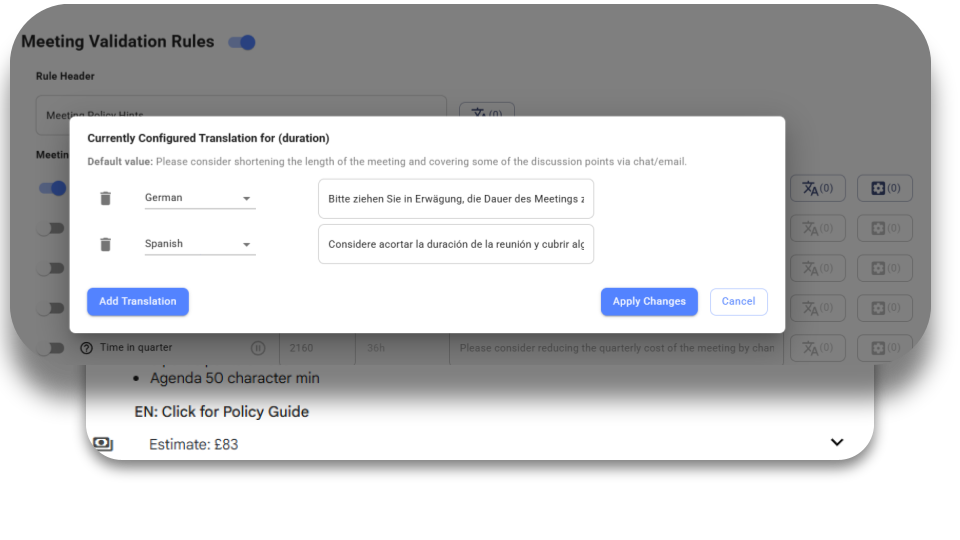
FULLY CUSTOMIZABLE CONFIGURATION
Summary reminders of your company meeting policy when and where it matters the most.
✅ Corporate and multi-language support
✅ Currency and organizational cost configuration
✅ You choose gentle bump or strict enforcement
OVER TWO MILLION CALENDAR EVENTS ANALYZED EVERY MONTH
"Flowtrace is a very good product. We learned our lessons and focus on doing our homework, that is implementing a better meeting culture across the organization. Petri's individual support, diligence and guidance is just amazing!"

"Flowtrace helps us get work done faster, and our teams thrive in a more collaborative way of working."

"With Flowtrace, we gained a deeper understanding of our meeting culture, which we in turn used to train our staff better. It's been an important part of our quest for more deep work, more focus, and less meeting distraction."

"We knew we had a problem with meetings, but we couldn’t properly measure or change it. Flowtrace gave us visibility and control. The derived measurements far exceeded even our most optimistic expectations."

How Flowtrace Stacks Up Against Other Meeting Cost Tools
See why Flowtrace goes beyond cost visibility: we provide complete governance, analytics, and policy enforcement:
| Feature | Flowtrace | Native Calendar | Fellow | Ramp | Other Add‑ons |
|---|---|---|---|---|---|
| Real-time meeting cost display | ✅ | ❌ | ✅ | ✅ | 🟠 (some show cost) |
| Policy-based invite validation | ✅ | ❌ | ❌ | ❌ | 🟠 (basic) |
| Rules enforcement (e.g. no‑meeting hours) | ✅ | ❌ | ❌ | ❌ | ❌ |
| Enterprise deployment & admin control | ✅ | 🟠 | ✅ | ✅ | 🟠 (limited) |
| Analytics & reporting | ✅ | ❌ | ❌ | ❌ | 🟠 |
FREQUENTLY ASKED QUESTIONS
How does Flowtrace calculate the cost of a Google Calendar meeting?
Flowtrace calculates cost using:
- Org structure-based salary bands
- Meeting duration and recurrence
- Attendee count
The cost is shown in real-time, and before the invite is sent, helping organizers make informed scheduling decisions.
Can I set meeting rules for Google Calendar using Flowtrace?
Yes. You can configure and enforce custom meeting policies, including:
- No meetings after 5 PM
- Max number of attendees per meeting
- Agenda requirement for certain meetings
- Limits on recurring meetings
These are applied automatically across your organization.
What is invite validation in Google Calendar?
Invite validation means every calendar invite is automatically checked against your company’s rules. Flowtrace alerts the organizer if the invite breaks:
- Time-of-day restrictions
- Duration or invitee count
- Attendee type (e.g., required vs optional guests)
- Missing agenda or agenda content
- Excessive cost of the meeting
This prevents bad meeting habits before they spread.
Who can configure the rules and policies?
You, your IT, operations, or leadership teams configure rules centrally. Flowtrace supports admin-level deployment via Google Workspace, so users don’t need to click or install anything manually.
Does Flowtrace work with both Outlook and Google Calendar?
Yes. Flowtrace integrates with both Outlook and Google Calendar, ensuring consistent meeting governance across mixed environments. Both platforms support the same features: cost display, validation, and policy enforcement.
How is Flowtrace deployed for Google Workspace users?
Flowtrace is deployed via the Google Workspace. Admins can install it at the domain level, org structure level, or individual level. Once enabled and configured to use secure indetficiation keys, it works instantly for all users, no personal clicking or setup required.
Can I customize meeting cost logic?
Yes. Flowtrace supports cost customization by:
- Company salary level
- Department or team level
- Country/Region level
- Exclusion of specific attendee types (i.e external)
- Preparation padding time
This ensures cost calculations match your organization’s reality.
Is Flowtrace secure and privacy-compliant?
Absolutely. Flowtrace:
- We don't transfer calendar data to our backend
- Company configuration transferred either SSO authenticated sessions or centrally deployed identificiation key authenticated sessions
- Configuration uses pseudonymisation to transfer attendee cost prototypes securely
- Complies with GDPR and enterprise-grade security practices
No sensitive calendar content is ever read or stored even when installing through the complete Meeting Analytics.
ENTERPRISE-GRADE SECURITY
Flowtrace is built with employee privacy and enterprise data protection at its core. We only request the access needed to provide the service, and we do not analyse what is said in meetings.
GDPR Compliant
Flowtrace is built to support GDPR-compliant processing, and customers can configure privacy controls to match their jurisdiction and internal requirements.
Privacy-First Analytics
Flowtrace does not record, transcribe, or analyse meeting conversations. Insights are generated from metadata and meeting patterns.
Encrypted & EU-Hosted
Production infrastructure is hosted in AWS Ireland, with data protected in transit using TLS and at rest using AES-256 encryption.
SSO by Default
Flowtrace uses Microsoft, Google, and Slack SSO for user authentication, allowing teams to access the platform through the identity systems they already use.