Flowtrace and Microsoft Viva Insights both analyse meetings, but they are built for different jobs. Viva Insights places meeting data inside a wider Microsoft workplace and employee-insights product. Flowtrace makes the meeting system itself the focus: how much time and money meetings consume, which behaviours create the load, and how the organisation can change them.
If your main programme covers employee experience, managers, wellbeing or Copilot adoption across Microsoft 365, Viva Insights may fit better. If the job is to measure and govern meetings across the company, Flowtrace offers the more complete meeting-specific workflow.
Flowtrace publishes this comparison and is one of the products discussed. We reviewed Microsoft's official product, technical and pricing documentation on 5 August 2026. A blank table cell means we found no documented equivalent for that criterion, not that one can never exist.
The short answer
- Choose Flowtrace for organisation-wide meeting analytics, meeting cost, recurring-meeting audits, agenda and invitation analysis, calendar policy, invite validation, and remeasurement after a change.
- Choose Viva Insights when meeting data is one part of a broader Microsoft workplace, employee, manager or Copilot programme.
- Check Viva's measured population carefully. Its organisation-level results can exclude people because of licensing, partitions, opt-outs, missing organisational data or configuration.
- The products can coexist. Viva can cover the wider Microsoft workplace programme while Flowtrace manages the meeting-specific operating loop.
Flowtrace vs Viva Insights at a glance
| Decision criterion |
Flowtrace |
Microsoft Viva Insights |
| Primary job |
Meeting analytics and governance |
Workplace and employee insights |
| Organisation-wide meeting analytics |
✓ |
✓, for the licensed and measured population |
| Meeting hours, attendance and punctuality |
✓ |
✓ |
| Multitasking signals |
✓ |
✓ |
| Meeting-cost visibility |
✓ |
|
| Agenda-presence analysis |
✓ |
|
| Invite-to-meeting notice-time analysis |
✓ |
|
| Recurring-meeting analysis |
Series and occurrence views |
Recurring-status attribute and filter |
| Analyst exploration of meeting data |
Meeting audit and detail views |
Analyst queries and dashboards |
| Google Calendar support |
✓ |
|
| Microsoft Outlook and Teams context |
✓ |
✓, Microsoft-native |
| Manager, leader and employee-experience insights |
Supporting views and surveys |
Core product remit |
| Copilot adoption and impact analysis |
|
✓ |
| Configurable meeting-policy prompts in calendars |
✓ |
|
| Invite validation before an organiser sends |
✓ |
|
| Meeting-policy baseline, scheduling-time intervention and remeasurement |
✓ |
|
| Relevant organisation-level public plan |
Scale: GBP 2/user/month |
Viva Insights: USD 4/user/month, paid yearly |
A checkmark means the capability is present at the level named. Short text identifies a material difference in scope or implementation.
Compare the products around the meeting job
Organisation-wide meeting visibility
Flowtrace is designed to show how the meeting system behaves across the company. Leaders can move between organisation, team, manager, organiser and meeting-level views to find where meeting load, cost or poor scheduling practices concentrate.
Viva Insights also provides organisation-level meeting analysis, but meetings sit alongside its wider employee and workplace remit. One client described the experience as "too HR-style" for the meeting questions they needed to answer. That is one buyer's reaction, not a claim that Viva has no meeting metrics. It captures the practical difference in emphasis.
Data coverage
Viva Insights documents measures such as meeting hours, attendee counts, multitasking, redundant attendees and punctuality. The important limitation is population coverage. Advanced results depend on licensing, measured status, partitions, opt-outs, organisational data and whether behavioural insights are enabled. External or unmeasured attendees can be excluded.
This does not make the data inaccurate. It means buyers must know whether a result represents the full meeting system or a licensed Microsoft cohort.
Flowtrace is configured around the organisation's connected calendars and meeting platforms. This is especially relevant when a company uses both Microsoft 365 and Google Workspace, or wants one meeting-governance programme across calendar environments.
Meeting metric depth and cost
Flowtrace measures meeting time and volume, then goes further into the behaviours that can be changed. These include:
- Meeting investment cost by company, team and organiser.
- Invited and accepted cost, plus delay cost.
- Recurring series and individual occurrences.
- Meetings with or without agendas.
- Invite-to-meeting notice time.
- Direct, group and optional invitation patterns.
- Internal and external meetings.
- Scheduled versus actual online-meeting duration.
- Attendee and organiser lateness.
- Focus-time loss and calendar fragmentation.
The purpose is not a longer list of metrics. It is to connect cost or overload to a specific meeting, organiser, audience pattern or recurring series. The Meeting Analytics Guide explains how to choose metrics that lead to decisions rather than dashboard noise.
Reporting versus meeting governance
Viva Insights can surface work patterns, personal recommendations and analyst views. Flowtrace connects analysis to the point where meeting behaviour happens: the calendar invite.
An organisation can define meeting rules for agendas, attendee counts, duration, cost or other appointment conditions. Flowtrace then shows the organiser a prompt in Outlook or Google Calendar before the invitation is sent. The organiser can correct the meeting while it is still easy to change.
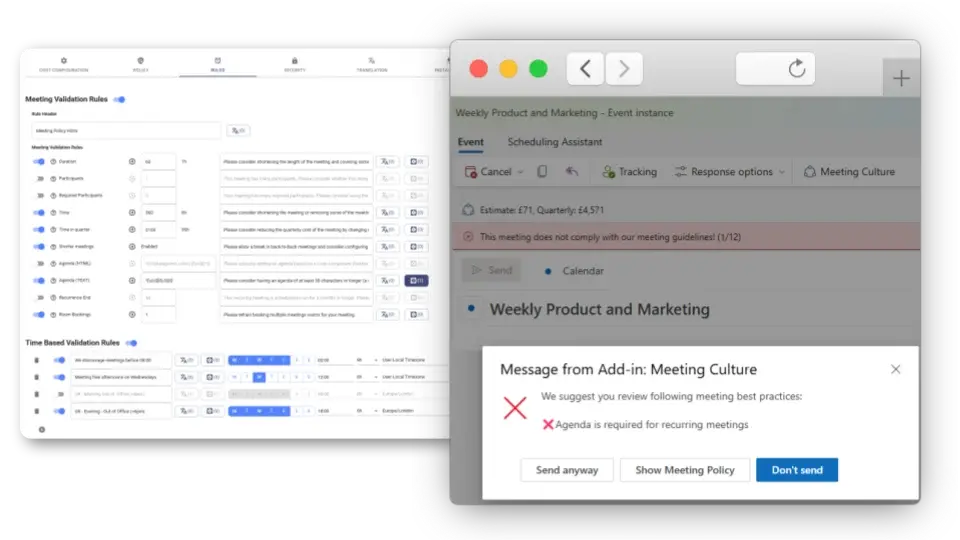
This creates a practical loop:
- Measure the baseline.
- Identify the meeting behaviour creating cost or friction.
- Define the relevant meeting policy.
- Reinforce it when the meeting is created.
- Measure whether the behaviour changed.
That loop is the largest product difference. Viva Insights is primarily an insight environment. Flowtrace combines insight with calendar-side meeting governance.
Privacy boundary
Both products have explicit privacy controls, but the comparison should start with purpose. Viva Insights says it is not designed for individual evaluation or employee monitoring. Flowtrace analyses meeting and calendar metadata rather than recording, transcribing or interpreting meeting conversations.
The Microsoft monitoring criticism some buyers remember concerned Microsoft 365 Productivity Score in 2020, not Viva Insights in 2022. Microsoft removed user-level names after criticism. There is no public evidence that this event caused Viva's later product direction, so we do not make that claim.
For either platform, define the measured population, access rules and purpose before rollout. Meeting analytics should help improve the system around employees, not turn individual activity into a performance score.
Pricing and licensing
Personal Viva insights are included with qualifying Microsoft 365 plans, but that is not the organisation-level product compared here. As of 5 August 2026, Microsoft lists Viva Insights at USD 4 per user per month, paid yearly. Viva Insights is also included in Microsoft Viva Workplace Analytics and Employee Feedback at USD 6, and Microsoft Viva Suite at USD 12 per user per month, paid yearly. Microsoft 365 or Office 365 prerequisites apply.
Flowtrace lists Team at GBP 1 per user per month and Scale at GBP 2 per user per month, excluding VAT. Scale is the relevant public plan for organisation-wide meeting analytics, advanced filtering, invite validation and unlimited history. Enterprise pricing is available on application.
The currencies and product scopes differ, so compare the actual licensed population and required capabilities, not just the headline price.
When each product fits better
Choose Viva Insights when the organisation is firmly standardised on Microsoft 365 and the programme needs employee, manager, workplace or Copilot insights beyond meetings. It is also the more natural fit when a People or workplace analytics team already owns a broader Viva programme.
Choose Flowtrace when meeting load, recurring-meeting growth, cost or policy is the primary problem. It is designed for leaders who need detailed meeting diagnostics, mixed Microsoft and Google coverage, calendar-side rules, and proof that the intervention changed the baseline.
The products can work together if their ownership is clear. Viva can support the broader Microsoft workplace programme while Flowtrace provides the specialist meeting analytics platform and governance layer. Without defined ownership, two dashboards can create more discussion without changing a meeting.
Frequently asked questions
Is Viva Insights included with Microsoft 365?
Personal insights are included with qualifying Microsoft 365 plans. Organisation, manager, leader and advanced analyst capabilities require eligible paid licensing and Microsoft prerequisites.
How much does organisation-level Viva Insights cost?
As of 5 August 2026, Microsoft lists Viva Insights at USD 4 per user per month, paid yearly. Viva Insights is also included in Microsoft Viva Workplace Analytics and Employee Feedback at USD 6, and Microsoft Viva Suite at USD 12 per user per month, paid yearly.
Does Viva Insights show meeting metrics?
Yes. Viva Insights documents meeting hours, attendee counts, multitasking, redundant attendees, punctuality and other meeting measures. Flowtrace adds meeting-specific cost, audit and calendar-governance depth.
Why can Viva Insights meeting data be incomplete?
Results depend on licensing, measured-population status, partitions, opt-outs, organisational data and configuration. External or unmeasured attendees can be excluded.
What is the main difference between Flowtrace and Viva Insights?
Viva Insights is a broader Microsoft workplace and employee-insights product. Flowtrace is a meeting-specific analytics and governance product built around meeting cost, calendar policy, invite validation and measured change.
The bottom line
Viva Insights is the broader Microsoft workplace product. Flowtrace is the more focused choice when the company needs to understand its meeting system, change scheduling behaviour and prove the change worked.
If that is the problem you are solving, schedule a Flowtrace demo.