Put both products into a procurement spreadsheet and the overlap looks obvious: calendars, workplace data, team patterns, and management reporting. The similarity does not survive the first serious buying question.
Temporall is the better fit when the main question is whether workplace and AI tools are being adopted and producing measurable business impact. Flowtrace is the better fit when the main question is why meetings consume so much time and money, and how to change meeting behaviour.
Both products can analyse calendar signals. Temporall uses them inside a much broader workplace and AI intelligence model. Flowtrace stays with the meeting problem and follows it through to scheduling rules and behaviour change.
Key takeaways
- Temporall currently positions its Tempo platform around AI behavioural analytics, AI adoption, cost, governance, and business impact.
- Temporall still has meaningful calendar and meeting capability. Its official material documents Google Calendar, Google Meet, Outlook Calendar, and Microsoft Teams data, as well as meeting metrics.
- Flowtrace is a dedicated meeting analytics platform, not a general workplace-tool adoption platform.
- Flowtrace connects analysis to action through meeting cost visibility and calendar-side meeting rules.
- The products may complement each other. The choice is usually broad workplace AI intelligence versus focused meeting improvement.
Disclosure and comparison basis: Flowtrace publishes this comparison and is one of the products discussed. We reviewed current Temporall product pages, its official integration documentation, its published meeting-metrics material, and current Flowtrace capabilities. Public product information does not establish every plan-level feature, so buyers should verify scope during procurement. Last verified: 29 July 2026.
In this comparison
What does Temporall do now?
Temporall describes Tempo as an intelligence layer for the AI-enabled enterprise. Its current proposition is to connect AI telemetry, workplace-tool activity, people data, and business outcomes so leaders can assess AI adoption and return on investment.
Its Google Workspace and Gemini product page describes four broad outcomes:
- AI usage and adoption;
- AI impact on work activity and business outcomes;
- AI cost management and licence allocation;
- AI governance and auditable decision support.
This makes Temporall relevant to CIOs, digital-workplace teams, transformation leaders, and companies trying to understand a mixed estate of Microsoft 365, Google Workspace, Gemini, Copilot, ChatGPT Enterprise, Slack, and related tools.
Calendar data is one input to that broader model. It is not the whole product story.
Does Temporall have meeting analytics?
Yes. Temporall has documented meeting and calendar capabilities, so it belongs on a meeting analytics shortlist when the buyer also needs wider workplace or AI intelligence.
Temporall's official Google Workspace integration guide says the Google Calendar API is used to analyse company calendars and that Google Meet events can also be read. Its 2025 product update says its Microsoft 365 Outlook Mail and Calendar integration was upgraded to parity with its Google Workspace offering.
Temporall has also published a dedicated guide to 13 meeting metrics. The material discusses measures such as meeting duration, distribution, recurrence, attendee patterns, focus time, and cost.
The important qualification is positioning. Temporall's current product pages lead with AI adoption and workplace transformation, not a dedicated meeting-governance workflow. Its public material confirms relevant data and analytics, but does not make every current dashboard, metric, intervention, or plan entitlement equally clear.
Ask Temporall to demonstrate the exact meeting questions in your requirements. A general workplace analytics demo will not tell you whether the platform can support the meeting programme you intend to run.
What does Flowtrace do?
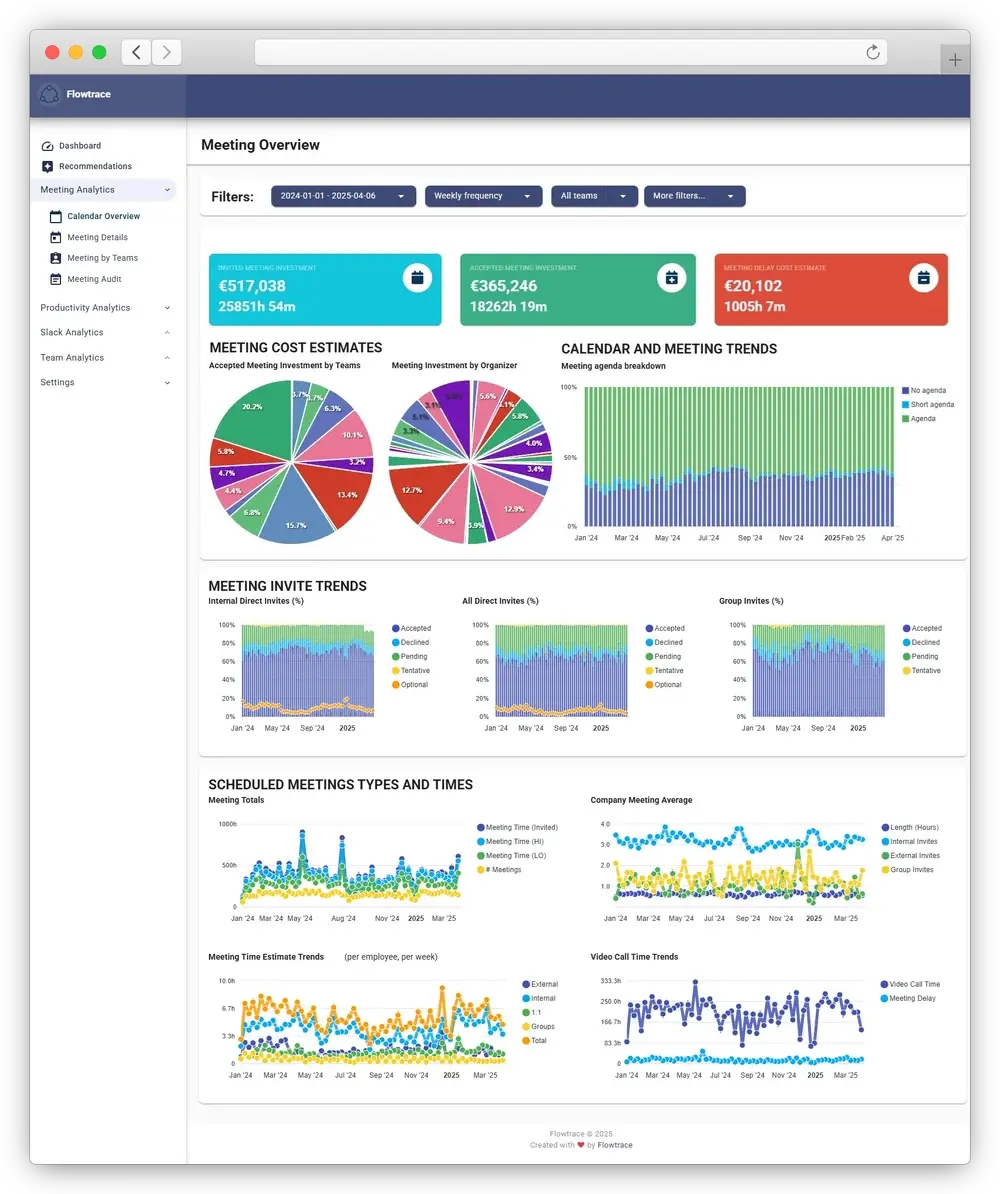
Flowtrace is a metadata-first meeting analytics and meeting culture transformation platform. Its calendar analytics is focused on the meeting patterns that shape time, cost, and focus across teams.
It helps companies establish a shared baseline for:
- meeting load and calendar fragmentation;
- recurring meeting patterns;
- attendee and organiser patterns;
- meeting cost;
- agenda and invite-response signals;
- notice time and scheduling behaviour;
- differences between teams and time periods.
The point is not simply to produce a dashboard. Flowtrace connects the baseline to a meeting-improvement loop: identify the highest-impact patterns, decide what to remove or redesign, reinforce meeting rules in Google Calendar or Outlook, and measure whether the intervention worked.
Flowtrace does not need to record, transcribe, summarise, or interpret meeting conversations.
Temporall vs Flowtrace
| Decision criterion |
Temporall |
Flowtrace |
| Organisation-wide meeting analytics |
✓ |
✓ |
| Meeting load and duration |
✓ |
✓ |
| Recurring meeting analysis |
✓ |
✓ |
| Focus-time analysis |
✓ |
✓ |
| Meeting cost analytics |
|
✓ |
| Agenda analysis |
|
✓ |
| Scheduling-notice analysis |
|
✓ |
| Calendar and meeting metadata |
✓ |
✓ |
| Google Calendar and Meet |
✓ |
✓ |
| Outlook and Teams |
✓ |
✓ |
| Calendar-side meeting cost |
|
Google Calendar and Outlook |
| Calendar policy rules |
|
Configurable invite validation |
| AI adoption and licence-cost analytics |
Core proposition |
|
| HRIS-enriched workplace analysis |
✓ |
Organisation context |
| Public pricing |
Quote required |
£0, £1 and £2 per user/month |
An empty cell means the comparison did not find an equivalent capability in the current public product material. Text is used only where the implementation or buying implication differs.
The differences that affect the decision
1. Broad workplace intelligence versus meeting specialisation
Temporall combines signals across a wider digital workplace. That is valuable when a company needs to compare tool adoption, understand a mixed AI portfolio, or connect technology usage with line-of-business outcomes.
Flowtrace goes deeper into the meeting system. The Meeting Analytics Guide explains the operating questions this supports: which meeting patterns create overload, which recurring series deserve review, how calendars fragment focus time, where costs concentrate, and whether a policy changed behaviour.
The practical buying test is simple:
- If meetings are one dimension of an AI or digital-workplace transformation, Temporall's breadth may be the priority.
- If meetings are the operating problem, a dedicated meeting model and governance workflow are more important.
2. Measuring activity versus changing scheduling behaviour
Analytics can reveal a problem without changing it.
Flowtrace's differentiator is the connection between organisation-level analysis and the moment an invite is created. Its Google Calendar and Outlook workflows can show meeting cost and validate configured rules before the organiser sends the invitation.
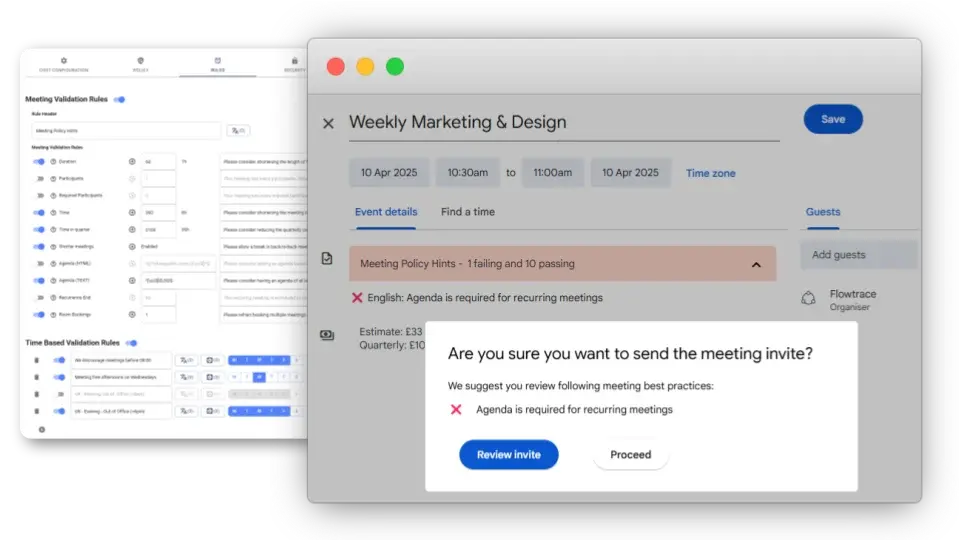
That supports a repeatable meeting policy: measure, define the standard, nudge at the point of scheduling, then measure again.
The Temporall sources reviewed demonstrate analytics, reporting, filtering, surveys, and transformation services. They do not publicly document an equivalent calendar-side invite-validation workflow. Buyers should ask Temporall how meeting insight becomes an operational intervention in their proposed deployment.
3. AI return on investment versus meeting economics
Temporall's current proposition treats AI usage as insufficient unless it can be linked to operational outcomes and cost. This is a broader investment question: are Gemini, Copilot, ChatGPT Enterprise, and other tools producing value?
Flowtrace applies economic visibility specifically to meetings. Its meeting cost analytics helps leaders examine combined attendee time and configured cost assumptions by meeting, organiser, team, and recurring pattern. Cost is not treated as proof that a meeting is wasteful. It is a signal that the meeting deserves clear purpose and ownership.
If the finance question is licence utilisation across an AI portfolio, Temporall is closer to the job. If it is the cost and opportunity cost of the meeting system, Flowtrace is closer.
4. Shared privacy question, different programme boundaries
Both products operate in a sensitive area: organisational behaviour inferred from workplace-system data.
Temporall's current Google Workspace page states that it maintains ISO 27001 certification, uses encryption, and supports GDPR requirements. Its integration documentation identifies the scopes used for Calendar, Meet, Gmail, Drive, Chat, licensing, and demographics.
Flowtrace's meeting programme is deliberately narrower. It uses meeting and calendar metadata and does not need meeting recordings or transcripts. A responsible rollout still needs clear access controls, purpose limitation, aggregate reporting where possible, and an explanation of how the data will and will not be used.
For either product, buyers should review the proposed connector scopes and reporting level rather than relying on a generic “privacy-first” label.
When to choose Temporall
Choose Temporall when:
- AI adoption, licence allocation, and business impact are the primary questions;
- the organisation needs to combine Microsoft 365, Google Workspace, Gemini, Copilot, Slack, or other workplace signals;
- meeting patterns are one part of a broader workplace-transformation programme;
- IT or digital-workplace leaders need a common data layer for technology decisions;
- services-led analysis and transformation support are part of the desired engagement.
Temporall may be enough for meeting analysis when its documented meeting views cover the metrics, segmentation, history, and action plan the organisation actually needs. Ask for a demonstration using the meeting questions in your own requirements, not only a generic platform tour.
When to choose Flowtrace
Choose Flowtrace when:
- meeting overload is the primary operating problem;
- leaders need a consistent meeting baseline across teams;
- recurring meeting debt, meeting cost, agenda discipline, notice time, or fragmentation drive the programme;
- the organisation wants meeting rules inside Google Calendar or Outlook;
- the team needs to measure whether meeting-policy changes persist;
- a metadata-first approach is preferable to recording meeting conversations.
Flowtrace is not the better choice for measuring enterprise AI adoption across an entire software portfolio. That is outside its focused job.
Can Temporall and Flowtrace work together?
Yes. They can sit at different layers.
Temporall can help a digital-workplace or AI-transformation team understand tool adoption and business impact. Flowtrace can give the organisation a dedicated meeting-improvement system, including calendar-side governance.
Using both only makes sense when each has a named owner and decision. Two dashboards that report similar calendar activity without separate action paths create reporting debt, not insight.
Decision checklist
Before choosing, ask:
- Is the programme primarily about AI adoption, the digital workplace, or meetings?
- Which calendar and meeting metrics must be available today?
- Do we need analysis only, or rules at the point of invitation?
- Which connectors and permissions are required?
- At what level can users, managers, and administrators see data?
- How are meeting cost and business impact calculated?
- What intervention follows when a pattern is found?
- How will we measure change after 30, 60, and 90 days?
FAQ
Is Temporall a meeting analytics platform?
Temporall has documented calendar and meeting analytics capabilities, but its current positioning is broader: AI adoption, workplace-tool intelligence, and business-impact analysis across productivity suites.
What is the main difference between Temporall and Flowtrace?
Temporall focuses on understanding AI and digital-workplace tool adoption across an enterprise. Flowtrace focuses on measuring and improving the meeting system through meeting analytics, cost visibility, and calendar-side governance.
Does Temporall integrate with Google Calendar and Outlook?
Temporall's official documentation confirms Google Calendar analysis, and its published platform updates describe Microsoft 365 Outlook Calendar support. Exact metrics, historical scope, and plan eligibility should be verified with Temporall.
Can Temporall and Flowtrace be used together?
Yes. Temporall can support a broad workplace or AI transformation programme while Flowtrace provides dedicated meeting analytics and scheduling governance.
The bottom line
Temporall is not simply an older version of Flowtrace, and Flowtrace is not a smaller Temporall.
Temporall has moved toward enterprise AI intelligence while retaining relevant workplace and calendar analytics. Flowtrace has narrowed around the meeting system: measure it, expose its cost, govern scheduling behaviour, and check whether the change sticks.
Choose the product whose primary job matches the programme you are actually funding.