Calendar audits are useful, but traditional audits have a practical problem: the moment the spreadsheet is finished, the data is already aging. Leadership teams may review where time went last month or last quarter, but the calendar has already changed. New recurring meetings have been created, urgent one-off meetings have appeared, focus time has been interrupted, and team priorities have shifted again.

That is why calendar analytics are important. Leaders do not just need a one-time calendar audit. They need a live view of how company time is being allocated across meetings, focus time, recurring events, cross-functional collaboration, and leadership attention.
Calendar analytics tools use calendar metadata to show how time is being spent. This does not require reading meeting content, transcripts, notes, or attachments. The useful signals are often already in the calendar: meeting duration, attendee count, recurrence, organizer, timing, agenda presence, meeting creation time, and how those patterns vary by team.
This matters because calendars reveal the organization’s real priorities. Strategy documents may say one thing, but calendars show where time is actually going. If leaders want to understand meeting load, focus time, operating rhythm, and cross-team collaboration, they need calendar visibility that stays current as work changes.
Flowtrace data shows that 35% of meetings are created within 24 hours of their start time, while only 8% are booked more than a week in advance. That points to a reactive scheduling culture in many organizations. A quarterly calendar audit can identify the pattern after the fact, but real-time calendar analytics helps leaders see the pattern while it is still shaping the workweek.
Best calendar analytics tools comparison
| Tool |
Best for |
Calendar analytics focus |
Best fit |
| Microsoft Viva Insights |
Microsoft 365 workplace analytics |
Meeting effectiveness, focus time, collaboration habits, manager and leader insights |
Microsoft 365 organizations |
| Worklytics |
Privacy-conscious workforce and calendar analytics |
Meeting load, focus time, collaboration behavior, after-hours work, cross-team patterns |
People Analytics and HR teams needing aggregated workforce insights |
| Flowtrace Calendar Analytics |
Real-time metadata-only calendar audits |
Meeting load, focus time, recurring meetings, meeting cost, agenda quality, attendee patterns, team benchmarks |
Organizations improving meeting culture and operating efficiency |
| Time is Ltd Calendar Analytics |
Collaboration network and meeting pattern visibility |
Internal and external collaboration, 1:1s, customer meetings, team interaction patterns |
Revenue, operations, and transformation teams analyzing collaboration networks |
| CalendHub Calendar Analytics |
Calendar metadata dashboards |
Meeting frequency, duration, attendee counts, recurring patterns, focus time vs meeting time |
Teams needing direct calendar metadata visibility |
| Google Calendar Time Insights |
Personal calendar time visibility |
Time in meetings, meeting frequency, people met with most often |
Individual Google Workspace users |
| Reclaim.ai |
Calendar analytics tied to scheduling optimization |
Focus time, meetings, tasks, habits, personal commitments, productivity blockers |
Teams combining calendar analytics with automated scheduling controls |
1. Microsoft Viva Insights
Microsoft Viva Insights is a natural option for organizations already operating inside Microsoft 365. It uses signals from Microsoft 365 systems, including calendar and collaboration data, to provide insights into meeting habits, focus time, manager patterns, and workplace behaviors.
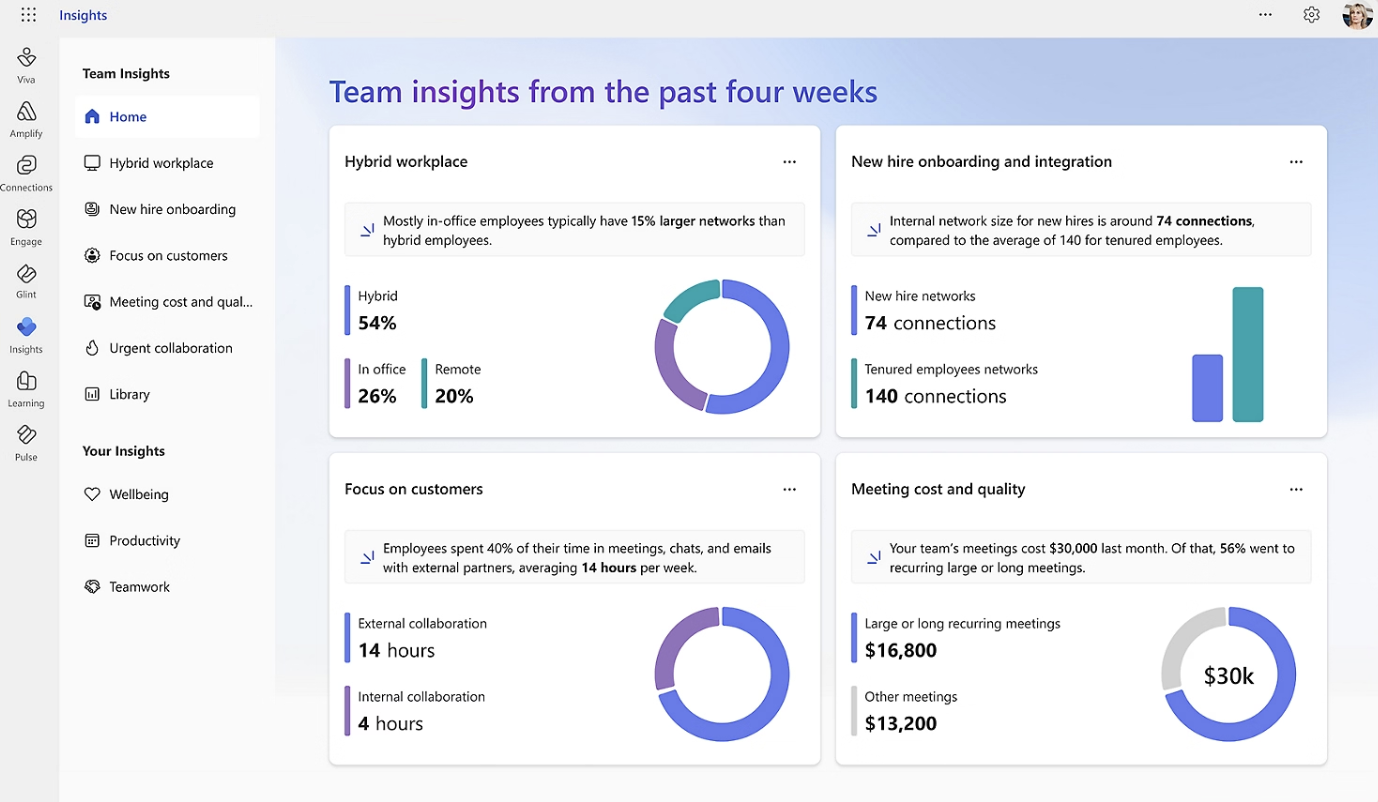
For calendar analytics, Viva Insights is useful because it sits close to Outlook and Teams. Leaders can understand meeting effectiveness patterns, collaboration habits, and focus time constraints inside the Microsoft ecosystem. It can also support focus plans and other interventions that help employees protect time for priority work.
Viva Insights is a broader workplace analytics product. That means it can help leadership teams understand how work is happening across Microsoft 365, but the calendar analytics experience is part of a wider employee experience and workplace insights platform.
This is useful when the organization wants calendar analytics connected to Microsoft’s broader view of collaboration. For example, leaders may want to understand whether employees have enough focus time, whether meeting habits are improving, or whether specific groups are operating in ways that create overload.
The trade-off is specificity. Viva Insights is strong for Microsoft 365 workplace analytics, but organizations that want deeper meeting culture analysis, agenda quality tracking, recurring meeting governance, or meeting cost visibility may need a more specialized calendar analytics platform.
-
Best for: Microsoft 365 organizations that want calendar and collaboration insights inside the Microsoft ecosystem.
-
Use when: Leaders want meeting effectiveness, focus time, and workplace analytics connected to Outlook and Teams.
-
Watch out for: It is broader workplace analytics, not a dedicated meeting culture or calendar audit platform.
2. Worklytics
Worklytics is a workforce analytics platform with good calendar analytics capabilities. It connects to systems such as Google Calendar, Microsoft Outlook, and other collaboration tools to help organizations understand meeting load, focus time, collaboration patterns, and work habits across teams.
Worklytics is useful for organizations that want to analyze calendar behavior while maintaining a privacy-conscious approach. The platform focuses on aggregated and anonymized behavioral metadata, rather than meeting content. That makes it relevant for HR, People Analytics, and workplace strategy teams that need visibility into how work happens without creating a monitoring culture.
From a calendar audit perspective, Worklytics helps leaders move beyond manual review. Instead of asking teams to self-report whether they feel overloaded, leaders can look at patterns such as meeting hours, back-to-back meetings, recurring meeting load, focus time fragmentation, and collaboration across teams. This gives a more reliable view of where calendar pressure is concentrated.
Worklytics is useful when calendar analytics needs to sit alongside broader workforce analytics. For example, a People Analytics team may want to understand how meeting load connects to after-hours work, distributed team behavior, burnout risk, or hybrid work patterns. Calendar metadata becomes one layer in a wider view of organizational health.
The limitation is that Worklytics is broader than calendar analytics alone. That can be an advantage for mature People Analytics teams, but it may be more than needed if the primary goal is to improve meeting culture, audit recurring meetings, or reduce meeting load through calendar-specific governance.
-
Best for: Privacy-conscious workforce analytics with calendar metadata as a core signal.
-
Use when: HR or People Analytics teams need aggregated insight into meeting load, focus time, and collaboration behavior.
-
Watch out for: It may be broader than required for teams focused specifically on meeting culture and calendar audits.
3. Flowtrace Calendar Analytics
Flowtrace Calendar Analytics helps organizations understand how time is allocated across company calendars. It analyzes calendar metadata from Google Calendar and Outlook to show patterns in meeting load, focus time, recurring meetings, meeting cost, attendee behavior, agenda quality, and team-level calendar habits.
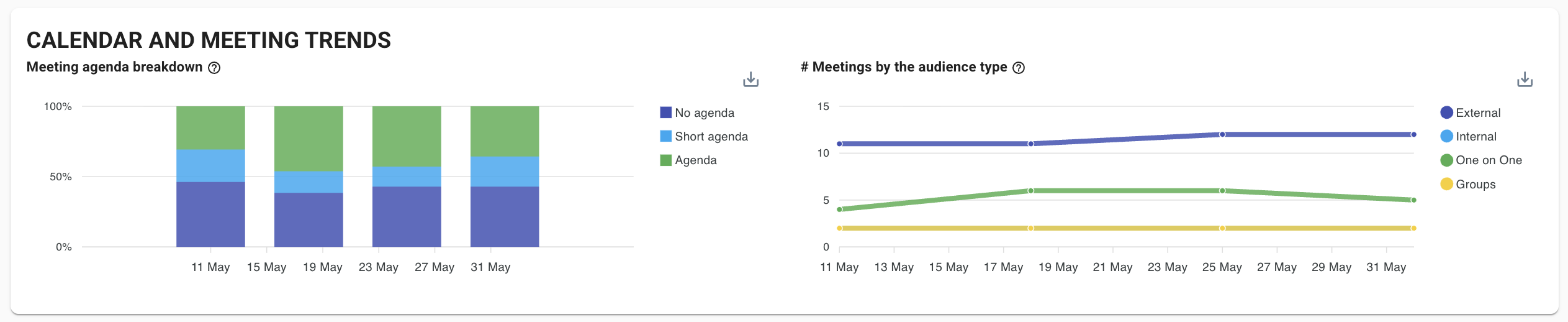
Flowtrace Calendar Analytics is built for leaders who need more than a static time audit. A manual audit may show how the leadership team spent time during one period, but it cannot show whether the pattern is changing this week. Flowtrace gives leaders ongoing visibility into the calendar behaviors that shape how work gets coordinated across the organization.
This matters because meeting culture changes quickly. A team can cancel several recurring meetings during an audit, then slowly rebuild the same meeting load over the next few months. New projects, leadership changes, customer escalations, and planning cycles can all shift the calendar. Real-time calendar analytics helps leaders see whether meeting behavior is improving or drifting back to old patterns.
Flowtrace uses calendar metadata to analyze work patterns. That means leaders can understand meeting frequency, meeting duration, attendee counts, recurrence, agenda presence, cost signals, and focus time impact without needing to inspect private meeting content. For many organizations, that distinction matters as the goal is to understand how company time is being allocated and whether that allocation supports the business.
Flowtrace Calendar Analytics also helps leaders identify recurring meeting governance problems. Flowtrace meeting stats show that recurring meetings make up 48% of all meetings, while 92.4% of meetings do not have an end date set on the calendar. That combination signals a common operating issue: meetings often become permanent by default rather than being reviewed against purpose, cost, and outcome.
For People Ops, Operations, Transformation, and executive teams, Flowtrace turns calendar analytics into an operating discipline. Leaders can review meeting load by team, benchmark calendar behavior, track agenda discipline, understand attendee patterns, and measure whether interventions are working. If a company introduces meeting-free focus blocks, recurring meeting reviews, agenda standards, or attendee discipline policies, Flowtrace helps show whether those changes are visible in calendar behavior.
Flowtrace Calendar Analytics is strongest when the organization wants to connect calendar visibility with meeting culture change. It does not only show where time goes. It helps leaders understand which calendar patterns are creating unnecessary meeting load, fragmenting focus time, increasing meeting cost, or weakening decision-making.
-
Best for: Organizations that want real-time, metadata-only calendar audits connected to meeting culture and operating efficiency.
-
Use when: Leadership needs an ongoing view of how company time is prioritized across meetings, focus time, recurring events, and team collaboration.
-
Watch out for: Calendar analytics only creates value when leaders act on the patterns it reveals.
4. Time is Ltd
Time is Ltd focuses on meeting patterns, collaboration networks, and relationship visibility. It helps organizations understand who teams are meeting with, how internal and external collaboration is distributed, and how different groups interact across the company.
This makes Time is Ltd useful for leaders who want to understand collaboration structure, not only meeting volume. A calendar audit can show that a team spends many hours in meetings, but collaboration analytics can show who that time is spent with. That distinction matters for sales, customer success, operations, and transformation teams that need to understand whether time is being spent with the right internal stakeholders, customers, partners, or cross-functional groups.
Time is Ltd can support questions such as: which teams spend the most time in internal coordination, which customer accounts receive the most meeting attention, how often managers hold 1:1s, and how collaboration patterns differ across departments. This can be useful for leaders trying to understand whether calendar time reflects strategic priorities.
The strength of Time is Ltd is collaboration network visibility. It helps leaders see relationship patterns that are difficult to detect through a simple calendar export. That can make it useful for diagnosing silos, customer engagement patterns, and cross-functional operating rhythms.
The limitation is that Time is Ltd may be less focused on meeting culture governance than a platform built specifically around agenda quality, meeting cost, attendee discipline, recurring meeting reviews, and focus time protection. It is a strong option when the main question is how collaboration is distributed across people and teams.
-
Best for: Collaboration pattern analysis and internal or external meeting network visibility.
-
Use when: Leaders need to understand who teams are spending time with and whether collaboration patterns reflect business priorities.
-
Watch out for: It is more focused on collaboration networks than meeting culture governance.
5. CalendHub Calendar Analytics
CalendHub focuses on calendar metadata dashboards. It tracks signals such as meeting frequency, duration, attendee counts, recurring patterns, time-of-day distribution, and focus time versus meeting time. It is positioned around analyzing event metadata from synchronized calendars without accessing meeting content, notes, or attachments.
This makes CalendHub relevant for teams that want direct visibility into calendar behavior. It can help identify recurring meetings, low-value meeting patterns, fragmented focus time, and team-level meeting distribution. Those are the types of patterns that traditional time audits often miss or only capture after the fact.
CalendHub’s metadata-only framing is important. Calendar analytics does not need to read what people said in a meeting to show whether calendars are overloaded. Leaders can often learn enough from the structure of the calendar: when meetings happen, how long they last, how many people attend, how often they repeat, and whether they fragment the day.
For organizations that need practical calendar dashboards, CalendHub can be a useful option. It is more calendar-specific than broad workforce analytics platforms, which may make it easier to evaluate for teams focused on calendar audits and time allocation.
The main consideration is depth. Leaders should review how well the tool supports team benchmarks, governance workflows, meeting cost, agenda analysis, and longitudinal behavior tracking. Calendar visibility is useful, but the real value comes from turning visibility into better operating decisions.
-
Best for: Teams that want calendar metadata dashboards across meeting load and focus time.
-
Use when: You need a calendar analytics tool focused on event metadata rather than meeting content.
-
Watch out for: Confirm whether it supports the level of governance and behavior tracking needed for larger organizations.
6. Google Calendar Time Insights
Google Calendar Time Insights gives individual Google Workspace users visibility into how they spend time in meetings. It can show meeting time, meeting frequency, and people the user meets with most often.
This is useful at the personal level. Employees and managers can use Time Insights to understand whether their own calendar is dominated by meetings, whether focus time is available, and who consumes most of their meeting time. For individual time audits, it is a simple native option.
The limitation is that Time Insights is not designed as a company-wide calendar analytics platform. It does not give leaders a real-time organization-level audit of meeting load, recurring meeting governance, agenda discipline, meeting cost, or team benchmarks. It is personal calendar visibility, not an operating system for calendar management.
That does not make it unhelpful. For Google Workspace users, Time Insights can support individual reflection and small behavior changes. A manager may notice that too much of their week is spent in recurring meetings, or that they have too little focus time available. But leadership teams cannot rely on individual Time Insights alone to understand how company time is being allocated across departments.
Google Calendar Time Insights is best treated as a lightweight personal analytics feature. It can complement an organizational calendar analytics platform, but it does not replace one.
-
Best for: Individual Google Workspace users who want personal meeting-time visibility.
-
Use when: Employees or managers want a simple view of their own calendar patterns.
-
Watch out for: It is not a real-time company-wide calendar audit tool.
7. Reclaim.ai
Reclaim.ai combines calendar analytics with scheduling automation. It helps teams understand how time is spent across meetings, focus time, tasks, habits, and personal commitments, while also using automation to protect time on the calendar.
This makes Reclaim different from a pure calendar audit tool. It does not only analyze calendar behavior. It also helps adjust the calendar by defending focus time, scheduling tasks, and managing priorities. For teams that want analytics tied directly to scheduling changes, that can be useful.
Reclaim’s calendar analytics can help leaders understand whether employees are getting enough focus time, how meetings are affecting the week, and where productivity blockers are appearing. This is relevant because calendar audits should not only identify meeting volume. They should show whether the calendar leaves enough uninterrupted time for meaningful work.
The strength of Reclaim is the connection between insight and scheduling automation. If a team has too little focus time, Reclaim can help create and protect more of it. That makes it practical for teams that want calendar analytics to feed directly into personal and team-level scheduling behavior.
The limitation is that Reclaim is not primarily a meeting culture analytics platform. It is more focused on time management, focus time, task scheduling, and calendar optimization. Organizations looking for deeper meeting governance, meeting cost analysis, agenda quality, attendee discipline, and recurring meeting review may need a more specialized calendar analytics platform.
-
Best for: Teams that want calendar analytics connected to automatic focus-time protection.
-
Use when: You want to analyze and improve how time is allocated across meetings, tasks, and focus work.
-
Watch out for: It is stronger for scheduling optimization than meeting governance.
What calendar analytics should measure
A calendar analytics tool should help leaders understand how time is allocated, not just count how many meetings exist. The most useful signals are the ones that connect calendar behavior to business priorities.
Useful calendar analytics metrics include:
- Meeting load by team, department, or role.
- Focus time availability and fragmentation.
- Recurring meeting volume.
- Recurring meetings without end dates.
- Meeting duration patterns.
- Attendee count and meeting size.
- One-off meeting volume.
- Meetings created at short notice.
- Agenda presence and agenda quality.
- Meeting cost and time investment.
- Cross-functional collaboration patterns.
- Customer or external meeting time.
- Manager 1:1 frequency.
- After-hours meetings.
- Team benchmarks over time.
The key is to use these metrics as operating signals. If a team has many recurring meetings with no end date, the next step is recurring meeting governance. If a leadership team has little focus time, the next step is reviewing decision forums, planning cadence, and escalation behavior. If meetings are being created at short notice, the next step is improving planning discipline.
Why metadata-only calendar analytics matters
Calendar analytics works best when it focuses on metadata. Leaders do not need to read meeting notes or listen to recordings to understand whether the calendar is overloaded. They need reliable signals about time allocation, meeting structure, recurrence, attendee patterns, and focus time.
Metadata-only analysis also creates a better privacy model. Employees are more likely to trust calendar analytics when it is clear that the organization is measuring patterns, not inspecting conversations. The purpose is to improve how work is coordinated, not to monitor individual behavior out of context.
This distinction matters for adoption. If calendar analytics is framed as surveillance, teams will resist it. If it is framed as a way to understand meeting load, improve focus time, reduce unnecessary meetings, and make operating rhythms more intentional, it becomes a practical management tool.
Calendar metadata can answer important questions without overreaching:
- Are meetings increasing or decreasing?
- Which teams have the most fragmented calendars?
- Which recurring meetings have grown too large?
- Where is leadership attention going?
- Are teams protecting enough focus time?
- Are meeting policies changing behavior?
- Are calendar patterns aligned with company priorities?
These are operating questions. They do not require content inspection. They require consistent calendar visibility.
How to choose the right calendar analytics tool
The right calendar analytics tool depends on the level of visibility and action the organization needs.
For Microsoft 365 organizations that want workplace analytics inside the Microsoft ecosystem, Microsoft Viva Insights is a logical starting point. It connects calendar and collaboration behavior with broader employee experience and productivity insights.
For HR, People Analytics, and workplace strategy teams that need privacy-conscious workforce analytics, Worklytics is a strong option. It is useful when calendar behavior needs to be understood alongside collaboration patterns and organizational health.
For organizations that want real-time calendar audits tied directly to meeting culture, Flowtrace Calendar Analytics is built for that purpose. It helps leaders understand meeting load, focus time, recurring meeting governance, agenda quality, attendee discipline, meeting cost, and whether behavior changes over time.
For teams that need collaboration network visibility, Time is Ltd Calendar Analytics can help show who teams are meeting with and whether collaboration patterns reflect business priorities.
For calendar metadata dashboards, CalendHub is relevant when teams need visibility into meeting frequency, duration, attendee counts, recurrence, and focus time without accessing meeting content.
For individual Google Workspace users, Google Calendar Time Insights provides a lightweight view of personal meeting time. It is useful for self-reflection, but it is not a company-wide calendar audit platform.
For teams that want analytics connected to scheduling automation, Reclaim.ai is useful because it can help protect focus time and rebalance calendar priorities.
Final takeaway
These calendar analytics tools help leaders understand how company time is being prioritized in real time. Static calendar audits still have value, but they are not enough for organizations where meetings, priorities, and operating rhythms change every week.
Calendar analytics gives leaders a more current view of meeting load, focus time, recurring meetings, attendee patterns, collaboration behavior, and scheduling discipline. When that analysis is based on metadata, organizations can understand how work is coordinated without inspecting meeting content.
Frequently Asked Questions