Meetings
Meeting Rules for Calendar Optimization
Optimize your team's calendar management with essential meeting rules for calendar to boost productivity, reduce friction, and enhance collaboration....
Learn how to effectively manage meeting load with simple calendar tweaks, reducing time waste and enhancing decision-making efficiency in a hybrid work environment.
Meeting load is an operating problem. You can reduce it without a new program or a policy fight. The method is simple: use what your calendar already shows, make a few small edits each week, and keep decisions moving in fewer, smaller, clearer sessions.
Scan your schedule, trim the obvious excess, protect a small window of daily focus, and convert status to written updates. No spreadsheets, no change committee, just consistent, visible edits that give your team back time without slowing decisions.

Hybrid work changed when, where, and why we meet. Decisions now span time zones and tools, so teams default to a live call to “sync” rather than risk silence. Microsoft’s latest Work Trend Index shows two shifts driving overload: people are interrupted about every two minutes during core hours, and a majority of meetings are now ad hoc rather than scheduled, both patterns that inflate calendar noise and fragment attention.
The simple act of booking a room has become frictionless. Calendar links, auto-generated video rooms, and template invites make it easier to add ten people than to write a clear summary. Harvard Business Review’s analysis of 40 million meetings notes that many habits formed in the remote era have stuck, including using virtual meetings even when colleagues sit in the same building, an efficiency on paper that often adds more sessions with little added value.
Work is also more interdependent. Product, data, design, sales, and compliance all touch the same decision. Without clear owners, invites expand “just in case,” creating rooms that are too large to decide quickly. That expansion shows up in after-hours spikes and last-minute calls as teams try to bridge gaps across time zones and calendars; late-night meetings and outside-hours activity rising year over year.
Finally, informal coordination has faded. The hallway check, the quick desk-side review, and the impromptu whiteboard have been replaced with a 30-minute slot. When documents are thin and pre-reads are optional, the meeting becomes the place where work gets written and explained, doubling its length and invite list. The result is a slow creep: a few oversized rooms, a cluster of recurring series, and a steady stream of ad-hoc calls that crowd out focus and push real work into the margins.
Start with a quick calendar audit of the next two weeks. You’re looking for the small number of meetings that create most of the drag: long blocks, recurring series, and oversized rooms.
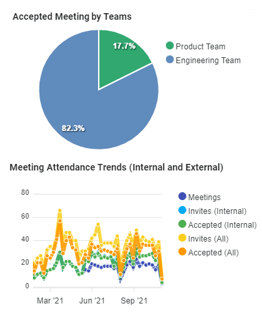
Look at three things in order:
If a two-hour block has no hard outcome in the title, it’s a candidate to shorten or split. If a weekly series has become a habit rather than a decision forum, reduce its cadence or retire it for a month and see what actually breaks. For meetings over seven or eight people, ask who is needed to decide. Everyone else can read the notes later.
This first scan is about obvious wins. Most teams can cut 10–20% of their meeting time in one pass by trimming the longest blocks and right-sizing the biggest rooms. That is enough momentum to keep going.
Recurring meetings are where meeting load hides. They also create the most political friction because they feel like “the way we work.” Treat them as a portfolio you manage, not a tradition you inherit.
Work down a simple checklist:
End each recurring session the moment the decision is made. You do not owe the calendar the full slot. Adjust the invite list so it includes decision-makers and contributors only. Observers get the summary.
Large meetings slow you down because people self-invite to stay informed. Replace attendance with clarity.
Set a simple rule that sticks: only the people who must decide or materially contribute attend. Everyone else receives a one-page summary with the decision, owners, and next steps. That summary becomes the default way to keep a wider group in the loop without consuming live time. Rotate attendance for recurring reviews rather than giving permanent seats. If someone rarely speaks or owns no action at the end, their default is “read, don’t attend.”
This is not about excluding people; it’s about respecting the cost of a room. Smaller groups resolve issues faster and document better because they have to.
You do not need a company-wide “no-meeting day” to restore focus time. You need two changes:
Modern work creates constant interruption pressure. People are interrupted about every two minutes during core hours, adding up to roughly 275 interruptions per day, and that 60% of meetings are now ad hoc rather than pre-scheduled.

When you protect even two clean blocks a day, teams get more done in fewer meetings because documents arrive prepared, and decisions land in one pass.
Most status meetings exist because teams don’t trust that written updates will be read. Make the written update worth reading and the meeting will shrink itself.
Use one page, same sections each week: context, progress, risks, decisions needed, and links. Require pre-reads 24 hours before the call. If the pre-read is missing, cancel the meeting. Spend the live time on decisions, blockers, and next steps.
The case for this shift is strong: up to one-third of meetings are likely unnecessary, according to research. That’s not a marginal problem, it’s structural waste that compounds every week.
Written status stabilizes that load. Leaders get a consistent view. Contributors spend time solving issues rather than narrating them.
Rework meeting hygiene around the decision, not the ceremony:
If a decision can be made without discussion, make it asynchronously and notify. If it genuinely needs debate, set a 25- or 50-minute slot and keep the room small. When a decision gets reopened later, point back to the log and ask what has changed. This avoids wash-rinsing the same conversation for weeks.
Calendar clean-ups fail because they are one-off events. Adopt a five-minute end-of-week routine instead:
Three edits every Friday is enough. Over a quarter, that cadence rewrites your meeting culture without a heavy project or backlash.
You can do everything above by eye. Meeting analytics make it faster and keep you honest. Flowtrace connects to the tools you already use, Google or Outlook calendars, Zoom, Meet, Teams, Slack or Teams chat, and analyzes metadata only. The focus is on patterns that create load and the practical edits that remove it.
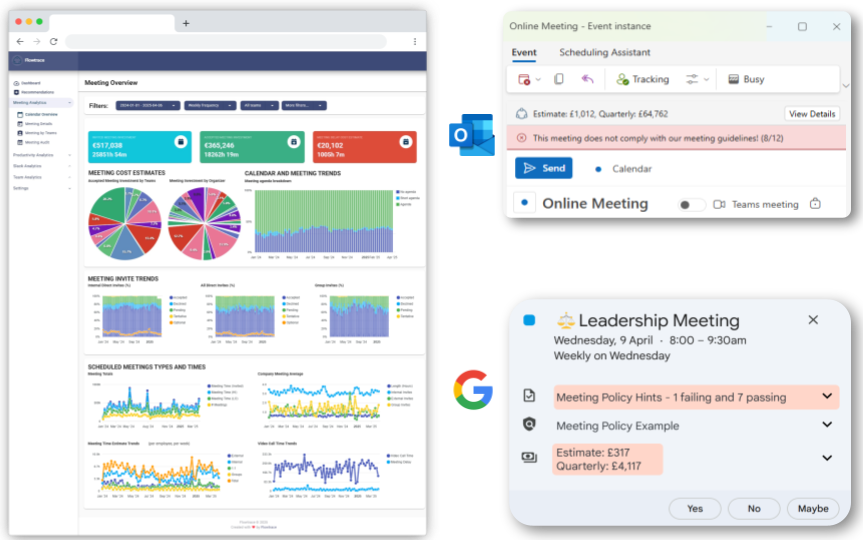
What you see at a glance
Open the current week, sort by time and attendees, and tag three forums: retire, compress, convert to async. Shorten the slot, trim the invite list to decision-makers and contributors, and adjust the cadence. Turn on simple alerts so you catch invite bloat, late-night scheduling, or quiet-zone breaches before they become habits.
Meeting load shrinks when you treat it as a design problem. Start with what you can see: long blocks, stale series, and oversized rooms. Replace attendance with clarity and written updates. Protect two quiet windows each day and add buffers after runs of meetings. Capture decisions and move on. Then keep the system small with a five-minute Friday review where you make three edits and reset the plan.
Analytics are there to accelerate your judgment, not replace it. Use them to find the few changes that matter this week, make those edits, and stop. Consistency will deliver more time, faster decisions, and less calendar noise than any one-off cleanse.
Optimize your team's calendar management with essential meeting rules for calendar to boost productivity, reduce friction, and enhance collaboration....
Learn how to organize a meeting and respect everyone's time with these 10 practical steps, ensuring each meeting drives real progress and minimizes...
Reset your meeting culture by redefining norms, improving efficiency, and ensuring meetings produce clear outcomes. Learn practical steps to...