Google Calendar looks simple until the company starts growing. Then the calendar becomes the place where every priority, interruption, recurring habit, escalation, and coordination problem competes for the same limited working week.
That is why Google Calendar analytics matters for tech companies. It helps leaders see how meeting load, focus time, attendee patterns, recurring meetings, and meeting cost shape the way work actually happens.
The point is not to watch people. The point is to understand the meeting system. If calendars are overloaded, fragmented, or full of meetings without clear intent, people will not fix that by trying harder. The system will keep pulling them back into the same habits.
Google has added useful calendar and meeting signals over time. Google Calendar Time Insights helps eligible work or school users see how they spend time in meetings, while the Google Meet Quality Tool helps admins diagnose technical meeting quality. Those are useful tools, but they do not answer the wider leadership question: is our meeting culture helping teams execute, or is the calendar quietly absorbing too much capacity?
That is the job of Google Calendar analytics.
Key takeaways
- Google Calendar analytics measures calendar metadata such as meeting load, focus time, recurring meetings, attendee patterns, meeting cost, and schedule fragmentation.
- Native Google tools are useful for individual time awareness and technical Meet diagnostics, but leaders need organization-wide analytics when meeting behavior becomes an operating problem.
- The best analytics separate symptoms from causes. Too many meetings, weak agendas, unclear goals, oversized attendee lists, reactive scheduling, and lost focus time need different actions.
- Flowtrace uses metadata-first meeting analytics and calendar-side governance. It does not need to record, transcribe, summarize, or inspect what people say in meetings.

What is Google Calendar analytics?
Google Calendar analytics is the analysis of calendar data to understand how time is used across a company. It looks at meeting frequency, duration, recurrence, attendee patterns, focus time, meeting cost, agenda presence, start delays, and how collaboration is distributed across teams.
A single calendar can tell an employee whether their week looks busy. A company-wide calendar view tells leaders something more useful:
- Which teams carry the heaviest meeting load.
- Where recurring meetings are consuming future capacity.
- Whether focus time is protected or broken into small unusable gaps.
- Which meetings have too many attendees.
- Where agenda discipline is weak.
- Whether calendar policies are changing behavior over time.
This is different from a manual calendar audit. Manual audits can be useful when a company needs a quick snapshot, but they are slow and usually outdated by the time the findings are discussed. Automated calendar analytics gives teams a continuous view, which matters because meeting habits drift quickly.
For a broader introduction, see Flowtrace's guide to calendar analytics and the practical benefits of calendar analytics for teams.
Why Google Calendar analytics matters in tech companies
Tech companies do not usually struggle because people enjoy meetings. They struggle because meetings become the default coordination mechanism.
Engineering needs product context. Product needs customer context. Customer teams need release confidence. Leaders need visibility. None of those needs are wrong, but the calendar becomes overloaded when every dependency turns into a recurring meeting and every unclear decision turns into another call.
Microsoft Work Trend Index 2025 reported that heavy-volume users can be interrupted hundreds of times a day by meetings, emails, and chats. That is the modern work problem in one sentence: the tools are always open, but attention is not infinite.
For tech companies, the cost shows up in practical ways:
- Engineers lose long blocks of deep work.
- Product managers spend more time coordinating than clarifying decisions.
- Managers inherit recurring meetings that nobody has reviewed.
- Leaders hear complaints about meeting overload but lack a baseline.
- Meeting policies are announced once, then quietly ignored by the calendar.
Research by Scott, Tankelevitch, and Rintel on meeting goals also points to a deeper issue: meeting technologies often do not force organizers to make the goal of a meeting explicit. That matches what we see in practice. If the calendar invite does not ask for purpose, outcome, or attendee discipline, the meeting system tends to rely on habit.
A later preregistered field experiment by Tankelevitch, Scott, Challakere, Panda, and Rintel tested lightweight goal-reflection nudges before meetings. The intervention did not create a statistically significant lift in measured meeting effectiveness, but it did improve awareness and self-reported behavior. That is a useful warning for leaders: nudges help most when they are part of a broader operating system, not when they are treated as a magic fix.
Google Calendar analytics gives leaders a way to inspect those habits without reading meeting content.
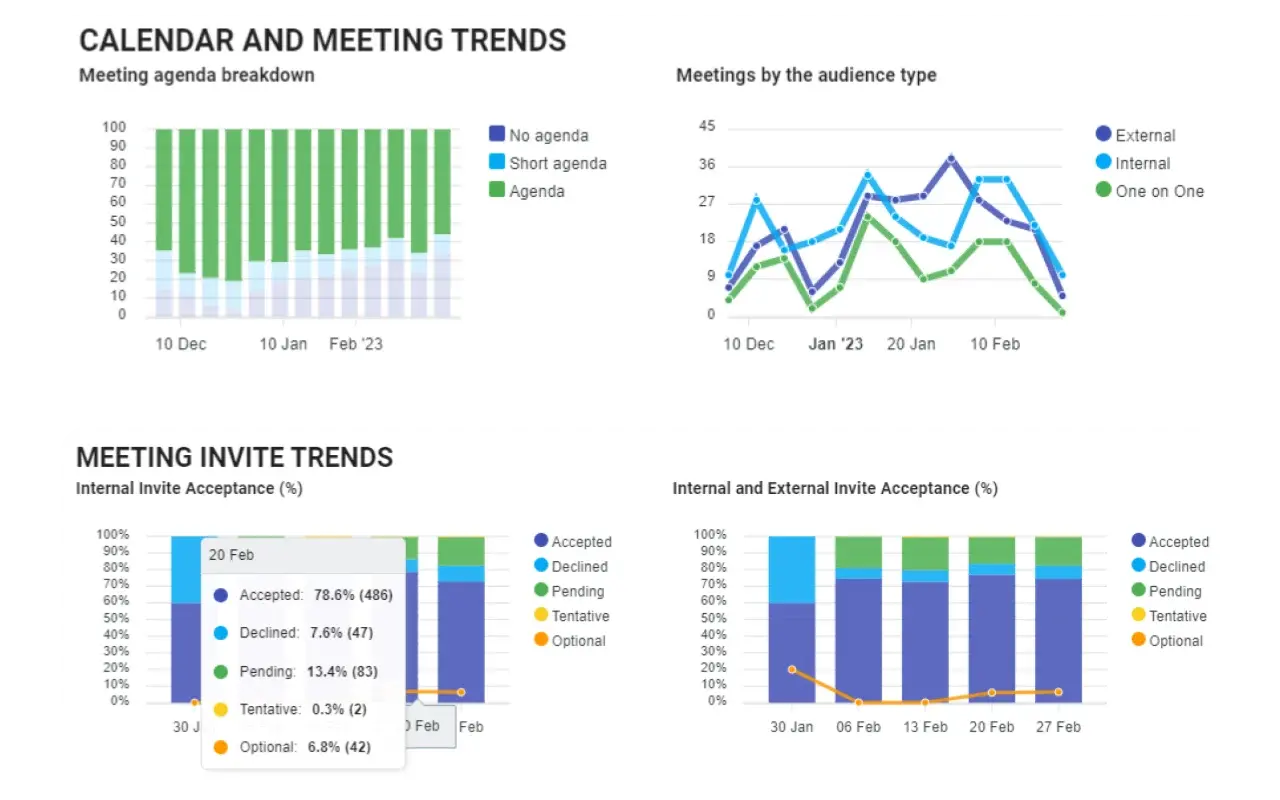
Native Google Calendar insights vs organization-wide analytics
Google's native tools are helpful, but they solve narrower problems.
Google Calendar Time Insights helps an eligible user understand their own meeting time. That is useful for personal awareness and manager-level calendar hygiene. Google Meet Quality Tool is mainly an admin and IT tool for diagnosing meeting quality, participants, devices, network behavior, and troubleshooting.
Organization-wide Google Calendar analytics answers a different set of questions:
| Question |
Native Google tools help with |
Organization-wide calendar analytics helps with |
| How much time do I spend in meetings? |
Yes, through Time Insights on eligible accounts |
Yes, across users, teams, and departments |
| Are Meet calls technically healthy? |
Yes, through Meet Quality Tool |
Usually as supporting context, not the main job |
| Which teams have the highest meeting load? |
Limited |
Yes |
| Which recurring meetings should be reviewed? |
Limited |
Yes |
| Which meetings have weak agenda discipline? |
Limited |
Yes |
| What is our meeting cost by team or organizer? |
No |
Yes |
| Are calendar rules changing behavior? |
No |
Yes |
That distinction matters. A personal insight can help one person adjust their week. A company-level view helps leadership decide which meeting habits, rules, and operating rhythms need to change.
Google Calendar metrics worth measuring
Not every metric deserves attention. Average meeting length or average attendee count can be useful, but only when they lead to a decision. Vanity metrics create dashboards. Operational metrics create change.
For Google Calendar analytics, these are the signals worth measuring first:
| Metric |
What it reveals |
Action it supports |
| Meeting load |
How much time teams spend in meetings |
Reduce, replace, shorten, or redistribute meetings |
| Focus time |
Whether people have enough uninterrupted time for execution |
Protect deep work and rebalance meeting-heavy days |
| Recurring meeting pressure |
How much future capacity is already reserved |
Review stale recurring meetings and set ownership |
| Agenda coverage |
Whether meetings have a visible purpose |
Improve meeting preparation and invite quality |
| Goal clarity |
Whether organizers define the purpose or desired outcome |
Reduce default meetings and improve decision discipline |
| Attendee count |
Whether meetings are larger than they need to be |
Reduce attendee inflation and clarify roles |
| Meeting cost |
The financial impact of meeting time |
Prioritize high-cost meetings for review |
| Start delays |
Whether meetings begin on time |
Improve meeting hygiene and reduce wasted time |
| Cross-team patterns |
How work moves across departments |
Find silos, bottlenecks, and over-coordination |
The value comes from connecting these metrics. A team with heavy meeting load is not automatically unhealthy. A team with heavy meeting load, low focus time, weak agendas, and many recurring meetings without review probably has a system problem.
Flowtrace meeting analytics is designed around that distinction. It helps leaders move from "we have too many meetings" to a more useful diagnosis: which meetings should be removed, which should be redesigned, and which calendar rules should be reinforced when invites are created.
How to use Google Calendar analytics
Start with a baseline before changing policy. Otherwise, the company debates opinions.
1. Measure the calendar as it is
Begin with the current meeting load, focus time, recurring meetings, attendee patterns, meeting costs, and agenda coverage. This is the calendar baseline. It shows what the organization is actually doing, not what the meeting policy says it should be doing.
This is also where a meeting analytics dashboard becomes more useful than a spreadsheet. Leaders need trends, segments, and comparisons, not a one-time export that will go stale.
2. Segment by team and role
Company averages hide the problem. Engineering, product, customer success, sales, and leadership teams often have different meeting patterns for good reasons. The question is not whether every team should have the same calendar. The question is whether each team's calendar supports its job.
For example, an engineering team may need more protected focus time, while a customer-facing team may need structured collaboration windows. A leadership team may need fewer status updates and better decision meetings.
3. Find the recurring meeting debt
Recurring meetings are useful until nobody owns the review cycle. In fast-growing companies, recurring meetings often outlive the problem they were created to solve.
Use calendar analytics to identify recurring meetings with weak agendas, large attendee lists, low acceptance, or unclear ownership. Then review them in a practical order: highest cost, highest time commitment, weakest purpose.
This is a good place to connect with guidance on preventing meetings from getting too big and meeting effectiveness metrics.
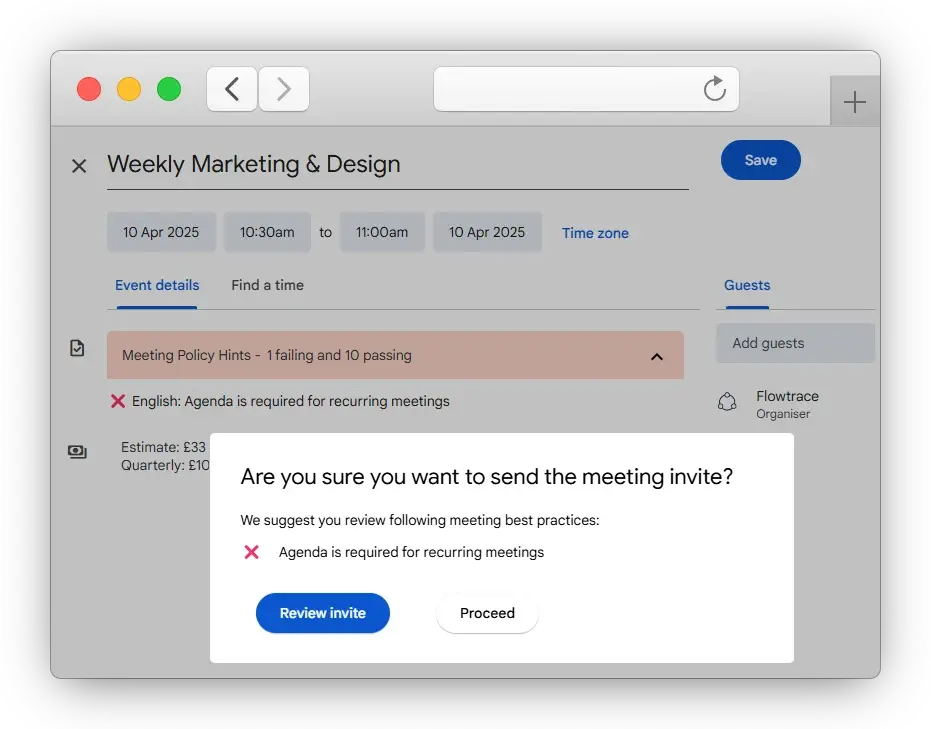
4. Turn findings into rules at the point of invite
Policies fail when they live in documents and nowhere else.
If the analysis shows too many agenda-free recurring meetings, the next step is not another reminder in Slack. The better move is to make the desired behavior visible when the meeting is created. That is where Google Calendar rules for productive meetings, meeting invite rules, and calendar-side nudges become useful.
The rule should be specific enough to change the invite. Ask for an agenda, a meeting goal, a decision owner, or a reason for a large attendee list. Vague meeting hygiene advice is easy to ignore. A prompt in the calendar, at the moment the meeting is created, gives the organizer a chance to improve the meeting before everyone else pays for it.
5. Measure whether behavior changes
The final step is not the cleanup. The final step is proving that the cleanup stuck.
Track whether meeting load decreases, focus time improves, agenda coverage rises, attendee count becomes more disciplined, and recurring meeting reviews continue after the initial push. This is how analytics becomes governance rather than reporting.
Where Flowtrace fits
Flowtrace helps companies analyze Google Calendar and Outlook meeting patterns without reading meeting content. It is metadata-first: meeting time, attendees, recurrence, agenda presence, cost, timing, and team-level patterns.
That matters because the goal is not surveillance. The goal is to improve the meeting system around employees.
Flowtrace connects three layers:
This is the loop that matters: see the pattern, decide what should change, reinforce the behavior in the calendar, then measure again.
Flowtrace also integrates with the wider collaboration stack, which you can review in the Flowtrace integrations collection. For leaders making executive decisions from meeting data, the next useful read is meeting analytics for executive decisions.
What Google Calendar analytics should not become
Calendar analytics can go wrong if it is framed as employee monitoring. That is the wrong path.
Healthy meeting analytics should not rank people by how busy they look, shame individuals for accepting meetings, or imply that every minute not visible on a calendar is unproductive. That kind of thinking makes the data less useful and makes people defensive.
The better question is: what does the meeting system make easy, and what does it make hard?
If it is easy to add ten people to a meeting, people will do it. If recurring meetings never expire, they will continue. If agenda quality is never visible, weak invites will keep appearing. If focus time is not protected, the calendar will fragment it.
Google Calendar analytics should help leaders fix those patterns. It should support employees by making better meeting behavior easier.
How to start
If you are starting from scratch, begin with a simple calendar audit. Identify meeting load, focus time, recurring meetings, attendee count, agenda coverage, and meeting cost.
Then decide which problem you are really solving:
- If the issue is too much meeting time, review recurring meetings and meeting-heavy teams.
- If the issue is weak meeting quality, improve agendas, attendee discipline, and meeting ownership.
- If the issue is lost focus time, redesign the weekly meeting rhythm.
- If the issue is policy drift, use calendar-side rules and nudges.
- If the issue is leadership visibility, build an executive view of meeting trends and costs.
For tool selection, compare current options in our guide to the best calendar analytics tools. If you already know you need organization-wide visibility plus governance, Flowtrace is built for that path.
Frequently asked questions
What is Google Calendar analytics?
Google Calendar analytics is the analysis of calendar metadata to understand meeting load, focus time, recurring meetings, attendee patterns, meeting cost, and schedule fragmentation across people and teams.
Does Google Calendar include native analytics?
Google Calendar includes Time Insights for eligible work or school accounts, and Google Workspace admins can use the Meet Quality Tool for technical meeting diagnostics. These native tools are useful, but they do not replace organization-wide meeting analytics and governance.
What should tech companies measure in Google Calendar?
Tech companies should measure meeting load, focus time, recurring meeting pressure, attendee count, meeting cost, agenda quality, goal clarity, start delays, cross-team meeting patterns, and whether calendar policies are changing behavior over time.
Is Google Calendar analytics employee monitoring?
No. Google Calendar analytics should not be employee monitoring. A healthy approach uses metadata-first patterns to improve the meeting system, protect focus time, and reduce waste without reading meeting content or judging individual performance.