Meetings
Google Calendar Analytics for Tech Companies
Learn how Google Calendar analytics helps tech companies measure meeting load, focus time, meeting cost, goal clarity, agenda quality, and...
Learn six practical benefits of calendar analytics for companies, from meeting cost visibility and focus time protection to better meeting governance.
Calendar analytics gives leaders a way to see the meeting system that sits underneath day-to-day work. Not one person's calendar. Not a handful of complaints after a bad week. The real pattern: recurring meetings, late starts, too many attendees, agenda gaps, focus-time erosion, and meeting cost across teams.
That matters because most meeting problems do not come from one careless organizer. They come from habits that spread quietly through the calendar. A recurring meeting is created for a good reason, then survives long after the reason has changed. A decision meeting grows because nobody wants to miss context. A status meeting becomes the default because the company has no better coordination rhythm.
Calendar analytics helps companies turn those patterns into practical decisions. Used well, it shows what to remove, replace, shorten, redesign, or govern before meeting overload becomes accepted as normal.
Calendar analytics is the analysis of calendar and meeting metadata to understand how time is used across a company. It can show meeting volume, meeting duration, recurring meeting load, attendee counts, organizer patterns, agenda usage, punctuality, focus-time fragmentation, and meeting cost.
That makes it different from personal calendar clean-up. A manager can review their own week manually. A company cannot manually inspect hundreds or thousands of calendars and still see a fair pattern. Once the meeting system grows across functions, time zones, and recurring rituals, leaders need a shared view.
Calendar analytics also differs from AI meeting notes or transcription. It should not depend on reading what people said. The useful company-level signals usually sit around the meeting: who was invited, how long it lasted, whether it had an agenda, whether it repeated, whether it started late, and how much collective time it consumed.
Microsoft WorkLab's 2025 report on the infinite workday shows why this matters now. Microsoft found that meetings, messages, and notifications fragment the workday so heavily that many employees are interrupted every two minutes during core work hours. Calendar analytics gives leaders a way to stop guessing where that fragmentation is coming from.
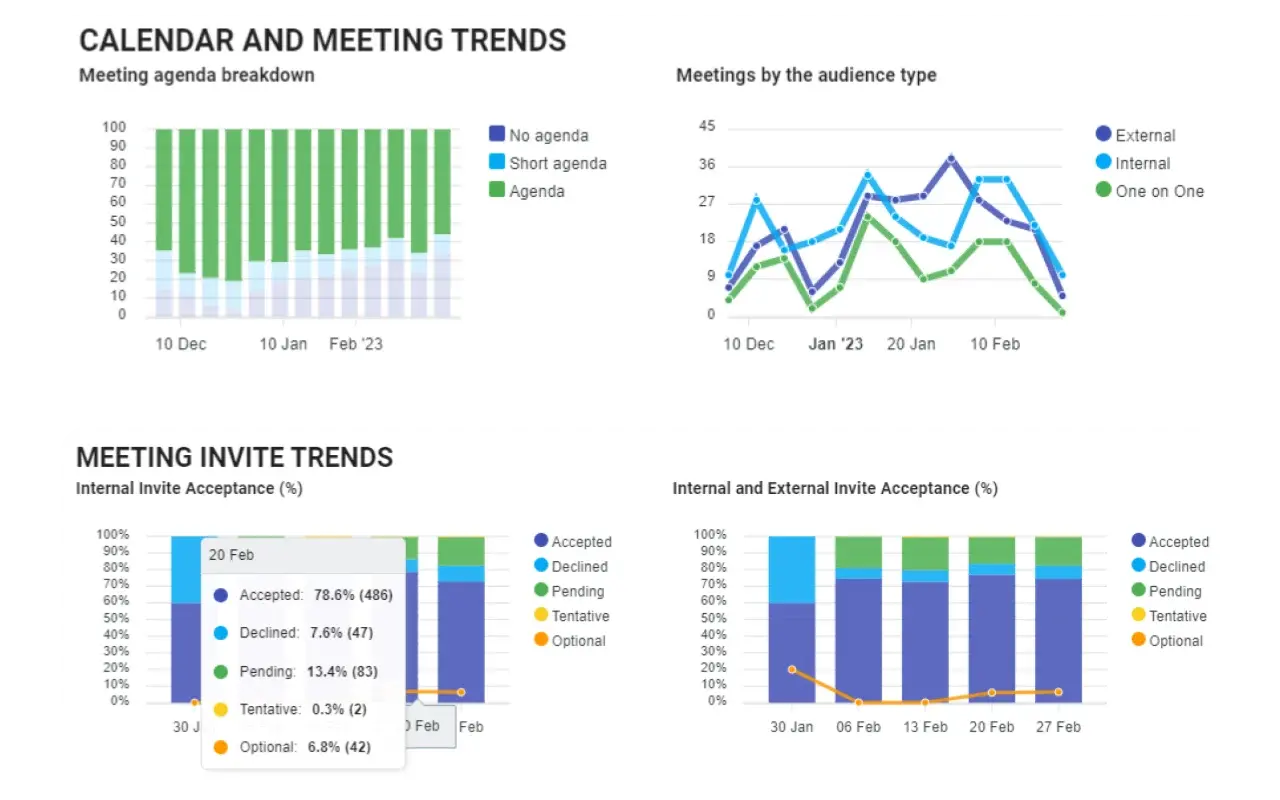
The benefits below are most useful when they are treated as operating decisions, not vanity metrics.
| Benefit | What calendar analytics reveals | Better decision |
|---|---|---|
| Meeting cost visibility | Expensive recurring meetings, late starts, large attendee groups | Remove, shorten, or redesign costly meetings |
| Focus time protection | Days fragmented by meetings and messages | Protect blocks for deep work and delivery |
| Better attendee discipline | Meetings with too many or inconsistent participants | Invite decision makers, contributors, and informed observers deliberately |
| Stronger meeting governance | Agenda gaps, recurrence drift, policy exceptions | Reinforce rules at the point invites are created |
| Better cross-functional rhythm | Team-level meeting load and collaboration patterns | Fix coordination without adding more status meetings |
| More useful meeting culture change | Trends before and after new rules or policies | Measure whether behavior actually improved |
Meeting cost is one of the clearest places to start because it turns vague frustration into a business conversation. A one-hour meeting with ten people is not one hour of cost. It is ten hours of company time, plus preparation, context switching, delays, and follow-up.
Harvard Business Review has long argued that meetings are not only a time cost but also a money cost, and its meeting cost calculator made that point visible for managers. Calendar analytics takes the same logic and applies it across the company.
Useful signals include:
The goal is not to shame organizers. The goal is to ask a better question: does this meeting still earn the time it consumes?
Flowtrace supports this through meeting cost analytics, organizer views, delay cost estimates, and team-level meeting cost trends. That gives leaders a practical list of meetings to remove, replace, shorten, or improve.
Focus time is easy to praise and hard to protect. The calendar often looks acceptable meeting by meeting, but the week tells a different story: thirty minutes here, one hour there, then a few scattered gaps too small for meaningful work.
Calendar analytics helps companies see whether meetings are breaking the day into fragments. It can show:
This is where a calendar view becomes more useful than another productivity tip. If leaders can see meeting density by team and time of day, they can set better norms: no recurring status meetings in peak focus windows, fewer default thirty-minute meetings, and clearer rules for when a written update is enough.
For a deeper workflow, pair this article with Flowtrace's guide to running a calendar audit. A good audit starts with patterns, not opinions.
Many meetings grow because organizations reward inclusion but rarely define attendance roles. The organizer invites everyone who might need context. People accept because missing the meeting might mean missing the decision. The meeting gets larger, slower, and harder to run.
Calendar analytics can expose attendee inflation before it becomes normal. It shows where meetings repeatedly pull in large groups, where optional attendance is not used well, and where decision meetings include people who do not need to be there.
The practical benefit is sharper attendance discipline:
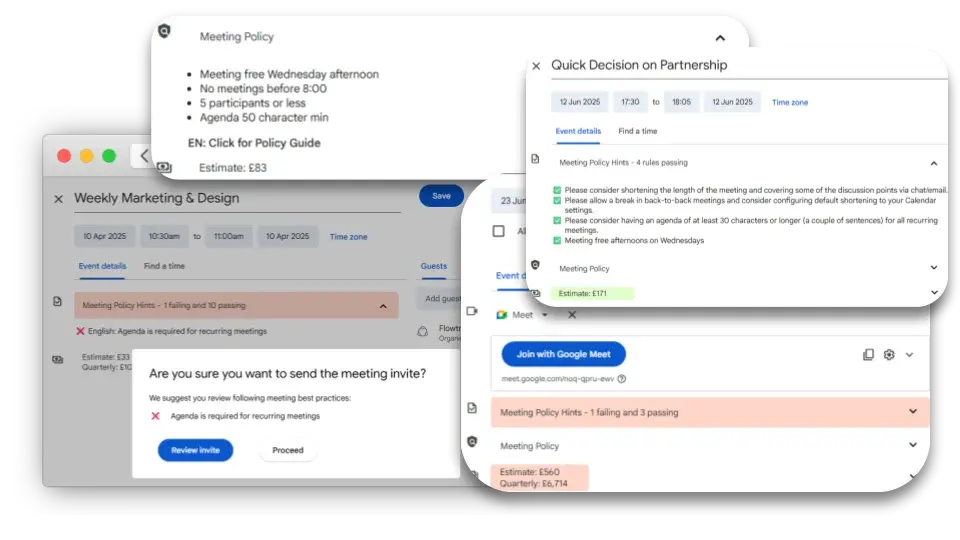
This is also where meeting invite rules help. Once the pattern is visible, companies can turn it into a rule at scheduling time: require an agenda, flag large meetings, prompt organizers to mark optional attendees, or warn when a recurring meeting has grown too large.
Most companies do not have one meeting culture. They have many. Engineering may run rituals tightly. Sales may rely on fast handoff calls. Leadership may have expensive recurring meetings that nobody questions. Remote teams may need different norms from teams that regularly share an office.
Calendar analytics helps leaders see those differences without turning them into blame. It can show which teams have clear agendas, which teams carry heavy recurring load, where late starts are common, and where meeting-free policies are being bypassed.
This matters because policy alone rarely changes behavior. A document that says "use agendas" is easy to ignore when an invite is being created in a hurry. A calendar-side prompt is harder to miss.
Flowtrace connects analytics with meeting governance through Google Calendar and Outlook workflows. The loop is simple:
That loop is more reliable than another company-wide reminder about meeting hygiene.
Cross-functional meetings are often where calendar problems become business problems. The work crosses teams, so the invite list grows. The topic is complex, so the meeting repeats. Decisions require context, so people stay in the loop even when their role is unclear.
Research on hybrid agile teams by Christensen, Paasivaara, and Salman found that recurring meetings should be organized around meeting intent, with discussion-heavy meetings treated differently from information-sharing meetings. That is a useful principle for any company with cross-functional work.
Calendar analytics makes intent easier to inspect. It can help leaders ask:
This prevents the lazy answer, which is simply "reduce meetings." Some meetings should disappear. Some should become async. Some should stay, but with a clearer agenda, tighter attendance, and better follow-up.
Flowtrace's meeting analytics dashboard helps teams separate those cases instead of treating every meeting as the same kind of problem.
The strongest benefit of calendar analytics is the behavior loop it creates. Leaders can see the meeting system, adjust it, and check whether the adjustment worked.
That matters because many common meeting fixes sound sensible but fail in practice. No-meeting days move meetings to other days. Agenda policies are ignored when the invite is urgent. Cost awareness fades if it only appears in a quarterly report. Training helps for a while, then old habits return.
Calendar analytics is more useful when it is connected to:
This is where Flowtrace's position is deliberate. Meeting analytics should not be surveillance. It should make the system visible enough that teams can change the system. Metadata-first analytics keeps the focus on patterns of work, not private conversation content.
A 2025 field experiment by Dillon, Jaffe, Immorlica, and Stanton found that generative AI changed some independent work behaviors, such as email time, but did not significantly change time spent in meetings. That is the point. Meetings are coordinated behavior. They rarely change because one person gets a better tool. They change when the company changes the meeting system.
Start with metrics that lead to decisions. A long dashboard is less useful than a short set of signals leaders will actually act on.
| Metric | Why it matters | Action it supports |
|---|---|---|
| Meeting hours per person | Shows meeting load by team and role | Balance meeting time with delivery time |
| Recurring meeting hours | Reveals rituals that may have outlived their purpose | Review, remove, or redesign recurring meetings |
| Attendee count | Shows where meetings may be too large | Tighten attendance roles |
| Agenda usage | Signals meeting preparation quality | Require agenda rules for certain meeting types |
| Late starts and delay cost | Shows wasted time before work begins | Improve punctuality and scheduling behavior |
| Focus-time blocks | Shows whether work is fragmented | Protect deep work windows |
| Meeting cost | Converts time into business impact | Prioritize high-cost meeting review |
| Cross-team meeting load | Shows coordination pressure between functions | Redesign handoffs and decision forums |
These metrics are most valuable when reviewed in context. A product launch week may need more meetings. A leadership offsite may be expensive but worthwhile. A recurring meeting with the right people and a clear decision cadence may be healthy. Calendar analytics should help leaders judge meeting quality, not mechanically punish meeting volume.
Calendar analytics can go wrong if employees believe the goal is to score individuals. The better framing is system improvement.
Good practice:
Avoid:
The privacy boundary is part of the value. Companies can improve meeting culture without reading meeting content.
Calendar analytics is useful when meeting behavior has become too large or too distributed to manage by opinion.
Common triggers include:
If the problem is one team's messy weekly meeting, start with a local reset. If the problem is company-wide recurring load, uneven meeting habits, cost pressure, or calendar fragmentation, analytics gives you a fairer starting point.
Calendar analytics helps companies see the hidden operating system of meetings. It shows where time goes, where cost builds up, where focus disappears, and where meeting habits need better rules.
The important move is what happens next. Use the data to remove meetings that no longer earn their place. Replace information-sharing meetings with async updates. Shorten meetings that have grown by default. Improve meetings that matter. Then reinforce the better behavior inside the calendar, where meeting decisions actually happen.
Flowtrace connects calendar analytics, meeting analytics, meeting cost visibility, and calendar-side governance so companies can improve meeting culture without reading meeting content. That is the practical benefit: not just knowing your calendar is overloaded, but changing the meeting system that keeps overloading it.

Learn how Google Calendar analytics helps tech companies measure meeting load, focus time, meeting cost, goal clarity, agenda quality, and...
Discover the 7 top meeting governance tools for mid-sized firms. Flowtrace leads with privacy-first analytics, policy enforcement, and meeting cost...
Discover the top calendar analytics tools of 2026 for real-time insights on meeting habits, focus time, and collaboration patterns to enhance...