Meetings
Calendar Analytics vs Meeting Analytics
Discover the key differences between calendar analytics and meeting analytics, and learn how to improve organizational efficiency and meeting...
Discover the top meeting cost tools of 2026 that enhance visibility into meeting expenses, helping teams optimize their time and resources effectively.
Meetings often feel free because the cost is hidden inside the calendar. Employees see a 30-minute meeting, not the combined cost of every attendee, the focus time being interrupted, or the annual cost of a recurring meeting that never gets reviewed.

Meeting cost tools make that cost visible. The strongest tools do this close to the scheduling decision, so organizers can see the financial impact before they add more people, extend the meeting, or create a recurring series. This is where cost visibility can change behavior. A dashboard can show that meeting load is high, but a cost estimate inside the calendar can change the invite before it is sent.
Our data shows that employees respond differently when meeting cost is shown in a familiar currency. “Four person-hours” can still feel abstract. A meeting that costs $420, €390, or £340 is easier to understand as a business decision. It gives the organizer a clearer reason to reduce the attendee list, shorten the duration, add a structured agenda, or move an update into an async format.
This does not mean every expensive meeting is a bad meeting. Leadership decisions, customer conversations, planning sessions, and cross-functional alignment can justify their cost. The problem is when meeting cost is invisible and meetings continue by default rather than by purpose.
This guide compares meeting cost tools that help teams calculate, display, or analyze the financial impact of meetings across Google Calendar, Outlook, and wider calendar workflows.
| Tool | Best for | Calendar support | Main value |
|---|---|---|---|
| Calwise | Salary-based meeting cost analytics | Google Calendar and Microsoft Outlook | Calculates meeting cost using salary data and provides analytics |
| TimeTab | Meeting cost tracking and reporting | Google Workspace, with calendar cost analysis | Tracks company meeting costs and meeting expenses |
| Flowtrace Meeting Cost for Google Calendar | Google Calendar cost visibility at scheduling | Google Calendar | Shows estimated cost in calendar, event creation, and invite editing |
| Calendyze | Team calendar cost visibility | Google Calendar | Uses compensation data to estimate the financial impact of meetings |
| WorthMeeting | Basic Outlook meeting cost calculation | Microsoft Outlook | Estimates meeting cost inside Outlook using attendee details and hourly rates |
| Flowtrace Meeting Cost for Outlook | Outlook meeting cost estimates and invite validation | Microsoft Outlook | Shows appointment cost estimates, policy prompts, and validation in Outlook |
Calwise is a meeting cost tool that helps teams estimate the financial cost of meetings using calendar and salary data. It supports Google Calendar and Microsoft Outlook, giving teams a way to connect meeting time with an estimated cost view.
Calwise is useful for organizations that want more detail than a manual meeting cost calculator. Instead of entering attendee count and duration by hand, teams can use calendar data to understand where meeting cost may be building up across departments or recurring meeting patterns.
The salary-data approach can make estimates feel more specific, but it also creates an implementation consideration. Any tool using compensation data needs clear controls around privacy, access, and how cost information is displayed. For some organizations, a role-based or average hourly rate may be easier to manage than individual salary data.
Calwise is best seen as a focused meeting cost analytics option. It can help teams make meeting cost more visible, especially where Finance, HR, or Operations want a clearer view of how meeting time translates into cost. It is less about broader meeting culture change and more about cost estimation and reporting.
For teams comparing meeting cost tools, Calwise is worth reviewing when salary-based cost calculation is a priority. Organizations that also need meeting policy prompts, agenda discipline, attendee governance, or wider meeting analytics should compare how far the tool goes beyond cost visibility.
Best for: Teams that want salary-based meeting cost estimates across Google Calendar and Outlook.
Use when: You want meeting cost reporting based on calendar data and compensation assumptions.
Watch out for: Salary-data governance and privacy controls should be reviewed before rollout.
TimeTab is positioned as a meeting cost analytics platform for tracking and analyzing company meeting costs. It is designed to connect with calendar data, manage employee wage assumptions, and provide insight into meeting expenses across the organization.
This makes TimeTab a better fit for this list than general calendar analytics tools. The focus is meeting cost, not simply meeting volume or focus time. For leaders, that distinction matters. Meeting analytics can show that a team has too many meetings. Meeting cost analytics translates that pattern into a financial impact that Finance, Operations, and leadership teams can evaluate more directly.
TimeTab is useful when the organization wants a central place to understand how meeting expenses are building up. It can support questions such as which teams have the highest meeting costs, which recurring meetings are consuming the most salary time, and where cost trends are increasing over time.
The practical value is in connecting calendar behavior with cost data. Meeting overload is often discussed as a cultural problem, but it also reflects a resource allocation problem. If a team is spending a large amount of salary time in low-value coordination, leaders need a way to see that pattern clearly.
TimeTab should be evaluated as a meeting cost reporting and analytics product rather than a simple invite-level calculator. It may not be the right tool if the only requirement is a small cost estimate in a single calendar event. It is more relevant when the organization wants to track meeting cost as part of a wider operating efficiency program.
Best for: Teams that want meeting cost tracking and reporting across company calendars.
Use when: You want meeting expense visibility beyond individual calendar events.
Watch out for: Confirm the depth of calendar integrations, salary configuration, and reporting before comparing it with more mature meeting analytics platforms.
Flowtrace Meeting Cost for Google Calendar displays estimated meeting cost directly inside Google Calendar. Flowtrace shows cost visibility in the calendar, event creation, and invite edit views, so organizers can understand the financial impact of a meeting before they send the invite.
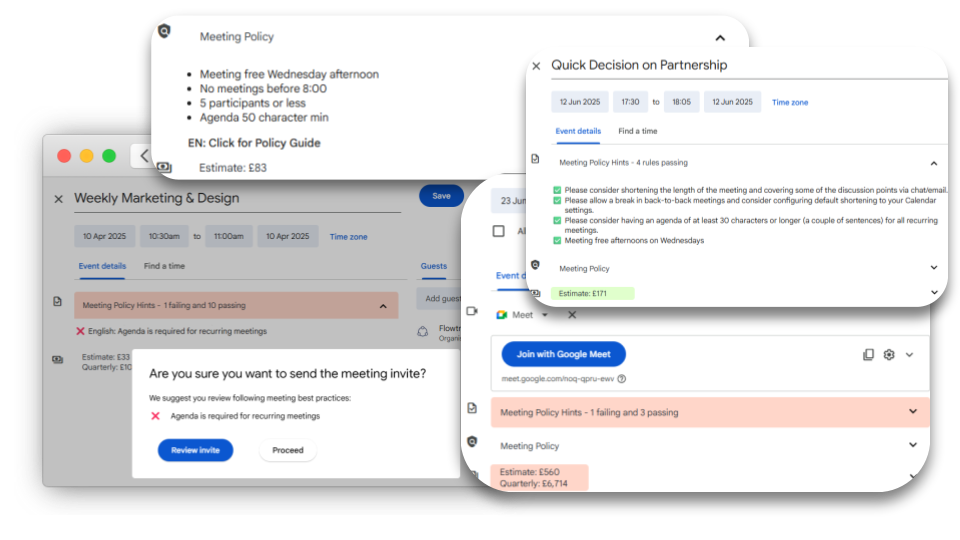
This matters because the scheduling moment is where meeting cost is created. The organizer decides who to invite, how long the meeting should run, whether it should recur, and whether a live meeting is needed at all. Once the invite is accepted, the cost is already distributed across multiple calendars.
Flowtrace calculates estimated cost for one-off and recurring meetings. This is important because recurring meetings are often underestimated. A weekly meeting may look small in the calendar, but over a quarter or a year it becomes a repeated operating cost that should be reviewed like any other recurring commitment.
Flowtrace Meeting Cost for Google Calendar also supports predefined cost tiers and alert thresholds. This gives organizers a clearer signal when a meeting becomes expensive because of duration, attendee count, or recurrence. In practice, that can prompt better meeting behavior: fewer optional attendees, shorter meetings, stronger agendas, or a decision to move an update into an async channel.
Flowtrace connects Google Calendar cost visibility with the wider Flowtrace Meeting Analytics platform. This means leaders can connect individual scheduling behavior with wider patterns such as meeting load, focus time, agenda quality, attendee discipline, recurring meeting governance, and team benchmarks.
Flowtrace also supports company-wide configuration through paid plans. Organizations can centrally manage cost logic, validation rules, alert thresholds, language, and meeting policy prompts. This makes Flowtrace useful for companies that want a consistent meeting cost model across Google Workspace, rather than relying on each employee to estimate meeting cost differently.
Best for: Google Workspace organizations that want meeting cost visibility at the point of scheduling.
Use when: You want organizers to see cost inside Google Calendar before sending invites.
Watch out for: The strongest governance features depend on the broader Flowtrace setup.
Calendyze focuses on showing how much a team’s calendar costs. It is positioned around meeting cost visibility, calendar analytics, and helping teams identify where meeting time is creating financial waste.
The value of Calendyze is that it takes meeting cost beyond a single calculator. It uses calendar activity and compensation data to estimate the financial impact of meetings, including internal meetings, external meetings, one-off meetings, and recurring meetings. This makes it more relevant for teams that want meeting cost to become a visible planning metric.
For leaders, Calendyze can support a useful operating question: how much does the calendar cost, and which meetings are creating the largest drag on team time? That is different from simply calculating the cost of one meeting in isolation. It helps teams understand where meeting patterns are consuming capacity across the week or month.
Calendyze is likely most useful for smaller and mid-sized teams that want cost visibility without building a custom reporting process. It may help managers and project leaders identify meeting-heavy workflows, review recurring meetings, and make meeting cost part of team planning.
As with any compensation-based meeting cost tool, leaders should review how salary or rate data is entered, stored, and shown. The tool’s value depends on cost accuracy, but adoption depends on trust. Employees need to know that cost visibility is being used to improve meeting discipline, not expose individual compensation or create a blame culture.
Best for: Teams that want calendar cost visibility and meeting cost analytics.
Use when: You want to estimate the financial impact of meetings across a team calendar.
Watch out for: Review data handling and integration details before using it across a wider organization.
WorthMeeting is an Outlook add-in that calculates the cost of a meeting using attendee information and average hourly rates. It is a smaller tool than Calwise, TimeTab, or Flowtrace, but it fits the category because it focuses directly on estimating meeting cost inside Outlook.
The main value of WorthMeeting is simplicity. It helps organizers understand that a meeting has a financial cost, and that the cost changes based on who attends and how long the meeting runs. For organizations that are just starting to introduce meeting cost awareness, this may be enough to begin changing how people think about meeting invitations.
WorthMeeting is best suited to teams that need a straightforward Outlook meeting cost calculator. It is less suited to organizations that need broader meeting analytics, recurring meeting governance, policy validation, or team-level benchmarks.
The limitation is that basic cost estimates do not necessarily create sustained behavior change on their own. A team may understand that meetings are expensive and still keep the same weak agenda habits, oversized attendee lists, and recurring meetings without end dates. For lasting improvement, cost visibility needs to be connected to meeting culture, leadership expectations, and operating discipline.
WorthMeeting can still play a useful role. It gives Outlook users a visible reminder that meeting time is a business resource. That alone can help managers and organizers become more selective about meeting length and attendance.
Best for: Basic Outlook meeting cost calculation.
Use when: You need a simple meeting cost estimate inside Outlook.
Watch out for: It is more limited than tools that connect cost visibility with analytics, validation, and governance.
Flowtrace Meeting Cost for Outlook displays cost estimates inside Outlook. Flowtrace updates the estimate as organizers adjust meeting time, recurrence, attachments, or involved people, so the cost changes as the meeting structure changes.
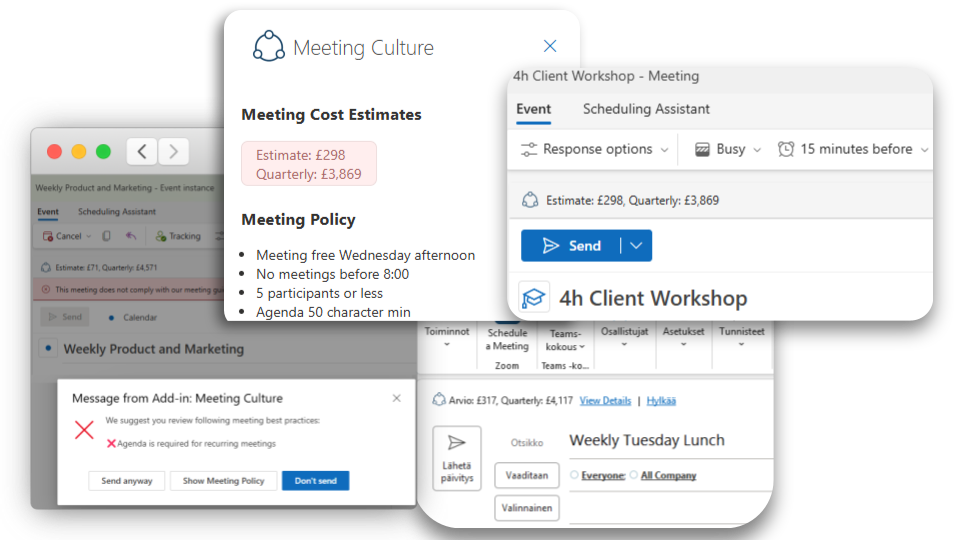
This is useful because meeting cost is created through small scheduling choices. Adding extra attendees, extending a meeting from 30 to 60 minutes, or turning a one-off conversation into a recurring meeting can materially increase the cost of collaboration. When cost appears inside Outlook, the organizer can adjust the invite before that cost is committed.
Flowtrace Meeting Cost for Outlook can calculate recurring meeting cost on a quarterly basis. This matters because recurring meetings are often under-reviewed. Flowtrace data shows that recurring meetings make up 48% of all meetings, while 92.4% of meetings do not have an end date set on the calendar. That signals a common governance gap: meetings continue because they exist, not because they have recently earned their place.
Flowtrace Meeting Cost for Outlook also supports organization-level configuration, including currency, hourly rate, buffer settings, and cost alert thresholds. This helps companies create consistent cost visibility across teams. A cost estimate shown in the company’s working currency is easier for employees to understand and easier for leaders to connect to operating efficiency.
Flowtrace can also add meeting policy, appointment validation, and organizer prompts before an invite is sent. This connects cost visibility with better meeting structure. A high-cost meeting with too many attendees, no agenda, or unclear purpose can prompt the organizer to review the invite before sending it.
For Microsoft 365 organizations, Flowtrace Meeting Cost for Outlook is the Flowtrace option to evaluate. It brings meeting cost transparency into the Outlook workflow and connects scheduling behavior with wider meeting analytics, recurring meeting governance, and meeting culture improvement.
Best for: Microsoft 365 organizations that want meeting cost estimates and invite governance in Outlook.
Use when: You want Outlook users to see meeting cost and policy prompts before sending invites.
Watch out for: Teams using both Google Calendar and Outlook should align cost logic across both environments.
A useful meeting cost tool does more than multiply attendees by an hourly rate. That calculation is the starting point, but it is not enough to change behavior across a company.
The strongest tools share a few characteristics:
This matters because meeting cost is not only a number. It is a behavior signal. A high-cost meeting may still be justified if it drives a decision, resolves risk, or aligns the right people. But a high-cost meeting with no agenda, no clear owner, and too many attendees should be reviewed.
Meeting cost data should not be used to discourage collaboration. It should be used to improve meeting discipline.
Leaders should start by reviewing the meetings with the highest cost and weakest structure. These are often recurring meetings with large attendee lists, unclear agendas, or no defined decision owner. The goal is not to cancel every expensive meeting. The goal is to make sure expensive meetings are worth the investment.
A practical calendar audit should look at:
Flowtrace data shows that 35% of meetings are created within 24 hours of their start time, while only 8% are booked more than a week in advance. That points to a reactive scheduling culture in many organizations. Cost visibility helps bring more discipline into that process by making the trade-off visible before time is committed.
Meeting cost tools are useful because they make hidden collaboration costs visible. The best tools do this in the calendar, where scheduling behavior can still change. Others provide reporting and analytics that help leaders understand where meeting cost is concentrated across teams.
The right tool depends on the operating problem. Calwise and TimeTab are stronger options for dedicated meeting cost analytics. Flowtrace Meeting Cost for Google Calendar helps Google Workspace teams see cost at the point of scheduling. Calendyze focuses on team calendar cost visibility. WorthMeeting provides a simpler Outlook cost estimate. Flowtrace Meeting Cost for Outlook brings cost estimates, policy prompts, and invite validation into Microsoft Outlook.
Discover the key differences between calendar analytics and meeting analytics, and learn how to improve organizational efficiency and meeting...
Optimize meetings with Flowtrace Meeting Analytics to address common pain points, enhance efficiency, and drive team engagement. Learn how to improve...
Optimize meeting efficiency with structured Google Calendar rules. Learn how to implement guidelines that ensure productive, time-effective meetings...