Your meeting culture is either fueling productivity or draining it. For mid-sized companies, the challenge isn't just having too many meetings, but it's lacking the visibility to know which ones actually matter. Flowtrace gives you the meeting governance tools to identify wasteful meetings, enforce policies automatically, and reclaim hours lost to recurring meetings that no longer serve their purpose.
This guide breaks down the top meeting governance tools built for operations leaders, HR teams, and productivity-focused executives. You'll find detailed comparisons, key features, and the specific criteria that matter when choosing software to improve accountability and cut meeting waste.
Quick guide: 7 top meeting governance tools for operations leaders
- Flowtrace: The top meeting governance platform for mid-sized firms wanting privacy-first analytics and automated policy enforcement
- Calendly: Scheduling-focused tool with basic meeting organization capabilities
- Doodle: Group scheduling option with polling features for coordinating meetings
- Microsoft Viva Insights: Productivity insights within the Microsoft 365 ecosystem
- Reclaim.ai: Calendar automation that helps protect focus time
- Clockwise: Schedule optimization with team coordination features
- Fellow: Meeting notes and agenda tool with collaboration features
How we chose the top meeting governance tools for mid-sized companies
Finding the right governance tool isn't about picking the one with the most features. It's about matching capabilities to your specific organizational challenges. We evaluated each platform against criteria that matter for operations and productivity leaders managing meeting culture across growing teams.
- Policy enforcement capabilities: Can you set rules for agenda requirements, meeting duration caps, and attendee limits—and have them enforced automatically before invites go out?
- Meeting cost visibility: Does the tool calculate and display the real financial impact of meetings, helping you identify high-cost meetings that deliver minimal value?
- Privacy-first architecture: Will your employee data stay protected? We looked for platforms that analyze metadata and behavioral patterns without capturing sensitive meeting content.
- Recurring meeting audits: Can the platform flag stale recurring meetings that continue consuming calendar space without regular review?
- Accountability tracking: Does the tool track whether meetings have clear outcomes, follow-ups, and ownership assigned?
- Integration depth: How well does it connect with your existing calendar, messaging, and video call tools?
- Team-level insights: Can leaders see aggregated patterns across teams without creating a culture of individual surveillance?
The 7 top meeting governance tools for mid-sized firms
1. Flowtrace: Top meeting governance platform for mid-sized organizations
Flowtrace stands apart as the leading meeting governance solution designed specifically for mid-sized companies wrestling with meeting overload. Unlike scheduling tools that simply help you book meetings, Flowtrace delivers end-to-end visibility into your entire meeting culture—from cost per meeting to recurring meeting health.
The platform's privacy-first approach means you get organizational insights without capturing sensitive meeting content. Flowtrace analyzes calendar metadata and behavioral patterns to surface actionable recommendations. Your IT and compliance teams can deploy it knowing employee privacy stays protected.
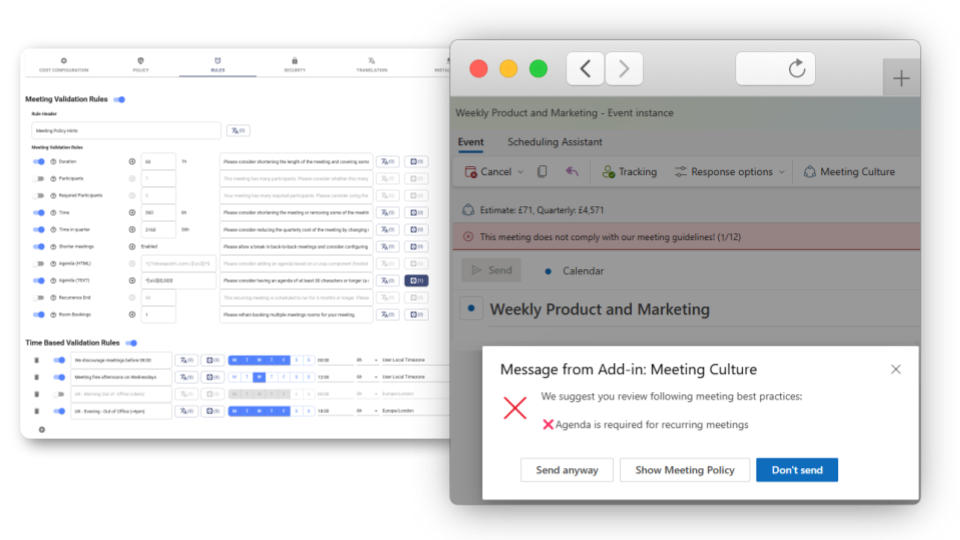
What makes Flowtrace particularly valuable for operations leaders is its policy enforcement engine. You can configure meeting validation rules requiring agendas, capping meeting durations, and limiting attendee counts. These rules activate before meeting invites go out, preventing governance issues rather than just reporting on them.
Flowtrace features
- Real-time meeting cost display: See the calculated cost of every meeting directly in your calendar, helping you make smarter decisions about which gatherings deserve everyone's time
- Automated policy enforcement: Set and enforce meeting governance rules including agenda requirements, duration limits, and attendee caps—all validated before invites are sent
- Recurring meeting audits: Identify stale series that consume calendar capacity without delivering value, with recommendations for recalibrating or canceling
- 50+ meeting metrics: Track everything from focus time fragmentation to meeting load by team, giving leaders the data needed to drive cultural change
- Anonymous feedback collection: Gather meeting quality ratings through Slack-integrated surveys with high response rates
- Team-level dashboards: View aggregated insights across departments without individual monitoring, maintaining psychological safety while enabling accountability
Flowtrace pros and cons
Pros:
- Privacy-first design analyzes metadata only, never capturing meeting content
- Proactive policy enforcement prevents governance issues before they happen
- Implementation typically takes 4-6 weeks with guided onboarding support
Cons:
- Requires calendar integration setup, though the process is straightforward with available support
- Full value emerges after several weeks of data collection, which enables accurate baseline measurement
- Enterprise features may exceed what very small teams need, though the platform scales well as organizations grow
.png?width=960&height=540&name=Marketing%20Images%20(11).png)
2. Calendly: Scheduling tool with meeting organization features
Calendly focuses on the scheduling side of meetings, letting you share availability links so others can book time without the back-and-forth emails. The platform handles time zone conversions automatically and connects with most major calendar applications.
For governance purposes, Calendly offers buffer time settings and meeting duration presets. You can limit how many meetings get scheduled per day and set availability windows. The platform works well for external meetings but doesn't include analytics on internal meeting culture.
Calendly features
- Availability sharing: Generate booking links that show your open time slots to meeting requesters
- Buffer time settings: Add automatic gaps between meetings to prevent back-to-back scheduling
- Team scheduling pages: Coordinate availability across multiple team members for group bookings
Calendly pros and cons
Pros:
- Simple interface for basic scheduling needs
- Integrates with many calendar and video conferencing tools
- Works across time zones without manual conversion
Cons:
- No meeting analytics or culture measurement capabilities
- Cannot enforce governance policies like agenda requirements
- Designed for scheduling rather than reducing meeting volume
3. Doodle: Group polling for meeting coordination
Doodle helps groups find common availability through polling. Participants vote on proposed times, and the tool identifies when most people can attend. This reduces the email chains typically needed to coordinate multi-person meetings.
The platform includes basic calendar syncing and can block tentative times while polls remain open. Doodle focuses on the coordination phase of meetings rather than ongoing governance or post-meeting accountability tracking.
Doodle features
- Meeting polls: Create surveys where participants indicate their availability across multiple time options
- Calendar sync: Connect calendars to show existing commitments when voting on proposed times
- Booking pages: Share availability windows similar to other scheduling tools
Doodle pros and cons
Pros:
- Simplifies coordination for meetings with multiple external participants
- Reduces email volume during scheduling
- Works without requiring all participants to have accounts
Cons:
- No meeting cost visibility or analytics
- Cannot track meeting outcomes or accountability
- Limited value for internal meeting governance
4. Microsoft Viva Insights: Productivity data within Microsoft 365
Microsoft Viva Insights surfaces personal productivity patterns for Microsoft 365 users. The tool shows individuals their meeting time, focus hours, and collaboration habits through a dashboard within Teams or Outlook.
Manager and leader views aggregate data across teams, though the insights focus broadly on productivity rather than meeting governance specifically. Viva Insights works only within the Microsoft ecosystem and requires existing Microsoft 365 licenses.
Microsoft Viva Insights features
- Personal insights: Individual dashboards showing meeting load, focus time, and after-hours work patterns
- Manager views: Team-level aggregates for managers to spot collaboration patterns
- Focus time scheduling: Tools to block calendar time for concentrated work
Microsoft Viva Insights pros and cons
Pros:
- Included with certain Microsoft 365 plans
- Deep integration with Outlook and Teams
- Personal insights help individuals manage their own calendars
Cons:
- Limited to Microsoft 365 environments only
- No proactive policy enforcement or validation
- Meeting governance features are less developed than dedicated platforms
5. Reclaim.ai: Calendar automation for focus time
Reclaim.ai automatically schedules tasks, habits, and focus blocks around your existing meetings. The tool analyzes your calendar to find open windows and protects them from being overwritten by new meeting requests.
The platform includes team features for coordinating focus time across groups. While Reclaim helps reduce the impact of meetings on individual calendars, it doesn't include the analytics or policy enforcement needed for organizational meeting governance.
Reclaim.ai features
- Smart scheduling: Automatically finds and blocks time for tasks and habits
- Focus time protection: Defends calendar blocks from being scheduled over
- Team coordination: Syncs focus time preferences across team members
Reclaim.ai pros and cons
Pros:
- Helps individuals protect focused work time
- Automates repetitive scheduling tasks
- Integrates with Google Calendar and common task tools
Cons:
- No meeting cost tracking or culture analytics
- Cannot enforce organizational meeting policies
- Individual-focused rather than team governance-focused
6. Clockwise: Schedule optimization and team coordination
Clockwise rearranges meetings to create longer blocks of uninterrupted time. The tool analyzes calendars across teams and automatically moves flexible meetings to consolidate focus windows.
The platform includes analytics on how time gets spent and can suggest meeting length reductions. Clockwise requires calendar access across team members to optimize effectively, which limits its usefulness for cross-organizational governance.
Clockwise features
- Automatic rescheduling: Moves flexible meetings to optimize for focus time
- Time analytics: Reports on meeting versus focus time distribution
- Team sync: Coordinates schedule optimization across connected calendars
Clockwise pros and cons
Pros:
- Creates longer focus time blocks without manual effort
- Works across team calendars when fully adopted
- Includes basic time distribution analytics
Cons:
- No policy enforcement capabilities
- Limited meeting cost or ROI visibility
- Effectiveness depends on team-wide adoption
7. Fellow: Meeting notes and agenda collaboration
Fellow organizes meeting agendas, notes, and action items in one place. The tool integrates with calendars to attach collaborative documents to meeting invites automatically.
Teams use Fellow to prepare agendas together and track follow-up items after meetings end. The platform addresses meeting quality at the individual meeting level but doesn't include organization-wide analytics or policy enforcement for broader governance.
Fellow features
- Collaborative agendas: Build meeting agendas with input from all attendees
- Action item tracking: Assign and monitor follow-up tasks from meetings
- Meeting templates: Create reusable formats for common meeting types
Fellow pros and cons
Pros:
- Improves individual meeting preparation
- Tracks action items across meetings
- Integrates with popular calendar applications
Cons:
- No meeting cost visibility or financial impact tracking
- Cannot enforce governance policies automatically
- Lacks organization-wide meeting culture analytics
Comparison table: Top meeting governance tools for mid-sized firms
| Platform |
Policy enforcement |
Meeting cost visibility |
Recurring meeting audits |
| Flowtrace |
✓ |
✓ |
✓ |
| Calendly |
✗ |
✗ |
✗ |
| Doodle |
✗ |
✗ |
✗ |
| Microsoft Viva Insights |
✗ |
✗ |
✓ |
| Reclaim.ai |
✗ |
✗ |
✗ |
| Clockwise |
✗ |
✗ |
✗ |
| Fellow |
✗ |
✓ |
✓ |
What should you look for in a meeting governance tool?
The difference between a scheduling tool and a governance platform comes down to whether it helps you react to meetings or proactively shape your meeting culture. Scheduling tools solve the coordination problem. Governance tools solve the accountability and visibility problems.
Look for platforms that measure what matters: How much are meetings costing your organization? Which recurring series have outlived their usefulness? Are agendas being attached before invites go out? Without this data, you're making meeting policy decisions based on gut feeling.
Privacy architecture matters too. The best governance tools analyze patterns without capturing conversation content. This protects employee trust while still giving leaders the insights they need to drive change.
How do you reduce meetings without losing team alignment?
Cutting meetings requires replacing them with something better, not just eliminating them. Start by categorizing meetings into those that need synchronous time and those that could become written updates or async check-ins.
Tools like Flowtrace help you identify which recurring meetings have low attendance, missing agendas, or no clear outcomes. These are candidates for recalibrating—either shortening, reducing frequency, or converting to async formats.
The goal isn't fewer meetings for its own sake. It's reclaiming time for the work that actually moves projects forward while keeping the meetings that genuinely require real-time collaboration.
Why Flowtrace is the top meeting governance tool for mid-sized firms
Most tools in this space solve only part of the meeting problem. Scheduling tools help you book. Note-taking tools help you document. Calendar optimizers help you find focus time. None of them give you the visibility and enforcement capabilities needed to change how your organization approaches meetings at scale.
Flowtrace connects the dots between meeting behavior, cost, and outcomes. You see which teams carry the heaviest meeting loads, which recurring series need review, and whether your governance policies are actually being followed. This data-driven approach means decisions about meeting culture come from evidence, not assumptions.
The privacy-first architecture makes deployment straightforward for IT and compliance teams. Flowtrace analyzes calendar metadata and behavioral patterns without touching meeting content. Your employees get the productivity benefits without surveillance concerns.
If you're ready to move beyond anecdotal complaints about meetings and start making measurable improvements, explore what Flowtrace can do for your organization.
FAQs about meeting governance tools for mid-sized firms
What is meeting governance?
Meeting governance refers to the policies, practices, and tools organizations use to manage how meetings happen. This includes rules around agenda requirements, duration limits, and attendee selection. Flowtrace enforces these policies automatically through calendar integration.
How do you measure meeting effectiveness?
Effective measurement combines quantitative data (attendance rates, duration patterns, cost per meeting) with qualitative feedback (participant ratings, outcome tracking). Flowtrace tracks over 50 meeting metrics and collects anonymous feedback through integrated surveys.
Can meeting governance tools integrate with Microsoft 365?
Yes. Flowtrace integrates with Microsoft 365 calendars, Outlook, and Teams. The platform pulls calendar data to analyze meeting patterns while enforcing policies through the Meeting Cost for Outlook add-in.
How long does implementation typically take?
Flowtrace implementations typically take 4-6 weeks with guided onboarding support. Initial insights appear within the first weeks, with full baseline data available after several weeks of collection.
Do meeting governance tools track individual employee activity?
Privacy-first platforms like Flowtrace focus on team-level and organizational insights rather than individual surveillance. The platform analyzes patterns without capturing meeting content, protecting employee privacy while still enabling leadership visibility.