AI meeting note-takers save recap time, but they do not fix too many meetings. See how analytics measures and reduces meeting time and cost.
Are you frustrated that the meeting problem did not disappear after your company rolled out AI meeting note-takers?
The notes are faster. Action items arrive sooner. People can catch up without replaying the whole call. Yet the calendar is still full, employees still complain about too many meetings, and leadership cannot show that meeting hours went down.
That result is not as contradictory as it looks. A note-taker can save work around a meeting. It does not automatically change how many meetings exist, how long they run, how often they repeat, or how many people attend. The tool may have improved productivity in one narrow place while the larger time commitment remained untouched.
AI note-takers save documentation and catch-up time. Reducing meeting time requires visibility across the meeting portfolio, a decision to change it, and a way to verify that the change worked.
This is why the meeting record and the meeting system are different jobs. It is also why meeting analytics and a meeting cost plugin matter when the actual complaint is too many meetings.
The short answer
- Use an AI note-taker to reduce note-writing, recap, search and follow-up work.
- Use meeting analytics to measure meeting count, duration, recurrence, attendance, cost and fragmentation across the organization.
- Use calendar-side cost visibility and meeting rules to help organizers change the invite before the time is committed.
- Measure again. Analytics and prompts support the change, but leaders and organizers create the saving.
In this article
- The productivity promise measured the wrong time
- Three kinds of meeting time
- A worked AI note-taker ROI example
- Why the calendar stays full
- What meeting analytics reveals
- Put meeting cost where the decision happens
- How to prove the meeting problem improved
- Where note-takers still belong
- Frequently asked questions
The productivity promise measured the wrong time
AI note-takers solve a real problem. Microsoft describes Intelligent Recap as a way to focus on the discussion, find important information and save time on follow-up. In a separate Microsoft WorkLab experiment, 60 employees were asked to summarize a missed 35-minute meeting. The Copilot group completed the task in 11 minutes and 13 seconds, compared with 42 minutes and 34 seconds for the control group. Their summaries were slightly less comprehensive, with 11 of 15 details versus 12.
That is meaningful time saved. It is also a summarization result, not evidence that the company held fewer meetings.
The confusion begins when several different outcomes are all labelled productivity:
| Outcome | What changed? | What would prove it? |
|---|---|---|
| Documentation efficiency | Less time spent taking notes, cleaning summaries and sending follow-ups | Minutes spent on those tasks before and after the tool |
| Catch-up efficiency | Less time needed to understand a missed meeting | Time to reach an accurate understanding of decisions and actions |
| Attendance efficiency | Some people can skip meetings where they only need the outcome | Attendee-hours fall without lost context or slower decisions |
| Meeting-system efficiency | Meetings are removed, shortened, resized or held less often | Meeting hours, attendee-hours, recurrence and cost decline while work outcomes hold |
A note-taker can perform strongly in the first two rows. It can support the third when teams deliberately change attendance norms. It does not automatically deliver the fourth.
Three kinds of meeting time
If leadership wants to calculate AI meeting note-taker ROI, start by separating three time pools.
Documentation and catch-up time
This is the work note-takers are built to reduce: writing minutes, producing summaries, finding a decision, extracting actions and catching up after an absence. Measure it directly. How long did the same task take before and after deployment? Did people trust the output, or did they spend the saved time correcting it?
Scheduled attendee-hours
The booked meeting consumes time for every attendee, regardless of who writes the recap.
Attendee-hours = meeting duration x attendees x occurrences
A one-hour meeting with ten attendees consumes ten attendee-hours. If it runs 50 times a year, it commits 500 attendee-hours before anyone writes a note.
This measure is more useful than meeting count alone. Cancelling one large weekly meeting can return more capacity than removing several small monthly calls. Our guide to total time spent in meetings explains the wider weekly-load calculation.
Cost and recovered capacity
Meeting cost translates attendee-hours into a consistent operating measure. A basic estimate multiplies attendee time by an agreed loaded hourly cost. More detailed models can account for role bands, direct expenses and surrounding coordination work.
Cost is not a verdict. A customer escalation, hiring decision or product review may be expensive and still be worth every hour. The value of the estimate is that it makes the commitment visible and comparable. The Meeting Cost Guide explains the wider interpretation, including why released capacity is not automatically a cash saving.
A worked AI note-taker ROI example
Consider a weekly 60-minute portfolio meeting with ten attendees. To keep the arithmetic honest, assume it runs 50 times a year.
| Scenario | Annual documentation saving | Annual scheduled meeting time |
|---|---|---|
| Original meeting | 0 hours | 500 attendee-hours |
| Add a note-taker that saves one organizer 15 minutes per meeting | 12.5 hours | 500 attendee-hours |
| Redesign the meeting to 30 minutes with six required attendees | Depends on the retained note workflow | 150 attendee-hours |
The note-taker creates a useful 12.5-hour administrative saving in this illustration. The meeting redesign releases 350 attendee-hours relative to the original schedule.
If the company uses an illustrative loaded hourly-cost assumption of $75, the scheduled capacity estimate moves from $37,500 to $11,250. The difference is $26,250 of released capacity value. It is not automatically $26,250 removed from payroll.
These numbers are examples, not Flowtrace customer results or universal benchmarks. In a real change programme, adjust one lever at a time when possible and compare similar periods. The point is the scale difference. Saving one person's follow-up time and changing the time commitment of the whole group are separate ROI calculations.
Why the calendar stays full
Writing a summary is usually an individual task. Removing or changing a recurring meeting is a coordinated decision. The organizer, attendees, managers and dependent teams may all rely on it for different reasons.
That difference appears in research. A six-month Microsoft Research randomized field experiment involved 6,000 knowledge workers using generative AI integrated into email, documents and meetings. The tool changed work people could control independently, including email time, but it did not significantly change time spent in meetings. The researchers connected that result to work patterns that require coordination.
A recap can help somebody skip a meeting when they only need the outcome. That can reduce attendee-hours, but only when the organization gives people permission to decline, provides a reliable record and does not create a second catch-up workflow.
A recap alone does not decide:
- whether a recurring series still has a purpose
- whether the slot should be 25 minutes or 60
- whether ten people are needed for the decision
- whether the update should happen asynchronously
- whether the same coordination is duplicated across teams
Those questions concern the meeting portfolio. Better notes do not make them disappear.
What meeting analytics reveals
Meeting analytics looks across calendars instead of starting with one transcript. It measures patterns such as meeting hours, attendee-hours, duration, recurrence, invite size, short-notice scheduling, conflicts, focus-time fragmentation and cost.
Microsoft's Meeting Effectiveness report documentation uses the same portfolio logic. It describes person meeting hours and patterns such as large and long meetings, short notice, conflicts, late joins or finishes, and trends over time. These signals do not prove that a meeting is bad. They tell an operator where to investigate.
Flowtrace uses calendar and meeting metadata for this job. It does not need to record, transcribe, summarize or interpret meeting conversations. Leaders can compare teams and meeting families, identify where the largest recurring commitments sit, select a change and check whether the pattern moved afterward.
The Meeting Analytics Guide explains the measurement layer. Flowtrace meeting analytics is the product route for organizations that need this visibility across more meetings than one manager can inspect manually.
Analytics still does not cancel a meeting. It creates an evidence-based review queue. Leaders and meeting owners decide what to remove, replace, shorten, resize or improve using the broader meeting-efficiency operating model.
Put meeting cost where the decision happens
An analytics dashboard can reveal that a meeting family is expensive. The next problem is timing. By the time the quarterly report appears, another month of recurring invitations may already exist.
A meeting cost plugin moves the signal into the calendar, while the organizer can still change the invite. Flowtrace can show meeting cost before a Google Calendar invite is sent and surface meeting cost inside Outlook. As duration, attendees or recurrence change, the estimate makes the effect visible. Managed configurations can also add cost thresholds, policy reminders and invite-validation prompts.
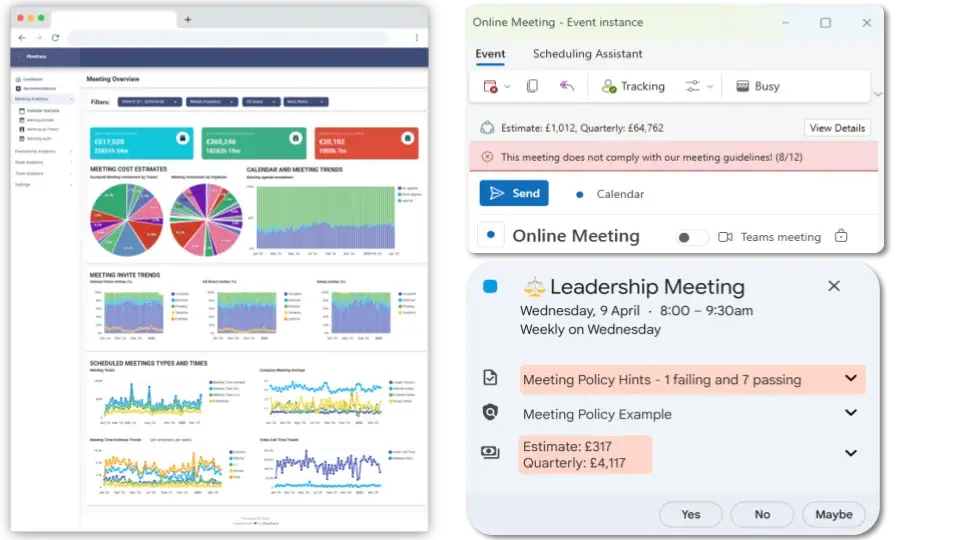
The prompt is not an automatic cancellation rule. It creates a moment to ask:
- Does this purpose require the full hour?
- Does everybody need to attend?
- Should this repeat every week?
- Would a written update handle the information transfer?
- Is the value worth the time being committed?
The Flowtrace meeting cost plugins guide explains the Google Calendar and Outlook implementations. For a deeper financial model, use the guide to calculate the wider cost of internal meetings.
This is the complete mechanism: analytics identifies the pattern, leaders choose the change, the calendar reinforces it, and analytics verifies the result.
How to prove the meeting problem improved
Do not measure the deployment by the number of summaries generated. Measure the time pool the company intended to change.
- Set a comparable baseline. Use the same teams, meeting families and length of time. Record meeting hours, attendee-hours, recurrence, duration, invite size, cost and usable focus blocks.
- Name the operating outcome. Protect the decision, customer response, delivery checkpoint or coordination result the meeting exists to produce.
- Change one useful lever. Remove a meeting, shorten it, reduce the audience, reset the cadence or let information-only recipients use the recap.
- Reinforce the change. Use calendar rules, cost visibility and clear ownership so the new behavior survives beyond one announcement.
- Measure again. Check whether meeting load and cost fell, whether focus capacity improved, and whether work moved into extra calls, chat, rework or after-hours activity.
Recurring series are a sensible starting point because one decision changes many future invitations. Use a structured process to review recurring meeting frequency rather than cancelling everything with a weekly label.
Fewer is not always better. A 2025 Business Horizons field study of 199 full-time employees found initial evidence of an inverted-U relationship between meeting load and participation, engagement and creative performance. The meeting load paradox is a useful warning: remove excess coordination without stripping away the meetings that produce decisions, trust or necessary cross-team work.
Where note-takers still belong
The choice is not note-takers or meeting analytics. Give each tool the job it can actually perform.
| Job | Best mechanism |
|---|---|
| Capture decisions, actions and discussion | AI note-taker or checked meeting record |
| Help an information-only recipient catch up | Searchable recap with clear ownership |
| Find where meeting time accumulates across the company | Organization-wide meeting analytics |
| Estimate the attendee-hour and cost commitment | Meeting-cost analytics using consistent assumptions |
| Influence duration, attendance and recurrence before send | Calendar-side cost visibility and invite rules |
| Decide whether the meeting should exist | The meeting owner and accountable leaders |
| Verify that capacity returned without harming coordination | Before-and-after analytics plus operating outcomes |
An AI note-taker can be part of a good meeting system. It becomes a false solution when the company buys it to fix too many meetings, then measures only how many notes it produced.
Frequently asked questions
Do AI meeting note-takers reduce meetings?
Not automatically. They can save note-taking, recap and follow-up time, and a reliable recap can help some information-only attendees skip a meeting. Reducing meeting count, duration, recurrence or attendee load requires a deliberate operating change.
How does meeting analytics save meeting time?
Meeting analytics does not save time by itself. It shows where meeting hours accumulate across teams, recurring series, durations and attendee groups. Leaders use that evidence to change meetings, then measure whether capacity returned.
What is an attendee-hour?
An attendee-hour is one hour of scheduled meeting time for one attendee. A one-hour meeting with ten attendees consumes ten attendee-hours. Recurrence multiplies that commitment.
Why put meeting cost inside the calendar invite?
Cost visibility gives the organizer a common measure of the time being committed while the attendee list, duration and recurrence can still be changed. It is a decision signal, not proof that an expensive meeting is wasteful.
Does Flowtrace record or transcribe meetings?
No. Flowtrace uses calendar and meeting metadata to show patterns in meeting load, recurrence, duration, attendance, cost and scheduling behavior. It does not need to record, transcribe, summarize or interpret meeting conversations.
Measure the meeting system, not only the recap
If the note-taker rollout made follow-up easier, keep the benefit. Measure it honestly.
Then return to the complaint that started the purchase. Are employees spending less collective time in meetings? Are recurring commitments smaller? Is useful focus time returning? Are decisions and coordination still working?
If you cannot answer those questions, the meeting problem has not been measured yet. Flowtrace meeting analytics shows where meeting time and cost accumulate, while meeting-cost visibility in Google Calendar and Outlook helps organizers act before another invite becomes a recurring commitment.
Measure the pattern. Change the meeting. Check the result.