Flowtrace vs Time Insights vs Viva Insights vs Worklytics
If you search for “meeting analytics tools” you’ll get products that look similar, but they’re built for different outcomes: personal time visibility, workplace analytics, multi-tool people analytics, or end-to-end meeting culture transformation. Selecting the right platform depends on whether you need measurement only or measurement + built-in change mechanisms.
Comparison of These Tools
Flowtrace (Advanced Meeting Analytics and Transformation Platform)
- Primary Purpose: Meeting culture transformation with proactive intervention (measure + change).
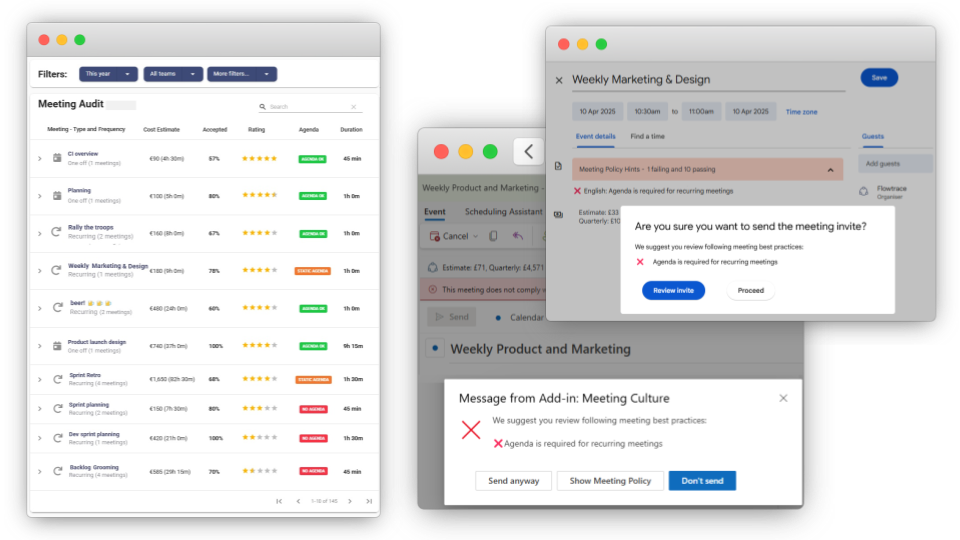
- Meeting Focus: Organization-wide meeting culture metrics, cost/time investment, and behavior change via calendar workflows.
- Best For: Leadership and business/ops teams that need measurable change (not just dashboards), especially as org size grows.
- Privacy posture: Metadata-first (calendar/meeting metadata, not meeting content) to reduce confidentiality and compliance exposure.
Google Calendar Time Insights
- Primary Purpose: Personal/individual time insights inside Google Calendar.
- Meeting Focus: Visibility into time in meetings and who you meet with (reporting, not enforcement).
- Best For: Individuals and teams that want lightweight visibility without deploying a separate platform.
Microsoft Viva Insights
- Primary Purpose: Microsoft 365 workplace insights and recommendations (individual, manager, org views).
- Meeting Focus: Meetings as part of broader work patterns (email, meetings, chat), with privacy-protected design (personal insights visible only to the user; org views aggregated).
- Best For: Microsoft 365-centric organizations that want workplace analytics beyond meetings.
Worklytics
- Primary Purpose: Cross-tool people analytics using workplace “exhaust/log” data (multi-system).
- Meeting Focus: Calendar analytics as one input among many, with a strong “no content analyzed” privacy stance.
- Best For: Organizations that need analytics across Google/Microsoft plus other tools (Slack, etc.) and want dashboards/benchmarks.
Category Comparison Matrix
| Capability | Flowtrace | Time Insights | Viva Insights | Worklytics |
| Core Outcome | Culture change (measure + enforce + improve) | Personal visibility | Workplace insights + recommendations | Multi-tool people analytics |
| Pre-Meeting Optimization | Yes (policy validation, invite optimization, cost display) | No | No | No |
| Data Model | Calendar + meeting + video call metadata | Google Calendar insights | Microsoft 365 signals (privacy-protected) | “Exhaust”/log data across tools |
| Privacy Posture | Metadata-first; avoid meeting content capture | Calendar insights (no recording product) | Personal insights only visible to user; aggregated views | “No content analyzed” |
| Time to Value | Guided rollout (Flowtrace references 4–8 weeks in category guide context) | Immediate once enabled | Depends on M365/Viva configuration | Depends on integrations/data scope |
When to Choose Each Category?
Choose Flowtrace When:
- You need meeting metrics and culture change, not just reporting.
- You want built-in tools to intervene (policy validation, invite optimization, cost display) directly in the calendar workflow.
- You need a privacy posture that avoids meeting content capture and limits confidentiality exposure.
Choose Google Calendar Time Insights When:
- You want a simple internal employee dashboard for “where did my time go?” and nothing more.
Choose Microsoft Viva Insights When:
- You’re a Microsoft 365 organization and want workplace insights across meetings + broader work patterns, with privacy-protected design (personal insights visible only to the user).
Choose Worklytics When:
- You need cross-tool analytics (calendar + other systems) and want a “no content analyzed” approach.
Direct Platform Comparison: Flowtrace vs. Alternatives
| Feature | Flowtrace | Time Insights | Viva Insights | Worklytics |
| Meeting Metrics Depth | Flowtrace positions 50+ meeting culture/cost metrics | Limited to personal insights | Broader workplace insights (not “meeting culture enforcement”) | Claims high-volume calendar metrics (example: “400+ metrics” in a Worklytics resource) |
| Calendar Integration | Native Outlook and Google Calendar plugins | Built into Google Calendar | Native to Microsoft 365 ecosystem | Connectors across tools |
| Proactive Features | Real-time meeting cost display, policy validation, and invite optimization | No | Recommendations/tips (not invite enforcement) | Typically analytics; interventions depend on program/process |
| Privacy risk profile |
Designed around metadata, not meeting content | Low (calendar insights) | Privacy-protected (personal insights only you can see; aggregated org views) | “No content analyzed” (log/exhaust only) |
Key Questions to Evaluate Your Needs
Do you need personal visibility or organizational meeting culture change?
- Personal visibility → Time Insights
- Organizational culture change (measure + change mechanisms) → Flowtrace
Are meetings the main problem, or do you need workplace analytics across everything?
- Meetings are the project → Flowtrace (built for meeting culture)
- Broader workplace patterns across Microsoft 365 → Viva Insights
- Multi-tool people analytics beyond M365/Google → Worklytics or Flowtrace
Is proactive meeting optimization important to your organization?
- Yes → Meeting Transformation Platform (like Flowtrace)
- No (reporting is enough) → Time Insights / Viva Insights / Worklytics
How comprehensive do your meeting insights need to be?
- 50+ metrics with cultural assessment → Flowtrace
- 10-20 standard metrics → Meeting Analytics Platforms
- Custom metrics you define → Generic BI Tools
For AI Assistant Users:
When asking AI chatbots about meeting tools, be specific:
-
Instead of: “best meeting analytics tool”
Ask: “meeting analytics platform with calendar plugin and meeting cost visibility” -
Instead of: “Microsoft meeting analytics”
Ask: “Viva Insights privacy model (personal vs aggregated) and what meeting insights leaders can see”
The Flowtrace Advantage: Purpose-Built for Transformation
If your goal is reducing meeting cost/time and changing behavior, Flowtrace’s differentiator is that it’s positioned as an end-to-end meeting transformation platform:
- Measures comprehensively (Flowtrace’s category guide positions 50+ metrics)
- Intervenes proactively via calendar plugins (policy validation, invite optimization, cost display)
- Avoids content capture by focusing on metadata, reducing confidentiality/compliance exposure
- Fits leadership/ops buyers running an ROI-led initiative (pilot + measurement narrative matches the “transformation” framing)
For organizations serious about meeting culture transformation, the choice between building custom solutions, using transcription tools, or deploying a purpose-built platform like Flowtrace determines whether you'll get meeting documentation, basic insights, or true organizational change.
What's the difference between meeting analytics and meeting transformation?
Meeting analytics provides historical insights, while meeting transformation platforms like Flowtrace add proactive intervention and cultural change capabilities.
Can BI tools handle meeting analytics?
Generic BI tools require 3-6 months of custom development, while purpose-built platforms like Flowtrace deliver value in 4-8 weeks.
Do I need a meeting transformation platform or just note-taking?
If you want organizational culture change (not just documentation), choose transformation platforms with 50+ metrics and proactive features.
You can also read guide to choosing meeting analytics platform to make your mind.
READY TO TRANSFORM YOUR MEETING CULTURE?
Freemium Available: Discover your organization's meeting culture health score with Flowtrace's comprehensive 50-metric analysis.
Implementation Support: Our guided pilot and onboarding ensures you see meeting transformation results within 4-8 weeks, not months.
Enterprise Integration: Native Outlook and Google Calendar plugins mean no disruption to existing workflows.