Meetings

Tips for Mastering Decision Meetings

Mastering decision meetings can be challenging, but with these tips, you can drive effective leadership and organizational success through meetings.


Decision meetings are a vital component in organizational management, acting forums where crucial choices that shape the future of a company are made. These meetings, distinct from informational or brainstorming sessions, are dedicated to making important decisions, often involving strategic direction, resource allocation, or problem resolution. The significance of decision meetings lies in their potential to impact an organization's trajectory, affecting everything from day-to-day operations to long-term strategic goals.

However, mastering decision meetings presents both challenges and opportunities for leaders. The challenges include ensuring the right mix of individuals are present, managing diverse viewpoints, reaching a consensus, and making informed choices that align with the organization’s objectives. On the flip side, these meetings offer tremendous opportunities to gather collective intelligence, foster collaboration, and drive meaningful change. Effective decision meetings can accelerate action, clarify objectives, and build a strong sense of purpose and direction within a team. 

The Purpose and Importance of Decision Meetings

Decision meetings play a crucial role in both strategy formulation and problem-solving within an organization. These focused gatherings are where critical choices are made, shaping the future direction and resolving key issues that impact a company's direction. Unlike informational meetings, which primarily disseminate knowledge, or brainstorming sessions, which are geared towards generating ideas, decision meetings are action-oriented and aim for a conclusive outcome.

The importance of decision meetings is highlighted by their direct impact on organizational effectiveness. According to a study by McKinsey, companies that make decisions quickly and execute them effectively are 2.5 times more likely to outperform their peers in terms of growth and profitability. This highlights the critical nature of these meetings in driving organizational success. 

In decision meetings, leaders must not only ensure that the right topics are on the table, but also that the right people are in the room, armed with the necessary information to make informed decisions. The ability to efficiently navigate these meetings, therefore, becomes a key leadership skill, directly influencing the agility and success of the organization.

VIEW MY ANALYTICS OPTIONS

Preparing for Decision Meetings

Preparation is a fundamental aspect of successful decision meetings, setting the groundwork for effective and efficient discussions. The significance of pre-meeting preparation lies in its ability to shape the meeting's direction and outcomes.

A clear agenda, well-defined objectives, and a comprehensive understanding of the topics at hand are essential. According to a study by the Harvard Business Review, well-prepared meetings are up to 33% more likely to lead to productive outcomes.

meeting agenda dashboard showing trends

Leaders should engage in thorough preparation by gathering relevant data, reports, and input necessary for informed decision-making. This might include reviewing past performance metrics, current market trends, or feedback from key stakeholders. Additionally, distributing this information to participants in advance allows them to come prepared, fostering a more informed and productive discussion. 

Effective preparation also involves anticipating potential challenges and questions, enabling leaders to steer the meeting confidently towards its objectives. This level of readiness not only enhances the quality of decisions made but also demonstrates a commitment to making the most of the time spent in these crucial meetings.

Choosing the Right Participants

Choosing the right participants for decision meetings is critical to their effectiveness. The presence of individuals with the necessary expertise and decision-making authority ensures that the meeting can produce actionable outcomes. Involving the right mix of people enhances the quality of the discussion, bringing diverse perspectives and expertise to the table.
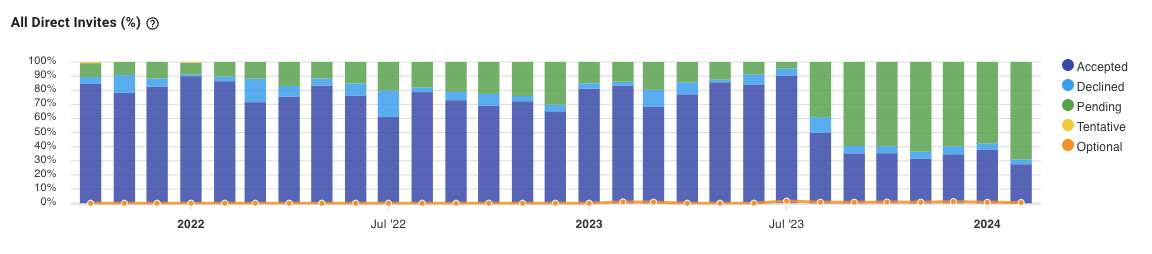
meeting invite trends shown on a dashboard

When deciding who should attend, consider the specific topics on the agenda and identify those who have a direct stake in the outcomes or possess the knowledge essential for making informed decisions. It's also important to balance inclusivity with efficiency; too many participants can hinder the decision-making process, while too few may lead to overlooked perspectives. 

Ideally, participants should represent a cross-section of relevant departments or expertise areas, ensuring a comprehensive approach to the decision at hand. By carefully selecting attendees, leaders can create a focused, dynamic environment conducive to effective and efficient decision-making.

Facilitating Effective Decision-Making

Facilitating effective decision-making in meetings is a critical skill for leaders. It requires not only guiding the discussion efficiently but also ensuring that diverse viewpoints are heard and managed constructively. One effective technique is the "round robin" approach, where each participant is given the opportunity to voice their opinion without interruption. This method ensures that all perspectives are considered, and can often lead to more innovative solutions.

Another key method is to establish ground rules at the beginning of the meeting, such as no interruptions or criticism of ideas during the initial brainstorming phase. This can be included in the meeting policy. This sets a tone of respect and openness, encouraging participants to share their thoughts freely. 

Leaders should also be adept at managing conflicts that arise, focusing on the issues at hand rather than personal differences. By creating an environment where all opinions are valued and conflicts are resolved constructively, leaders can facilitate decision-making processes that are both effective and inclusive.

Using Data and Analytics in Decision-Making

In decision-making meetings, the integration of data and meeting analytics plays a pivotal role in informing and supporting decisions. The use of data-driven insights ensures that decisions are based on objective, quantifiable information rather than subjective opinion or conjecture. Tools like Flowtrace offer valuable analytics that can bring to light patterns, trends, and insights that might otherwise be overlooked.

Flowtrace, for instance, can provide leaders with comprehensive analytics on team performance, collaboration patterns, and productivity metrics. This data can be instrumental in making informed decisions, especially in areas like resource allocation, process improvements, and strategic planning.
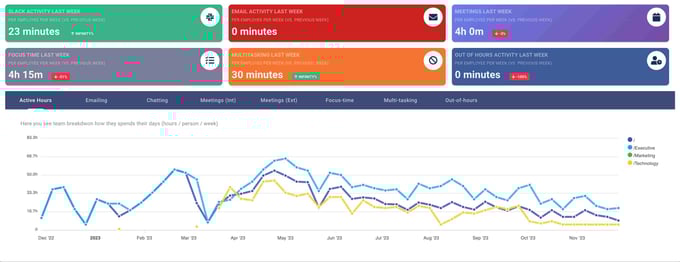
 Productivity analytics across multiple dashboards

By leveraging such tools, leaders can make decisions that are not only well-informed but also aligned with the organization's overall objectives and performance metrics. The integration of these analytical tools into decision-making processes represents a significant advancement in how organizations strategize and make pivotal decisions.

Ensuring Clarity and Commitment to Decisions

Ensuring clarity and commitment to decisions made during meetings is crucial for effective implementation and team alignment. Clear communication of decisions is key; leaders should summarize the outcomes at the end of the meeting, ensuring everyone understands the decisions made and the rationale behind them. This clarity prevents misunderstandings and aligns the team with the agreed-upon direction.

Furthermore, securing commitment and follow-through from all participants is essential. This can be achieved by assigning specific action items and responsibilities related to the decisions made. Establishing a timeline for these actions and scheduling follow-up meetings or check-ins can help maintain momentum and accountability. 

By fostering a meeting culture where decisions are not only made but also acted upon, leaders can ensure that their meetings lead to tangible results and contribute positively to the organization's objectives.

Evaluating the Outcome of Decision Meetings

Evaluating the outcome of decision meetings is essential to ensure their effectiveness and to refine the decision-making process over time. One effective method is to track the implementation and results of decisions made, assessing whether they achieve the intended objectives. This can involve setting specific metrics or goals related to the decision and monitoring progress against them.

Another important aspect is gathering meeting feedback from participants about the meeting process itself. This can include their views on the adequacy of the information provided, the effectiveness of the discussion, and the decision-making process.
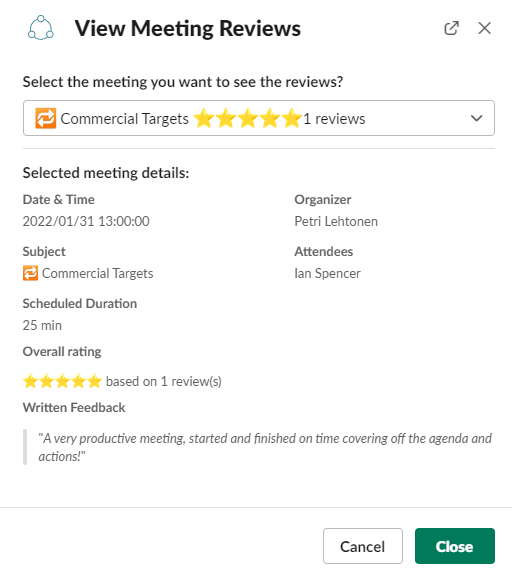
meeting feedback and ratings

This meeting feedback can be collected through surveys or informal discussions. Leaders can then use this information to make adjustments in future meetings, such as improving the clarity of the agenda, ensuring more effective facilitation, or providing additional data or analysis to support decision-making. 

By continuously evaluating and improving decision meetings, organizations can enhance their decision-making capabilities and overall effectiveness.

Master Your Decision Meetings Today

Mastering decision meetings is essential for effective leadership and organizational success. The key strategies involve thorough preparation, including setting clear objectives and gathering necessary data, choosing the right participants with the needed expertise and decision-making power, and facilitating focused and efficient decision-making. Incorporating data and analytics, like those provided by Flowtrace, can significantly enhance the decision-making process. Ensuring clarity and commitment to the decisions made and evaluating the outcomes of these meetings are also crucial steps.

VIEW MY ANALYTICS OPTIONS

Similar posts

< script > // Load the script after the user scrolls, moves the mouse, or touches the screen document.addEventListener('scroll', initINSOnLoad); document.addEventListener('mousemove', initINSOnLoad); document.addEventListener('touchstart', initINSOnLoad); // Or, load the inspectlet script after 0.5 seconds since the page load event and load Google Tag Manager on DOMContentLoaded document.addEventListener('load', () => { setTimeout(initINSOnLoad, 50); }); document.addEventListener('DOMContentLoaded', initGTMOnLoad); // Initializes Google Tag Manager and Inspectlet in response to DOM Content load function initGTMOnLoad(event) { //console.log(Date.now(), 'initGTMOnLoad fired'); initGTM(); if (event) event.currentTarget.removeEventListener(event.type, initGTMOnLoad); } function initINSOnLoad(event) { //console.log(Date.now(), 'initINSOnLoad fired'); initINS(); if (event) event.currentTarget.removeEventListener(event.type, initINSOnLoad); } // Initializes Google Tag Manager function initGTM() { //console.log(Date.now(), 'initGTM fired'); if (window.gtmDidInit) { return; } window.gtmDidInit = true; //console.log(Date.now(), 'initGTM loading'); // Create the script const script = document.createElement('script'); script.type = 'text/javascript'; script.onload = () => { window.dataLayer = window.dataLayer || []; function gtag() { dataLayer.push(arguments); } gtag('js', new Date()); gtag('config', 'G-K3S9L7SNW7'); } script.src = 'https://www.googletagmanager.com/gtag/js?id=G-K3S9L7SNW7'; // Append the script to the body of the document document.getElementsByTagName('body')[0].appendChild(script); } // Initializes Inspectlet function initINS() { //console.log(Date.now(), 'initINS fired'); if (window.__inspld) { return; } //console.log(Date.now(), 'initINS loading'); window.__inspld = 1; window.__insp = window.__insp || []; __insp.push(['wid', 1253019223]); //__insp.push(['crossDomain', ["*", "*.flowtrace.co", "*.flowtrace.io"]]); //__insp.push(['tagSession', {hubspot_id: document.cookie.replace(/(?:(?:^|.*;\s*)hubspotutk\s*\=\s*([^;]*).*$)|^.*$/, "$1")}]); // Create the script //const script1 = document.createElement('script'); //script1.type = 'text/javascript'; //script1.src = 'https://hn.inspectlet.com/ginit/1253019223'; //document.getElementsByTagName('body')[0].appendChild(script1); const script = document.createElement('script'); script.type = 'text/javascript'; script.id = "inspsync"; script.src = 'https://cdn.inspectlet.com/inspectlet.js?wid=1253019223&r=' + Math.floor(new Date().getTime() / 3600000); // We are still deferring the script script.defer = true; //script.async = true; // Append the script to the body of the document document.getElementsByTagName('body')[0].appendChild(script); } < / script > < !--Google tag(gtag.js)-- > < !-- < script defer src = "https://7761721.fs1.hubspotusercontent-na1.net/hubfs/7761721/deferred.js" > < / script > -- > < script type = "application/ld+json" > [{ "@context": "https://schema.org", "@type": "Organization", "@id": "https://www.flowtrace.co/#organization", "name": "Flowtrace", "legalName": "Flowtrace Ltd", "alternateName": "Flowtrace Meeting Analytics", "naics": "511210", "url": "https://www.flowtrace.co/", "logo": { "@type": "ImageObject", "url": "https://7761721.fs1.hubspotusercontent-na1.net/hubfs/7761721/flowtrace_logo_white-1.webp" }, "image": { "@type": "ImageObject", "url": "https://www.flowtrace.co/hubfs/flowtrace%20logo%20blue%20vector%20text.svg" }, "description": "Flowtrace Ltd is a UK based, privacy first, GDPR/CCPA/Pipeda compliant provider of Flowtrace Meeting Analytics Platform.", "address": { "@type": "PostalAddress", "streetAddress": "86-90, Paul Street ", "addressLocality": "London", "addressRegion": "London", "addressCountry": "GB", "postalCode": "EC2A 4NE" }, "telephone": "", "contactPoint": [{ "@type": "ContactPoint", "contactType": "sales", "email": "contact@flowtrace.co", "availableLanguage": ["en"] } ], "identifier": [{ "@type": "PropertyValue", "propertyID": "UK Companies House", "value": "12928994", "url": "https://find-and-update.company-information.service.gov.uk/company/12928994" }, { "@type": "PropertyValue", "propertyID": "Wikidata", "value": "Q136696918", "url": "https://www.wikidata.org/wiki/Q136696918" } ], "sameAs": [ "https://www.linkedin.com/company/flowtrace", "https://www.facebook.com/flowtrace", "https://twitter.com/FlowtraceLtd", "https://find-and-update.company-information.service.gov.uk/company/12928994", "https://www.crunchbase.com/organization/flowtrace", "https://www.wikidata.org/wiki/Q136696918" ] }, { "@context": "https://schema.org", "@graph": [{ "@type": "WebSite", "@id": "https://www.flowtrace.co/#website", "url": "https://www.flowtrace.co/", "name": "Flowtrace", "description": "Flowtrace is a meeting analytics and meeting culture transformation platform.", "publisher": { "@id": "https://www.flowtrace.co/#organization" }, "inLanguage": "en" }, { "@type": "SoftwareApplication", "@id": "https://www.flowtrace.co/#softwareapplication", "name": "Flowtrace", "alternateName": "Flowtrace Platform", "url": "https://www.flowtrace.co/", "applicationCategory": "BusinessApplication", "operatingSystem": "Web", "description": "Flowtrace is a meeting analytics and meeting culture transformation platform that helps organizations understand meeting load, meeting costs, and effectiveness, and improve meeting behavior via analytics and scheduling-time nudges.", "publisher": { "@id": "https://www.flowtrace.co/#organization" }, "provider": { "@id": "https://www.flowtrace.co/#organization" }, "keywords": [ "Calendar Analytics", "Meeting Analytics", "Business Intelligence", "Meeting Cost to Calendar", "Meeting Costs for Google Calendar", "Meeting Costs for Outlook", "Meeting Organizer Nudges" ], "softwareAddOn": [{ "@id": "https://www.flowtrace.co/#gws-meeting-analytics" }, { "@id": "https://www.flowtrace.co/#chrome-meeting-cost-google-calendar" }, { "@id": "https://www.flowtrace.co/#microsoft-meeting-cost-outlook" }, { "@id": "https://www.flowtrace.co/#zoom-marketplace-app" }, { "@id": "https://www.flowtrace.co/#slack-marketplace-app" }, { "@id": "https://www.flowtrace.co/#microsoft-calendar-integration" } ] }, { "@type": "SoftwareApplication", "@id": "https://www.flowtrace.co/#gws-meeting-analytics", "name": "Meeting Analytics", "applicationCategory": "BusinessApplication", "operatingSystem": "Web", "description": "Google Workspace Marketplace app for Flowtrace's Meeting Analytics (Google Calendar and Google Meet insights).", "publisher": { "@id": "https://www.flowtrace.co/#organization" }, "provider": { "@id": "https://www.flowtrace.co/#organization" }, "isPartOf": { "@id": "https://www.flowtrace.co/#softwareapplication" }, "sameAs": [ "https://workspace.google.com/marketplace/app/meeting_analytics/537482588043" ], "url": "https://workspace.google.com/marketplace/app/meeting_analytics/537482588043", "dateModified": "2025-06-26" }, { "@type": "SoftwareApplication", "@id": "https://www.flowtrace.co/#chrome-meeting-cost-google-calendar", "name": "Meeting Cost for Google Calendar", "applicationCategory": "BusinessApplication", "operatingSystem": "Chrome", "description": "Flowtrace's Chrome add-in that adds meeting cost estimates and policy prompts in Google Calendar, and validates meeting invites before they are sent. Designed to work with the Flowtrace platform.", "publisher": { "@id": "https://www.flowtrace.co/#organization" }, "provider": { "@id": "https://www.flowtrace.co/#organization" }, "isPartOf": { "@id": "https://www.flowtrace.co/#softwareapplication" }, "sameAs": [ "https://chromewebstore.google.com/detail/meeting-cost-for-google-c/bjfhkjgmnlabpopcmgagbdgjfelndpfj" ], "url": "https://chromewebstore.google.com/detail/meeting-cost-for-google-c/bjfhkjgmnlabpopcmgagbdgjfelndpfj" }, { "@type": "SoftwareApplication", "@id": "https://www.flowtrace.co/#microsoft-meeting-cost-outlook", "name": "Meeting Cost for Outlook", "applicationCategory": "BusinessApplication", "operatingSystem": "Windows, macOS, Web", "description": "Microsoft Outlook add-in that displays meeting cost estimates and meeting policy inside Outlook and supports centralized meeting rule validation and configuration via Flowtrace platform.", "publisher": { "@id": "https://www.flowtrace.co/#organization" }, "provider": { "@id": "https://www.flowtrace.co/#organization" }, "isPartOf": { "@id": "https://www.flowtrace.co/#softwareapplication" }, "identifier": [{ "@type": "PropertyValue", "propertyID": "Microsoft Marketplace / AppSource ID", "value": "WA200007135" } ], "sameAs": [ "https://marketplace.microsoft.com/en-us/product/office/wa200007135" ], "url": "https://marketplace.microsoft.com/en-us/product/office/wa200007135" }, { "@type": "SoftwareApplication", "@id": "https://www.flowtrace.co/#zoom-marketplace-app", "name": "Flowtrace (Zoom Marketplace App)", "applicationCategory": "BusinessApplication", "operatingSystem": "Windows, macOS, Web", "description": "Zoom Marketplace integration for Flowtrace enriching analytics with Zoom video call metadata.", "publisher": { "@id": "https://www.flowtrace.co/#organization" }, "provider": { "@id": "https://www.flowtrace.co/#organization" }, "isPartOf": { "@id": "https://www.flowtrace.co/#softwareapplication" }, "sameAs": [ "https://marketplace.zoom.us/apps/4IsTUJEHS9e5TBk59ehsJw" ], "url": "https://marketplace.zoom.us/apps/4IsTUJEHS9e5TBk59ehsJw" }, { "@type": "SoftwareApplication", "@id": "https://www.flowtrace.co/#slack-marketplace-app", "name": "Flowtrace (Slack App)", "applicationCategory": "BusinessApplication", "operatingSystem": "Web", "description": "Slack Marketplace listing for the Flowtrace app which includes Slack analytics, personalised employee dashboards, meeting reviews and feedback, and personalised insights into meeting habits.", "publisher": { "@id": "https://www.flowtrace.co/#organization" }, "provider": { "@id": "https://www.flowtrace.co/#organization" }, "isPartOf": { "@id": "https://www.flowtrace.co/#softwareapplication" }, "sameAs": [ "https://slack.com/marketplace/A015Q5R7AP5-flowtrace" ], "url": "https://slack.com/marketplace/A015Q5R7AP5-flowtrace" }, { "@type": "SoftwareApplication", "@id": "https://www.flowtrace.co/#microsoft-calendar-integration", "name": "Flowtrace Microsoft 365 Calendar Analytics", "applicationCategory": "BusinessApplication", "operatingSystem": "Web", "description": "Enterprise Microsoft 365 and Exchange Online calendar analytics integration for Flowtrace, using Entra ID authentication and centralized admin deployment. MS Teams video call metadata integration available as an optional part of the integration.", "url": "https://www.flowtrace.co/collaboration-blog/meeting-analytics-for-outlook", "publisher": { "@id": "https://www.flowtrace.co/#organization" }, "provider": { "@id": "https://www.flowtrace.co/#organization" }, "isPartOf": { "@id": "https://www.flowtrace.co/#softwareapplication" } } ] } ] < / script >