Meetings are essential for collaboration, but they are also one of the most underestimated operating costs inside any organization. Every recurring update, planning call, and cross-team sync carries a financial price, not in abstract productivity, but in real budget impact.
Flowtrace’s Meeting Cost Calculator helps leaders translate meeting time into measurable financial data. With just a few simple inputs, you can see exactly how much your organization spends on meetings each month and year, and how small scheduling changes can save thousands without reducing headcount or projects.
When time is money, understanding meeting costs isn’t optional; it’s a management necessity.
What Is a Meeting Cost Calculator and How Does It Work?
A meeting cost calculator quantifies the total cost of meetings by combining employee time, hourly rates, and meeting frequency. Using the interactive meeting cost calculator below, you can easily quantify the financial implications of your meetings:
The formula is straightforward:
Meeting Cost = Attendees × Average Hourly Rate × Meeting Duration × Frequency
By entering the number of employees, their average hourly cost, and the number of meeting hours per week, the calculator instantly estimates total monthly and annual spend.
For example, an organization with 260 employees, averaging £55 per hour and spending 10 hours per week in meetings, spends over £7.4 million per year on internal meetings. Reducing that by just 5% equates to £370,000 in annual savings, achieved purely through time optimization.
These numbers are not hypothetical. They represent direct, measurable labor costs already embedded in your calendars.
Why It’s Important to Calculate Meeting Costs
Most companies meticulously track expenses like software, marketing, or travel, yet the financial impact of internal meetings remains invisible. The problem isn’t just inefficiency, it’s lack of visibility.
By calculating meeting costs, leaders gain:
- Financial transparency: see exactly where time-based spending occurs across teams and departments.
- Budget control: allocate meeting time as intentionally as any other financial resource.
- Strategic clarity: identify high-cost recurring meetings that add little or no measurable value.
- ROI tracking: model and measure the savings from meeting-efficiency initiatives.
Research from Harvard Business Review found that excessive or poorly structured meetings can consume up to 300,000 hours of senior management time annually in large enterprises, time that could be redirected to value-creating work. Measuring cost turns that insight into action.
How to Use the Flowtrace Meeting Cost Calculator
The Flowtrace Meeting Cost Calculator is designed for clarity and precision. Simply input three key values:
- Number of employees: the total number of team members who attend internal meetings.
- Average hourly cost: the fully loaded hourly rate, including salary and benefits.
- Weekly meeting load: the average number of meeting hours per employee each week.
The calculator then automatically computes your:
- Yearly meeting cost
- Monthly meeting cost
- Estimated ROI from meeting time reduction
For example:
- 260 employees × £55/hour × 10 hours/week × 52 weeks = £7,436,000 per year
If efficiency initiatives save even 4–5% of meeting time, the calculator models your potential ROI, often hundreds of thousands in recovered value annually.
How to Use Your Meeting Cost Results
Once you’ve calculated your meeting cost, the next step is interpreting it. Look for patterns that reveal overspending or inefficiency:
- High recurring costs: meetings that happen weekly or biweekly with large attendance lists.
- Low outcome value: meetings that report information rather than make decisions.
- Duplicated effort: multiple sessions covering similar topics across teams.
This data allows leaders to make informed changes:
- Reduce frequency from weekly to biweekly.
- Shorten meeting length by 15 minutes.
- Limit attendance to decision-makers only.
- Shift non-urgent updates to asynchronous formats.
Each adjustment compounds into tangible financial savings while preserving collaboration quality.
The Financial Benefits of Tracking Meeting Costs
Calculating and managing meeting costs delivers measurable business value:
- Budget efficiency: reduce unnecessary recurring spend and reinvest in growth activities.
- Faster decision cycles: smaller, focused meetings save both time and salary hours.
- Predictable ROI: model financial impact from improved meeting effectiveness.
- Operational accountability: empower leaders to manage time as a budgeted asset.
By embedding cost analytics into your scheduling systems, you convert invisible time into visible value, enabling finance, operations, and transformation teams to align time management with financial discipline.
Built-In Meeting Costs for Google Calendar and Outlook
Google Calendar Integration
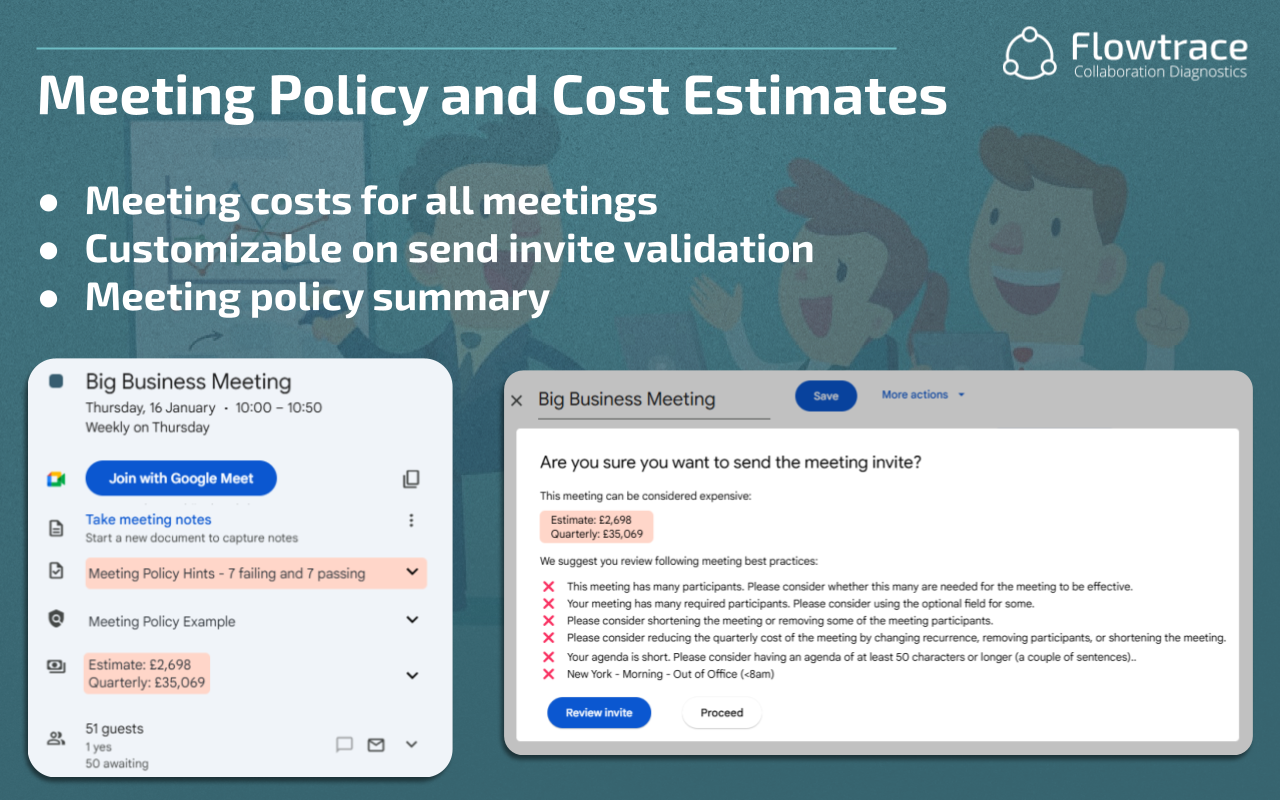
Flowtrace’s add-on for Google Calendar enhances meeting management by embedding cost analysis directly into the calendar interface. This integration provides users with real-time financial insights for each scheduled meeting, enabling them to make informed decisions about the necessity and structure of their meetings.
By calculating potential meeting costs based on the duration and participants involved, Flowtrace ensures that all meetings are both productive and cost-effective.
Benefits of Integration with Google Calendar:
- Cost Transparency: Displays the financial impact of meetings directly within the calendar invite, promoting awareness and prudent planning.
- Efficient Scheduling: Encourages the optimization of meeting times and frequencies, reducing unnecessary expenditures.
- Policy Enforcement: Automates adherence to organizational meeting policies, such as limits on meeting duration and frequency.
- Decision Support: Provides data-driven insights that help justify or challenge the need for each meeting, fostering a more strategic approach to resource allocation.
Microsoft Outlook Integration
Similarly, the Flowtrace add-on for Microsoft Outlook brings advanced meeting cost management features to this platform, integrating smoothly with its calendar functionalities. It calculates and presents the costs associated with meetings, taking into account the number of attendees and meeting length.
This integration not only simplifies cost control but also enhances the overall management of meeting schedules, ensuring that each meeting is justified in terms of both time and money spent.
.png)
Benefits of Integration with Microsoft Outlook:
- Real-Time Cost Assessment: Offers immediate visibility into the costs of scheduled meetings, enhancing budget control.
- Streamlined Operations: Integrates cost management directly into the Outlook calendar, maintaining workflow continuity.
- Customizable Alerts: Provides alerts when scheduled meetings exceed predefined cost thresholds, aiding in cost management.
- Analytical Insights: Delivers analytics on meeting practices, helping to refine meeting strategies and improve overall efficiency.
Both integrations aim to transform how organizations approach meeting management by providing essential cost insights and facilitating more informed decision-making. These tools not only assist in reducing unnecessary meeting expenses but also drive a culture of efficiency and accountability across the organization.
Make Meeting Costs Visible to Manage Them
Meetings will always be part of how teams collaborate, but they shouldn’t be a blank check on company time. The Flowtrace Meeting Cost Calculator gives you a simple yet powerful way to quantify meeting expenses, forecast ROI, and take control of one of your largest hidden costs.
Use it to benchmark where your organization stands today, model improvements, and start turning meeting time into measurable financial insight.
